
Summer Rooftop Fashion Photo
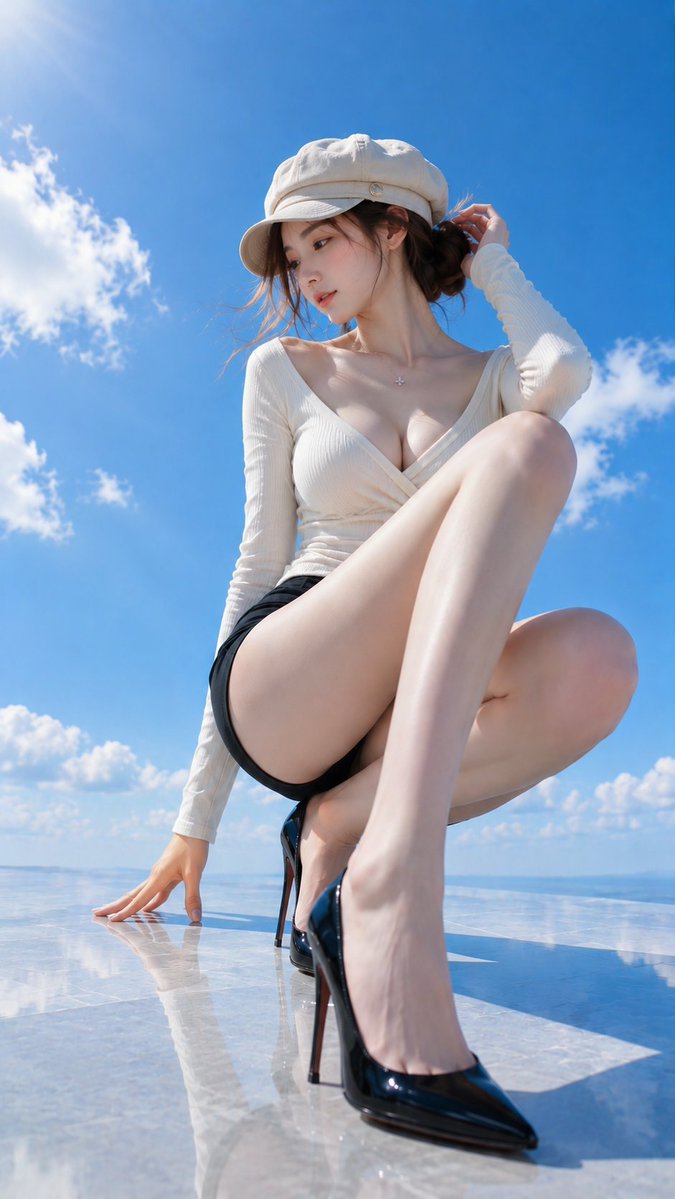
In a place that seems to touch the blue sky, only the brim of the hat casts a small shadow. Between white and black, summer light slides through. This is a 9:16 vertical fashion photo depicting an elegant adult woman crouching low on a rooftop terrace, with legs reaching toward the sky as the visual focus.
Prompt
In a place that seems to touch the blue sky, only the brim of the hat casts a small shadow. Between white and black, summer light slides through. ☀️🩵🖤👒 #AIart #AI写真 【GPT Image2 Prompt】 Subject: Legs reaching toward the sky Main Subject: A 9:16 vertical fashion photo depicting a fictional adult woman crouching low on a glossy rooftop terrace against a clear blue sky. The figure is placed largely from the center to the right, occupying about 80% of the frame. One leg extended forward and black pumps are shown largest, guiding the eye to the bent opposite leg, upper body, and blue sky. Character & Expression: A natural and elegant adult woman. Mature feminine figure with a slender waist, long legs, and soft body lines. Dark brown hair loosely tied low, with a few thin strands left by the cheek. Light coral blush, delicate eye makeup, naturally glossy pink-beige lips. Face turned toward the lower left of the frame, gaze quietly dropped to the feet. A very small smile on the lips. Clothing & Pose: Deep V-neck long-sleeved wrap top in ivory fine ribbed fabric. Neckline opens naturally to show feminine lines, with clear fabric overlaps and fine wrinkles. Black high-waisted shorts, glossy black pointed-toe high heels. Head wears a round ivory cap without logo. Left hand with fingers spread on the floor, right hand lightly touching hair at the back of the head. One knee raised close to the chest, the other leg folded inward, weight supported by the hip and the hand on the floor. Natural depiction of contact between shoe sole and floor, fingertips and floor. Background & Light: Background is a vivid cobalt blue sky with white cumulus clouds, no buildings or signs. Floor is light gray polished marble-look panels, faintly reflecting the sky, hands, shoes, and legs. Sun shines from high upper left, creating strong white highlights on shoulders, collarbone, arms, and front of legs. The figure's shadow extends long to the lower right. The enamel surface of the shoes reflects the blue sky and white light. Air is dry and transparent, evoking strong midsummer sunlight. Composition & Camera: 9:16 vertical composition. Low angle looking up from just above the floor, 24-28mm equivalent wide-angle feel. Perspective enlarges the front pump and leg, slightly reducing the face and upper body. Leave about 20% blue sky above the figure's head, ensure the toe of the shoe is not cut off at the bottom edge. Focus accurately on face and upper body, while keeping the front shoe clear enough to see its outline. Background clouds slightly softly blurred. Texture & Style: Bright, clean realistic photo reminiscent of a summer fashion magazine. Precisely depict natural skin texture, three-dimensionality of collarbone and knees, fine vellus hair, ribbed fabric, floor reflection, and enamel gloss. Based on three colors: white, black, and blue, maintaining high transparency and moderate contrast. Avoid excessive skin retouching or artificial gloss, achieving a realistic outdoor shooting texture. Negative: Underage-looking character, unnatural face, extra fingers, missing fingers, fused limbs, joint distortions, twisted legs, poor contact between shoe and foot, floating, unnatural gravity, incorrect perspective, shadows inconsistent with light source, excessive skin smoothing, plastic-like skin, text, logos, watermarks.
Kynvio Prompt Workflow
How to use this prompt
Open it in Image Studio
Send the prompt to Kynvio AI without starting a generation.
Adapt the details
Replace the subject, setting, colors, text, or composition for your goal.
Review and generate
Choose your final settings, then click Generate when you are ready.
Related GPT Image 2 prompts
GPT Image 2 prompts
About this prompt
Will opening this prompt spend credits?
No. The button only prefills Image Studio. Credits are used only after you start a generation.
Can I edit the prompt first?
Yes. The transferred text is fully editable before you generate an image.