
Hyper-Realistic High-Fashion Eyewear Ad
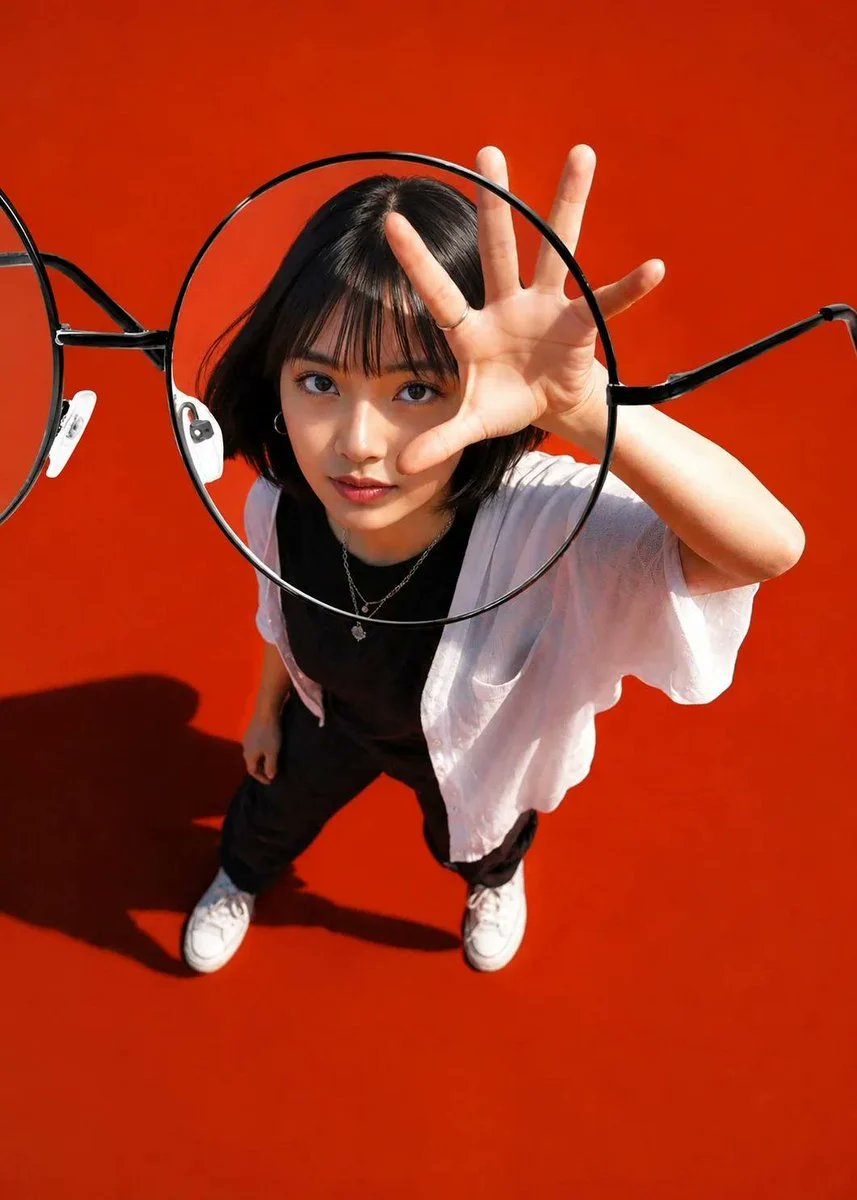
Using the uploaded image and without changing face, create a hyper-realistic high-fashion optical advertisement featuring an oversized black round eyeglass lens perfectly aligned over the subject's face, creating a natural magnification effect. Capture the scene from a dramatic top-down ultra-wide perspective with the subject reaching an open hand toward the camera, creating strong forced perspective. Style with a sleek black bob haircut, layered silver necklaces, minimalist black-and-white outfit, warm terracotta seamless background, bold graphic layout, subtle editorial typography, crisp geometric shadows, premium eyewear campaign aesthetic, ultra-sharp focus, realistic skin texture, flawless lens reflections, studio lighting, clean modern composition, luxury branding feel, 8K photorealism, HDR, masterpiece.
Prompt
Using the uploaded image and without changing face, create a hyper-realistic high-fashion optical advertisement featuring an oversized black round eyeglass lens perfectly aligned over the subject's face, creating a natural magnification effect. Capture the scene from a dramatic top-down ultra-wide perspective with the subject reaching an open hand toward the camera, creating strong forced perspective. Style with a sleek black bob haircut, layered silver necklaces, minimalist black-and-white outfit, warm terracotta seamless background, bold graphic layout, subtle editorial typography, crisp geometric shadows, premium eyewear campaign aesthetic, ultra-sharp focus, realistic skin texture, flawless lens reflections, studio lighting, clean modern composition, luxury branding feel, 8K photorealism, HDR, masterpiece, --ar 4:5 --style raw --v 7 --stylize 100.
Kynvio Prompt Workflow
How to use this prompt
Open it in Image Studio
Send the prompt to Kynvio AI without starting a generation.
Adapt the details
Replace the subject, setting, colors, text, or composition for your goal.
Review and generate
Choose your final settings, then click Generate when you are ready.
Related GPT Image 2 prompts
GPT Image 2 prompts
About this prompt
Will opening this prompt spend credits?
No. The button only prefills Image Studio. Credits are used only after you start a generation.
Can I edit the prompt first?
Yes. The transferred text is fully editable before you generate an image.