
STYLE ARCHIVE 2026 Fashion Editorial Wardrobe Portfolio
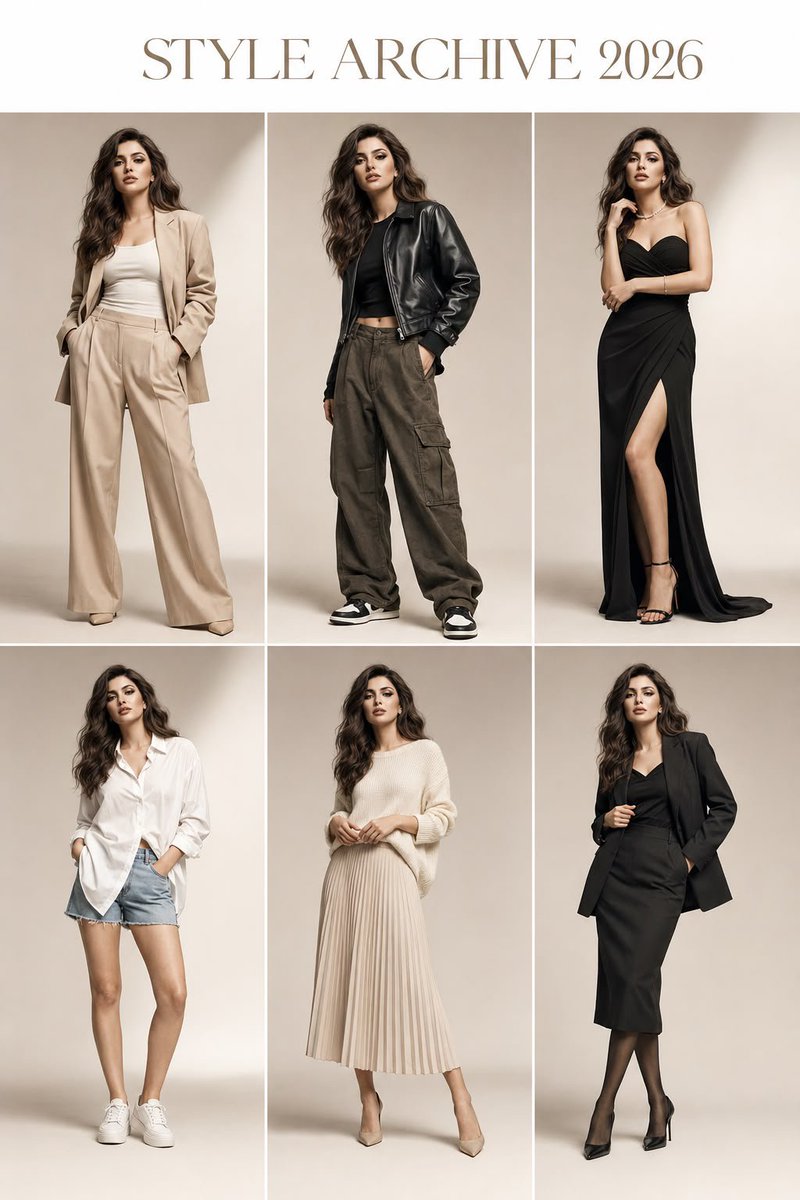
Ultra-luxury fashion editorial wardrobe portfolio featuring the same woman across 6 panels with consistent identity and varied outfits.
Prompt
Ultra-luxury fashion editorial wardrobe portfolio featuring the same woman from the reference image in all 6 panels, preserving her exact facial features, identity, face shape, hairstyle, hair color, skin tone, body proportions, height, and overall appearance with complete consistency. No identity drift, no face changes, no face swap. She appears as the same person in every panel, with only outfit styling, pose, and subtle expression variations. Clean 2×3 full-body editorial grid with elegant serif title “STYLE ARCHIVE 2026”. Outfits: (1) beige oversized blazer layered over a white fitted top with wide-leg trousers and heels; (2) cropped black leather jacket, fitted top, cargo pants, luxury sneakers; (3) sophisticated black evening dress with minimal jewelry; (4) oversized white button-up shirt with denim shorts; (5) cream knit sweater paired with a pleated midi skirt; (6) monochrome tailored skirt suit with refined styling. Warm ivory seamless cyclorama studio backdrop, premium Vogue Korea-inspired fashion photography, soft directional studio lighting, natural shadows, realistic skin texture, visible fabric details, luxury editorial styling, medium-format camera, 85mm lens, HDR, ultra-photorealistic commercial fashion campaign, full-body framing in every panel, magazine-quality composition, 8K detail. Negative prompt: identity drift, altered face, face swap, inconsistent appearance, different woman, cropped body, duplicate subject within panels, extra limbs, bad anatomy, distorted hands, blur, low resolution, CGI look, illustration, anime, plastic skin, over-retouching, cluttered background, logos, text artifacts, watermark.
Kynvio Prompt Workflow
How to use this prompt
Open it in Image Studio
Send the prompt to Kynvio AI without starting a generation.
Adapt the details
Replace the subject, setting, colors, text, or composition for your goal.
Review and generate
Choose your final settings, then click Generate when you are ready.
Related GPT Image 2 prompts
GPT Image 2 prompts
About this prompt
Will opening this prompt spend credits?
No. The button only prefills Image Studio. Credits are used only after you start a generation.
Can I edit the prompt first?
Yes. The transferred text is fully editable before you generate an image.