
Platform Gaze
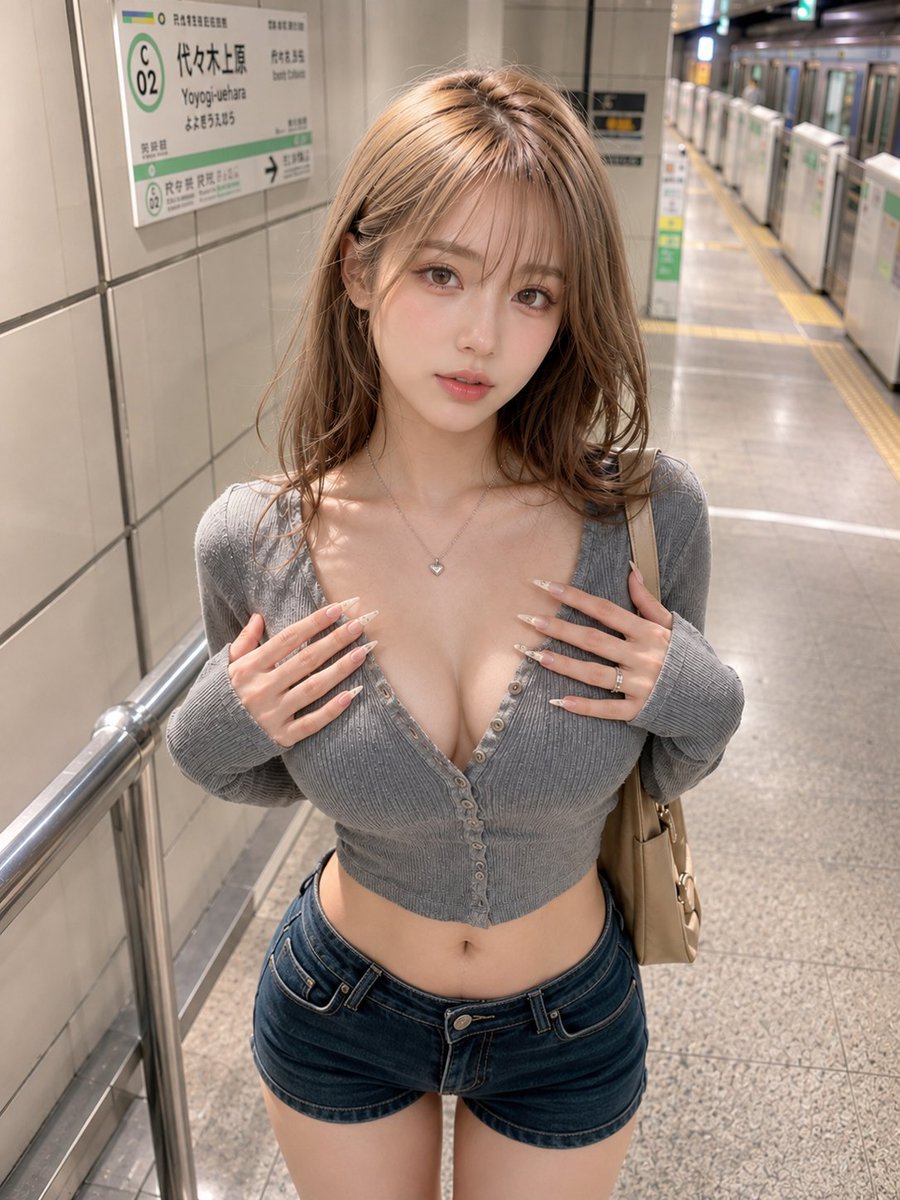
For just a few seconds until the train arrives, turn toward the camera. The white light on the platform quietly catches your hair and fingertips.
Prompt
For just a few seconds until the train arrives, turn toward the camera. The white light on the platform quietly catches your hair and fingertips. 🚇🤍📷 #AIart #AI写真 #駅ポートレート [GPT Image2 Prompt] Theme: Platform Gaze Subject: Vertical 3:4 realistic fashion portrait. On a Tokyo subway platform, a woman in her 20s stands in the center of the frame. The shot includes from the top of her head to mid-thigh, with the subject occupying about 80% of the frame. A slim waistline and navel are clearly visible between the cropped top and shorts. Face & Expression: Bright ivory-beige skin with a natural texture and a hint of pink flush. Delicate highlights on cheeks, nose tip, shoulders, and collarbone, retaining pores and fine skin texture. Light rose pink blush, champagne beige and pink brown eyeshadow, thin long eyelashes, natural under-eye bags, soft light brown eyebrows, and a sheer pink-beige gloss lip. Face is forward, head slightly tilted to the right, calm eyes looking at the camera. Small clear catchlights in the eyes. Hair is light milk tea ash brown. Thin see-through bangs, layered cut framing the face, medium-long length to below shoulders. Ends are loosely curled inward, with a fluffy airy feel and natural separation. Fine highlights, soft shine, and a few stray hairs carefully depicted one by one. Clothing & Pose: Gray fine ribbed cropped cardigan. Tight fit naturally following the body, with multiple chest buttons undone, creating a deep V-line down to one more button. Hem stops above the navel, clearly showing waist curve. Dark blue low-rise denim shorts, beige small shoulder bag, delicate silver necklace and thin rings. Both hands lightly placed on either side of the chest, fingers naturally spread. Long light beige nails visible, shoulders relaxed, waist slightly twisted. Background & Lighting: Tokyo subway platform. White tile wall and station sign on the left, platform doors and a silver stopped train on the right, yellow tactile paving blocks creating perspective. Green line color reminiscent of Yoyogi-Uehara Station as background accent, with guide text details naturally blurred. Ceiling white lighting as main source, uniform soft light from above front. Thin reflected light on hair surface, cheeks, collarbone, and back of hands, with a light shadow behind the subject. Composition & Camera: Camera positioned slightly above eye level, a slight high-angle shot from a short distance. Retaining a viewpoint as if looking down from the first stairs, yet naturally composed within the station platform. 35mm equivalent lens, showing face and upper body large, while including waist, shorts, and upper thighs. Subject centered, background track direction flowing to the right rear. Focus precisely on face and eyes, background smoothly blurred with shallow depth of field. Texture & Style: High-definition Japanese fashion photography. Clearly depict natural skin texture, fine hair strands, rib knit weave, denim thickness, and metal accessory reflections. Bright clean tones, low contrast, soft sharpness. Balances intimacy of a close-up smartphone shot with the sophistication of a magazine snapshot. Negative: Unnatural face, unnatural gaze, asymmetrical eyes, extra fingers, missing fingers, fused fingers, broken joints, misaligned buttons, distorted waist, incorrect perspective, shadows inconsistent with light source, garbled text, logos, watermarks, excessive skin smoothing, plastic-like skin.
Kynvio Prompt Workflow
How to use this prompt
Open it in Image Studio
Send the prompt to Kynvio AI without starting a generation.
Adapt the details
Replace the subject, setting, colors, text, or composition for your goal.
Review and generate
Choose your final settings, then click Generate when you are ready.
Related GPT Image 2 prompts
GPT Image 2 prompts
About this prompt
Will opening this prompt spend credits?
No. The button only prefills Image Studio. Credits are used only after you start a generation.
Can I edit the prompt first?
Yes. The transferred text is fully editable before you generate an image.