
Minimalist Studio Fashion Portrait: East Asian Woman in Lace and Denim
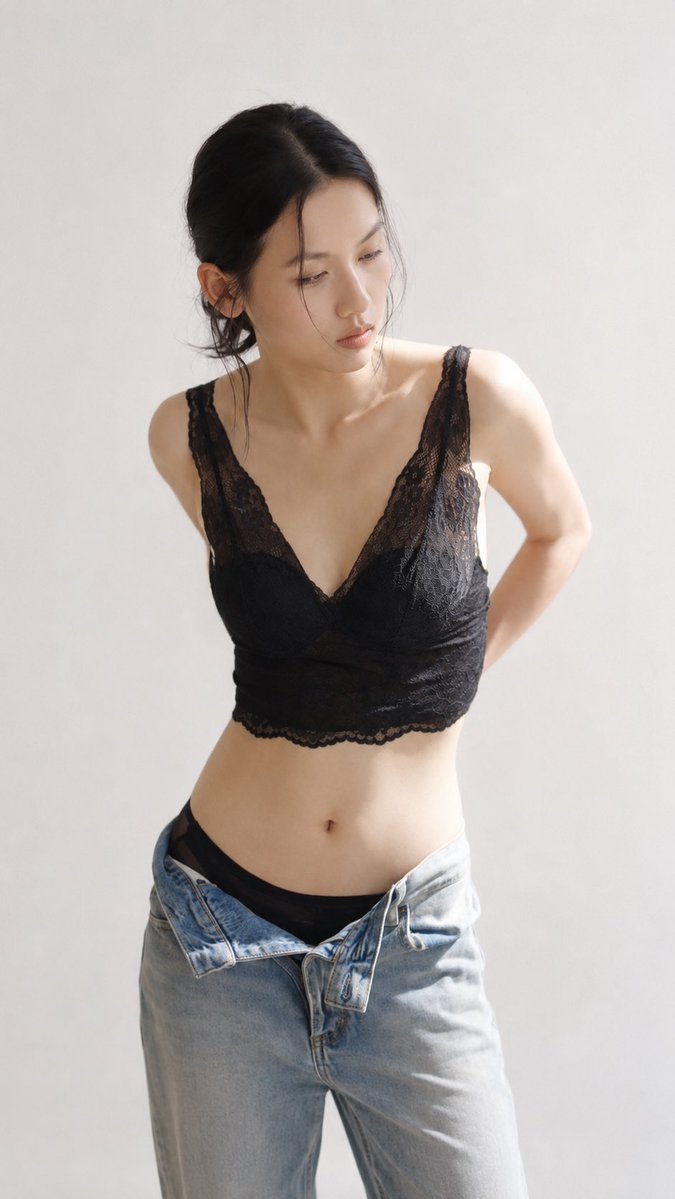
A realistic vertical minimalist studio fashion portrait of an East Asian adult female over 21, standing before a warm white seamless background, wearing a black lace longline corset and loose light blue jeans, low bun, averted gaze, hands behind back, soft natural light, creating a quiet intimate fashion atmosphere.
Prompt
Create a realistic vertical minimalist studio fashion portrait of an East Asian adult female over 21 years old, standing in front of a warm white seamless background under soft lighting. The composition frames from upper thigh to head, slightly offset to the left, with ample clean negative space around. Her torso faces forward with a slight three-quarter turn, shoulders slightly tilted, relaxed posture. Arms are placed behind her back, naturally lifting her shoulders and creating a smooth waist curve. Her head tilts slightly downward and turns to the viewer's right, gaze averted, evoking a quiet introspective mood. She has dark brown-black hair, center-parted, tied in a loose low bun at the nape. A few natural wispy strands fall on her forehead, cheeks, and neck, shimmering in the light. Her makeup is delicate and understated: smooth luminous skin with realistic texture; well-groomed eyebrows; subtle brown eyeliner; natural lashes; light peach blush; soft contouring; and a soft rose nude lip. Her expression is calm, contemplative, slightly distant, with relaxed facial muscles and lips gently closed. She wears a fitted black lace longline corset or camisole top with wide lace straps, deep V-neckline, structured opaque cups, intricate floral lace overlay, fine mesh panels, scalloped edges, and subtle sheer detailing above the bust and at the hem. Retain the contrast between opaque black lining and transparent lace, with delicate embroidery on the lace, realistic fabric texture. Paired with loose light blue jeans, waistband casually unbuttoned, revealing a black belt underneath. The jeans should have realistic washed denim texture, belt loops, metal button, zip fly, visible stitching, soft wrinkles, slight fading, and natural relaxed folds at hips and thighs. The overall look should be elegant, modern, and editorial. Use soft diffused daylight from upper right and front, creating warm highlights on her forehead, cheekbones, nose, collarbone, shoulders, arms, torso, lace fabric, and denim. The right side of the image should be brighter, with light gradually diminishing to the left. Add soft shadows under the jawline, lace edges, waist, and denim folds. Overall color palette: warm white, soft beige, black lace, light blue denim, and natural warm skin tones. The background should be completely clean, smooth, transitioning softly from warm white to light cream. Use shallow depth of field to keep the subject sharp and background softly blurred. Show fine hair strands, realistic skin pores, natural body proportions, intricate lace embroidery, detailed denim stitching, and smooth fabric transitions. Style: minimalist realistic studio fashion photography, East Asian adult model, black floral lace longline corset, loose light jeans, low bun with loose strands, sideward downward gaze, hands behind back, warm soft natural light, clean white background, creating a quiet intimate fashion atmosphere, realistic skin texture, delicate lace and denim details, soft film-like quality, high resolution, 2:3 vertical aspect ratio, no text, no watermark, no logo, no jewelry, no other people, no distorted body proportions, no exaggerated proportions, no cartoon style, no harsh light, no clutter, no nudity.
Kynvio Prompt Workflow
How to use this prompt
Open it in Image Studio
Send the prompt to Kynvio AI without starting a generation.
Adapt the details
Replace the subject, setting, colors, text, or composition for your goal.
Review and generate
Choose your final settings, then click Generate when you are ready.
Related GPT Image 2 prompts
GPT Image 2 prompts
About this prompt
Will opening this prompt spend credits?
No. The button only prefills Image Studio. Credits are used only after you start a generation.
Can I edit the prompt first?
Yes. The transferred text is fully editable before you generate an image.