
Hyper-realistic Marble Print Backless Gown Fashion Portrait
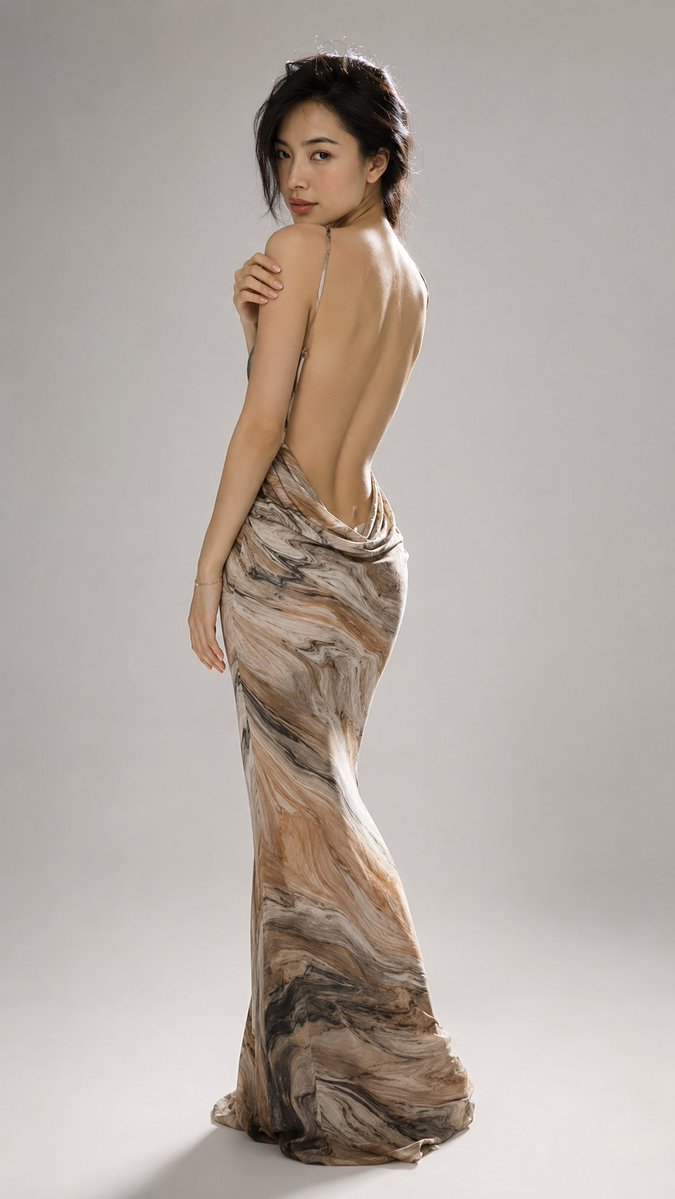
Hyper-realistic full-body studio fashion portrait of an elegant young East Asian female in three-quarter back view, looking back over shoulder. Dark brown-black hair in low bun, floor-length haute couture evening gown with extremely low back and delicate natural marble print. Minimalist gray backdrop, soft backlight and frontal fill. Full-frame 85mm, luxury couture editorial style.
Prompt
Hyper-realistic full-body studio fashion portrait. Elegant young adult East Asian female, minimalist studio, from head to toe, three-quarter back view. Slightly to the right — ample smooth negative space on the left and above the head. Body angled away from camera towards the right; head turned back over left shoulder, looking directly at camera. Dignified, calm, understated confident expression — relaxed lips, soft portrait gaze. Subject: Slender elegant figure, warm light to medium skin tone, delicate features, almond-shaped dark brown eyes, soft eyebrows, small refined nose, natural rose-red lips. Refined subtle makeup: luminous skin, light blush, gentle cheekbone contouring, thin eyeliner, neutral eyeshadow, soft lip color. Realistic skin texture, fine pores, natural shoulder blades, spine contour, soft highlights on back. Hairstyle: Dark brown-black hair pinned up in a loose slightly messy low bun. Wispy strands around temples, cheeks, neck and top of head. A few fine flyaway hairs catching strong backlight — creating delicate glowing rim light halo on top and right side. Elegant but deliberately not stiff, not perfectly neat. Dress: Floor-length haute couture evening gown — extremely low back design, thin spaghetti straps, entire back exposed nearly to below waist. Fabric gathers at upper hips and lower back into a soft draped cowl neck shape. Dress fits waist and hips then falls into a long narrow flowing column to floor. Skirt pools softly around feet, small train extends to lower left and right corners. Marble print: Delicate natural marble pattern — flowing organic swirls. Colors: ivory, warm beige, sand, caramel, taupe, smoky gray, charcoal, subdued browns and occasional near-black veins. Resembles polished travertine, agate or flowing stone, with longitudinal grain stripes wrapping naturally along body. Upper hips and waist area lighter cream and tan marbling; lower skirt deeper brown and charcoal flows; dramatic dark stone-like texture near hem. Fabric smooth, lightweight, slightly glossy, with realistic tension, draping, folds and specular highlights. Arms and accessories: Left arm gently crossed in front of upper body — left hand resting on right shoulder, fingers relaxed and elegant, natural light nude nails, anatomically accurate joints. Right arm slightly bent hanging at side, hand relaxed near outer thigh. Very thin subtle gold bracelet on right wrist. No heavy jewelry, necklace, earrings or distracting accessories. Background: Seamless warm gray studio backdrop — smooth gradient from medium warm gray at top to lighter off-white near floor. Floor and wall blend seamlessly, no visible horizon. No equipment, props or clutter. Lighting: Bright diffused light source from behind model slightly to the right — glowing rim light on hair, right shoulder, arm, waist and right edge of dress. Large soft frontal fill light from upper left, revealing face and dress details while retaining sculptural shadows. Clear rim light, soft facial modeling, warm skin glow, gentle highlights on shoulder blades, smooth shadow transitions. Long soft-edged gray shadow cast diagonally to lower left. Camera: Waist to chest height, full-frame 85mm, medium depth of field — woman and entire dress sharp and clear, background completely smooth. Flattering natural perspective, minimal distortion. Accurate proportions, realistic hands, fine fabric rendering, individual hairs, detailed marble texture. Luxury couture editorial, elegant restraint, refined neutral tones, high dynamic range, slight film softness. Negative: No text, no logo, no watermark, no furniture, ...
Kynvio Prompt Workflow
How to use this prompt
Open it in Image Studio
Send the prompt to Kynvio AI without starting a generation.
Adapt the details
Replace the subject, setting, colors, text, or composition for your goal.
Review and generate
Choose your final settings, then click Generate when you are ready.
Related GPT Image 2 prompts
GPT Image 2 prompts
About this prompt
Will opening this prompt spend credits?
No. The button only prefills Image Studio. Credits are used only after you start a generation.
Can I edit the prompt first?
Yes. The transferred text is fully editable before you generate an image.