
Hyper-Realistic Fashion Editorial Street Photography: Royal Blue Dress with Plaid Accessories
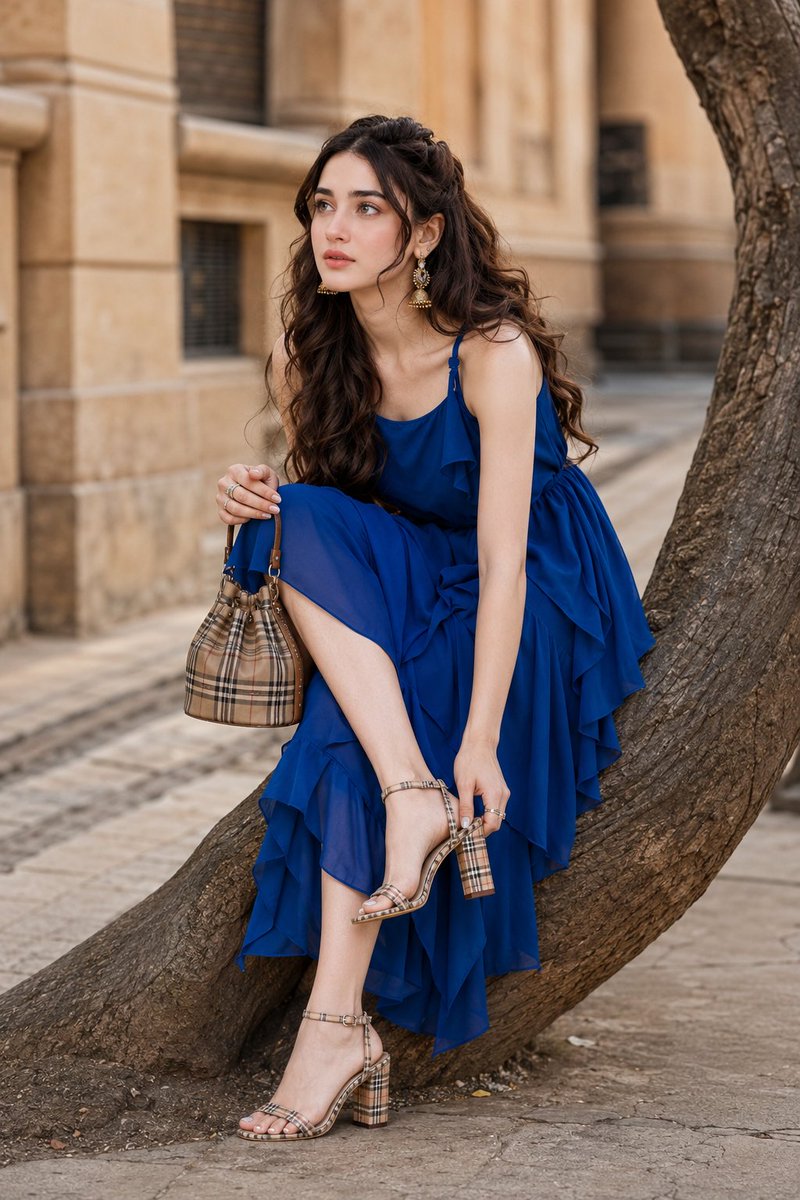
Hyper-realistic fashion editorial street photography featuring [PRIMARY_CHARACTER] with face 100% from reference image. Porcelain glass skin with Korean pinkish glow makeup, delicate symmetrical features. Long voluminous dark chestnut-brown hair in soft loose waves. Wearing vibrant royal-blue layered midi dress with asymmetric straps, beige plaid mini bucket handbag and sandals. Gracefully seated on tree trunk along upscale city sidewalk. Soft natural daylight, 85mm lens, full-body portrait, shallow depth of field, luxury editorial aesthetic.
Prompt
A hyper-realistic Fashion Editorial Street Photography featuring [PRIMARY_CHARACTER], take the face 100% from the reference image and do not change the facial identity. porcelain glass skin with Korean pinkish glow makeup, radiant smooth complexion, soft pink blush on the cheeks, glossy natural pink lips, luminous youthful glass-skin glow. Her face features very delicate and symmetrical features, and her skin is super flawless, porcelain-white with no visible pores. Douyin makeup style: a very smooth matte-glow base with a high brightening effect, leaving skin looking clean, glowing, and healthy. A soft sun-kissed blush is quite visible on the cheeks and a little on the nose, subtle highlighting on the nose and cheekbones, natural nude pink eyeshadow, thin, precise eyeliner, naturally long curled eyelashes, neat eyebrows that follow a natural, slightly curved shape, and glossy nude pink lips with a plumping effect. The character has long voluminous dark chestnut-brown hair styled in soft loose waves with natural movement and texture. Expression is elegant, thoughtful, and slightly inquisitive, with the eyes looking upward toward camera-left. The character is wearing a vibrant royal-blue layered midi dress with asymmetric shoulder straps, flowing ruffled fabric, and soft draping details. Accessories include delicate rings, a luxury beige plaid mini bucket handbag, and matching plaid block-heel sandals. Pose and body posture: seated gracefully on a large curved tree trunk along an upscale city sidewalk. One leg is lifted and bent, with one hand adjusting the sandal strap while the other hand holds the designer handbag. Body slightly leaning forward, creating a candid high-fashion editorial moment. The scene takes place on a sophisticated urban street lined with historic stone architecture, textured building facades, and elegant city details. A sculptural tree trunk extends into the frame, adding organic contrast to the urban environment. Lighting is soft natural daylight with warm neutral tones, creating realistic skin highlights, gentle shadows, and refined editorial depth. The atmosphere feels luxurious, fashionable, and effortlessly chic. Captured using an 85mm professional fashion lens, full-body portrait composition, eye-level perspective, shallow depth of field, luxury editorial framing, sharp focus on the subject, creamy background separation, magazine-cover quality photography. Color palette includes vivid royal blue fabric, warm sandstone architecture, natural wood textures, beige plaid accessories, rich brunette hair tones, and soft neutral skin tones. Ultra-detailed textures, photorealistic rendering, HDR, realistic skin detail, professional fashion photography, luxury street-style editorial aesthetic, cinematic color grading, ultra-high resolution, 4K, masterpiece quality. NEGATIVE PROMPT: low quality, blurry, pixelated, flat lighting, distorted face, bad anatomy, extra limbs, extra fingers, missing fingers, deformed hands, unnatural skin texture, oversharpened image, noise, artifacts, text, watermark, logo, duplicate body parts
Kynvio Prompt Workflow
How to use this prompt
Open it in Image Studio
Send the prompt to Kynvio AI without starting a generation.
Adapt the details
Replace the subject, setting, colors, text, or composition for your goal.
Review and generate
Choose your final settings, then click Generate when you are ready.
Related GPT Image 2 prompts
GPT Image 2 prompts
About this prompt
Will opening this prompt spend credits?
No. The button only prefills Image Studio. Credits are used only after you start a generation.
Can I edit the prompt first?
Yes. The transferred text is fully editable before you generate an image.