
Golden Hour Luxury Fashion Portrait
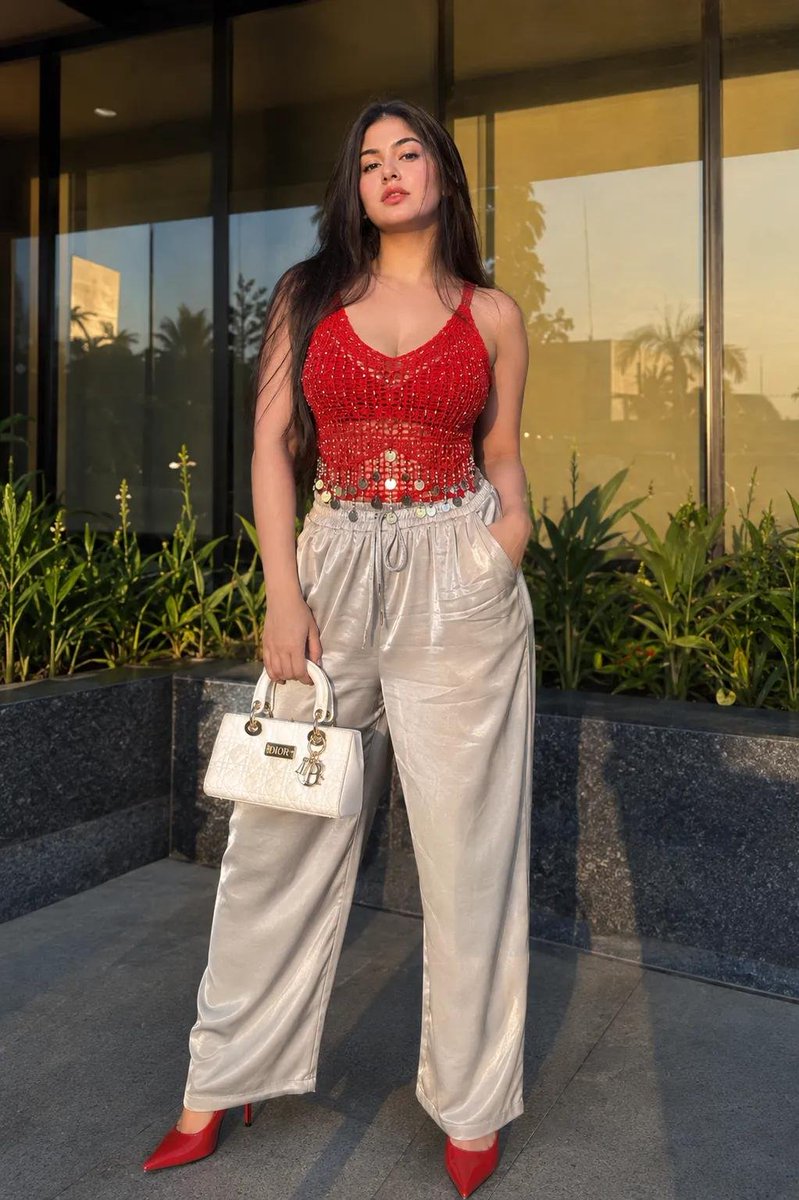
Ultra-realistic 4K UHD fashion portrait generated by GPT Image 2, featuring a young woman standing outdoors in front of a modern luxury glass storefront during golden hour, wearing a red crochet top and silver high-waist pants, accessorized with a white DIOR handbag and designer high heels.
Prompt
Don't Alter Face ID, Use my 100% exactly same face and body structure from attached reference to create a ultra-realistic 4K UHD fashion portrait of a young woman standing outdoors in front of a modern luxury glass storefront during golden hour. Full-body composition, body facing the camera with left hand carrying a luxury expensive white DIOR handbag and right hand hooked inside the front pocket of the trackpant.Head slightly tilted back and angled subtly to the left, chin raised, maintaining a confident expression. Long straight dark hair with soft face-framing strands, warm soft-glam makeup, glossy glittering bold red lips. Wearing a vibrant red crochet/mesh sleeveless top with metallic coin tassel detailing and silver high-waist loose bottom matching designer high heels, Background features reflective floor-to-ceiling glass panels, landscaped green plants along a stone planter, and warm sunset reflections. Natural golden-hour lighting casting soft shadows, DSLR photography, Sony A7R V, 50mm lens, HDR, shallow depth of field, photorealistic, ultra-detailed skin and fabric textures, masterpiece, 4K Ultra HD.Negative Prompt: blurry, low quality, CGI, cartoon, anime, bad anatomy, extra fingers, distorted hands, plastic skin, watermark, text, oversaturated colors, motion blur, duplicate person, low resolution, incorrect pose, wrong camera angle.
Kynvio Prompt Workflow
How to use this prompt
Open it in Image Studio
Send the prompt to Kynvio AI without starting a generation.
Adapt the details
Replace the subject, setting, colors, text, or composition for your goal.
Review and generate
Choose your final settings, then click Generate when you are ready.
Related GPT Image 2 prompts
GPT Image 2 prompts
About this prompt
Will opening this prompt spend credits?
No. The button only prefills Image Studio. Credits are used only after you start a generation.
Can I edit the prompt first?
Yes. The transferred text is fully editable before you generate an image.