
Premium Ice Cream Commercial Storyboard
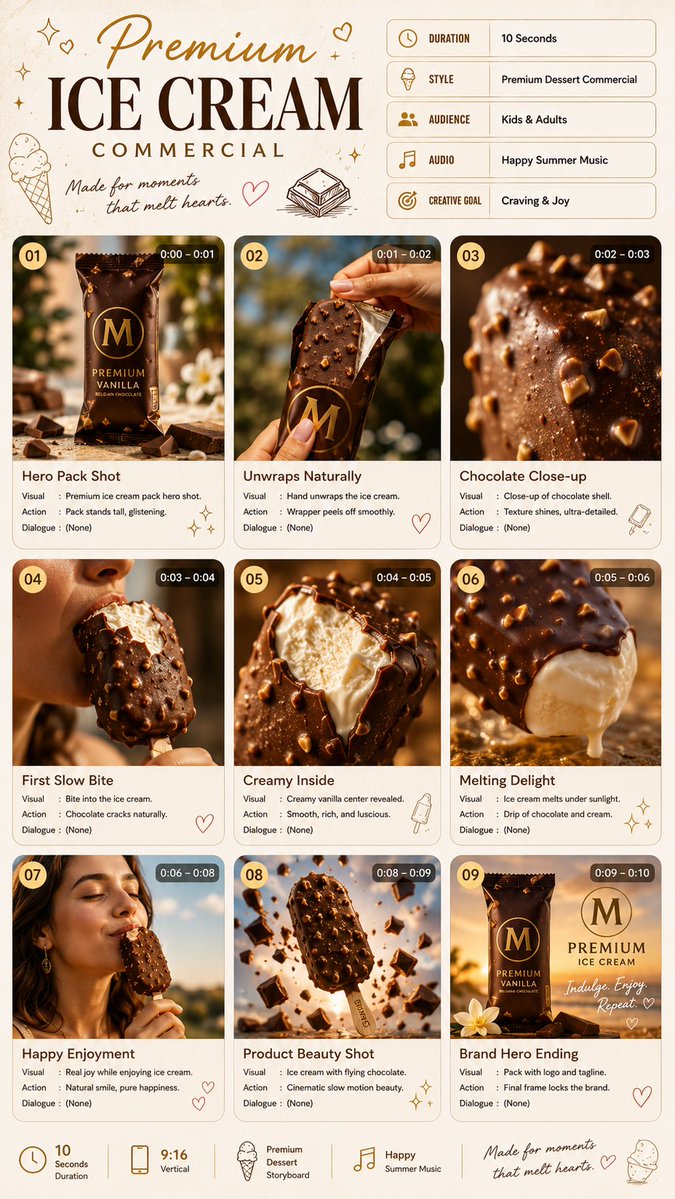
A cinematic storyboard for a 10-second premium ice cream commercial, featuring 9 scenes from product hero shot to enjoyment moment, with realistic food photography style, golden-hour lighting, ultra-detailed chocolate texture, photorealistic composition, and overall aesthetic referencing Magnum and Häagen-Dazs campaigns.
Prompt
TITLE: Premium Ice Cream Commercial FORMAT: • Premium dessert commercial storyboard • Single-page portrait layout • High-end luxury editorial presentation • 9 cinematic storyboard scenes • Swiss editorial grid • Client presentation quality • Designed for a 10-second advertisement HEADER: • Playful elegant title • Handwritten creative note • Sweet-themed decorative accents • Information cards: - Duration: 10 Seconds - Style: Premium Dessert Commercial - Audience: Kids & Adults - Audio: Happy Summer Music - Creative Goal: Craving & Joy GRID STRUCTURE: • 3 × 3 storyboard layout • Rounded premium cards • Large cinematic previews • Scene number • Timestamp • Visual / Action / Dialogue SCENE FLOW: 1. Ice cream hero pack shot (0:00–0:01) 2. Hand unwraps the ice cream naturally (0:01–0:02) 3. Chocolate shell close-up with realistic texture (0:02–0:03) 4. First slow bite, chocolate cracks naturally (0:03–0:04) 5. Creamy vanilla filling revealed (0:04–0:05) 6. Ice cream melting under warm sunlight (0:05–0:06) 7. Happy enjoying moment with natural expression (0:06–0:08) 8. Product beauty shot with flying chocolate pieces (0:08–0:09) 9. Premium hero pack shot with logo and tagline (0:09–0:10) VISUAL STYLE: Realistic food commercial Natural daylight Golden-hour lighting Ultra-detailed chocolate texture Real creamy vanilla Premium food photography Commercial-grade cinematography Natural hand movements Photorealistic composition GRAPHIC ELEMENTS: Tiny hearts Sparkles Minimal doodles Clean premium layout FOOTER: 10 Seconds 9:16 Vertical Premium Dessert Storyboard OVERALL AESTHETIC: Magnum commercial, Häagen-Dazs campaign, luxury food advertising, cinematic realism, Behance featured, print-ready, ultra-clean editorial layout, photorealistic, 8K.
Kynvio Prompt Workflow
How to use this prompt
Open it in Image Studio
Send the prompt to Kynvio AI without starting a generation.
Adapt the details
Replace the subject, setting, colors, text, or composition for your goal.
Review and generate
Choose your final settings, then click Generate when you are ready.
Related GPT Image 2 prompts
GPT Image 2 prompts
About this prompt
Will opening this prompt spend credits?
No. The button only prefills Image Studio. Credits are used only after you start a generation.
Can I edit the prompt first?
Yes. The transferred text is fully editable before you generate an image.