
Tiger Beer Cozy Harbor System Board Poster
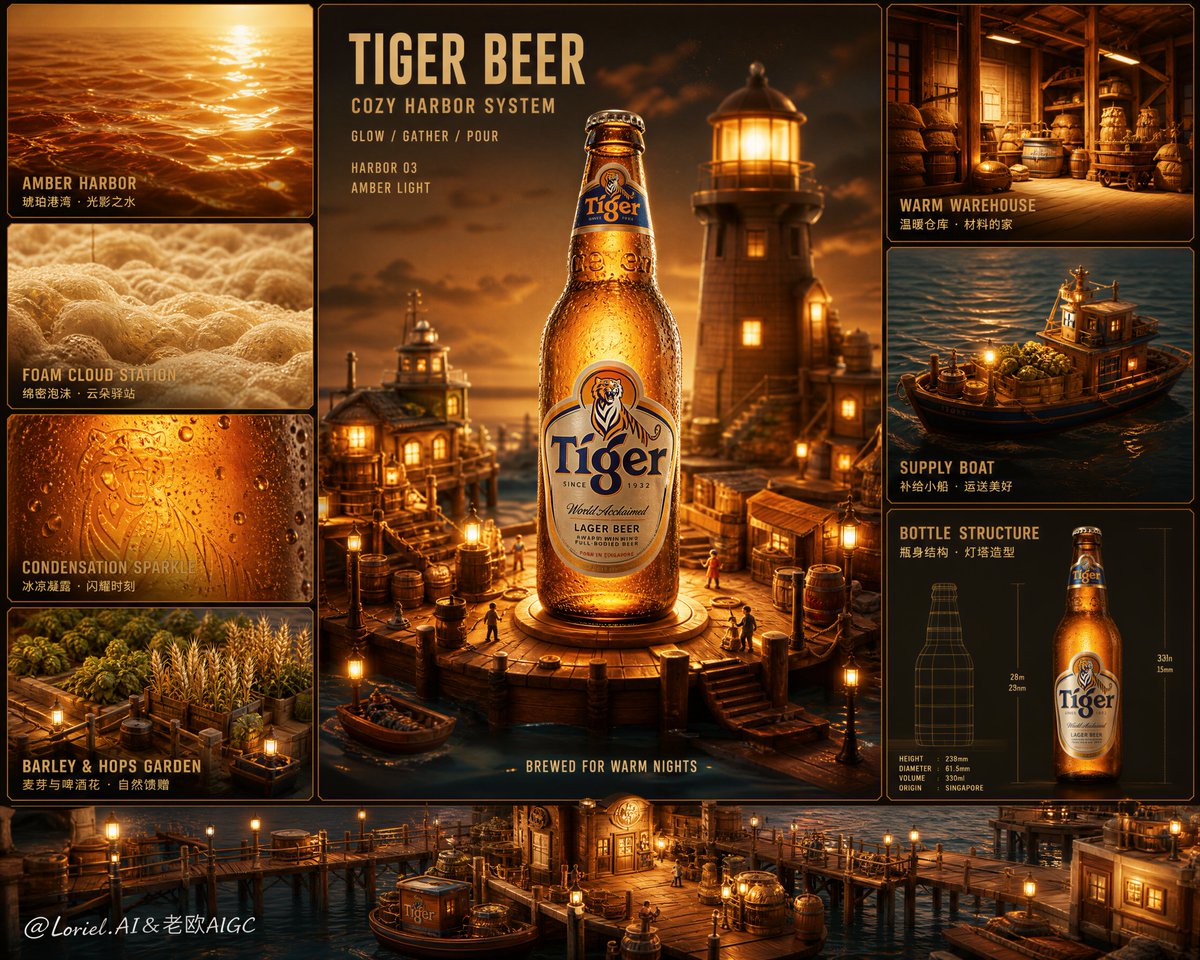
An ultra-premium editorial advertising poster for Tiger Beer, designed with a modular system-board layout. The central hero panel prominently features a Tiger Beer bottle or can, surrounded by supporting panels depicting a cozy harbor world including docks, boats, warehouses, barley gardens, hop storage, and more. The overall mood is warm, healing, cinematic, with rich colors, soft golden lighting, and elegant typography.
Prompt
Create an ultra-premium editorial advertising poster for Tiger Beer, designed as a warm and heartwarming harbor-world system board while preserving a strong modular archive composition. The layout must keep one dominant central hero product panel surrounded by smaller supporting panels, but the overall emotional direction should shift into a cozy, healing, cinematic animated-feature atmosphere. The final image should feel like a collectible Tiger Beer campaign poster where the product becomes the glowing lighthouse-heart of a tiny harbor world filled with warmth, gentle wonder, and premium storytelling. Core concept: The hero product is a hyper-real Tiger Beer bottle or can presented as the radiant centerpiece of a cozy miniature harbor universe. The product should feel like a golden harbor beacon or treasured dockside light source. Around it, smaller modular panels reveal a loving world of warm piers, tiny boats, glowing warehouse interiors, barley gardens, hop storage houses, soft foam-cloud stations, and amber liquid studies. The image must feel emotionally welcoming, magical, and refined, while always keeping Tiger Beer as the dominant focus. Composition: Use a vertical premium poster layout divided into elegant modular panels. The central panel must dominate and contain the main Tiger Beer product as the hero object, presented prominently and with strong visual gravity. Around it, build secondary panels showing different harbor-world modules: a dockside amber glow panel, a foam-cloud texture panel, a condensation sparkle panel, a hops-and-barley garden panel, a warm warehouse materials panel, a tiny supply boat scene, and a clean bottle silhouette or product structure panel. The overall layout must feel highly organized, balanced, and architectural, while emotionally soft and inviting. Product realism: Render Tiger Beer with absolute realism and premium fidelity: crisp bottle glass or metallic can structure, clearly visible Tiger Beer branding, rich golden amber beer tone, cold condensation droplets, lively foam texture, clean highlights, premium label details, and tactile packaging realism. The hero product must remain the sharpest, coldest, and most desirable element in the entire poster, even within the whimsical harbor setting. Cozy harbor world: Transform the supporting system into a miniature warm harbor environment. Use tiny dock platforms, soft-lit piers, glowing storage huts, elegant cargo ropes, floating supply boats, hop gardens, barley drying racks, little lanterns, and foam-like cloud stations. Everything should feel handcrafted, cozy, and story-rich, as if the Tiger Beer product powers a charming living port. The harbor should feel intimate and warm rather than busy or cartoonish. Supporting detail panels: Design each surrounding module as a premium harbor-themed study related to the product: a close-up of glowing amber liquid like harbor sunset water, a foam texture panel interpreted like soft cloud surf, a condensation droplet panel with sparkling freshness, a barley and hops ingredient dock-garden, a small warm warehouse materials panel, a floating supply-boat panel carrying ingredients, and a minimal structural panel showing the product form like a port beacon schematic. All panels must feel directly connected to Tiger Beer and the harbor-world concept. Color direction: Use a warm premium palette of honey gold, amber, soft cream, weathered wood brown, toasted brass, warm ivory, muted sea teal, dusk blue, and gentle lantern orange. Keep the colors rich and cozy with soft cinematic gradients, avoiding harsh darkness or loud cartoon saturation. Typography: Use a minimal elegant English-led typography system with warm editorial spacing. Suggested text direction: Main title: “TIGER BEER” Secondary title: “COZY HARBOR SYSTEM” Supporting English microcopy: “GLOW / GATHER / POUR” “HARBOR 03 / AMBER LIGHT” “BREWED FOR WARM NIGHTS” If Chinese support text is included, keep it very restrained, small, and design-led. Typography should feel warm, premium, and beautifully integrated into the panel structure. Brand coding: Preserve Tiger Beer identity through: clear product visibility, golden beer tonality, premium packaging fidelity, and an elevated social warmth. Preserve the modular system-board structure through: central hero panel, surrounding supportive modules, clear hierarchy, and elegant visual organization. The emotional style should feel healing, cozy, cinematic, and premium. Lighting: Use soft cinematic golden lighting with warm lantern-like highlights, subtle ambient bloom, and gentle reflections across the product and harbor modules. Let the beer glow like a treasured beacon while the surrounding harbor world receives soft comforting illumination. Condensation, foam, metal, and glass must remain tactile and luxurious. Mood: warm, healing, cinematic, premium, cozy, magical, inviting, story-rich, collectible, luxurious, uplifting Rendering style: hyper-real Tiger Beer product poster, modular system-board layout, cozy harbor miniature world, premium animated-feature atmosphere, warm amber lighting, soft mist and glow, elegant editorial composition, 8k, world-class commercial image quality Negative prompt: dark aggressive lab mood, horror tone, literal cartoon characters, cheap toy-like harbor, cluttered composition, weak product visibility, rough typography, low-detail bottle, oversaturated childish palette, low-end animation look
Kynvio Prompt Workflow
How to use this prompt
Open it in Image Studio
Send the prompt to Kynvio AI without starting a generation.
Adapt the details
Replace the subject, setting, colors, text, or composition for your goal.
Review and generate
Choose your final settings, then click Generate when you are ready.
Related GPT Image 2 prompts
GPT Image 2 prompts
About this prompt
Will opening this prompt spend credits?
No. The button only prefills Image Studio. Credits are used only after you start a generation.
Can I edit the prompt first?
Yes. The transferred text is fully editable before you generate an image.