
Photorealistic Portrait of a 19-Year-Old in PUBG and Free Fire Attire
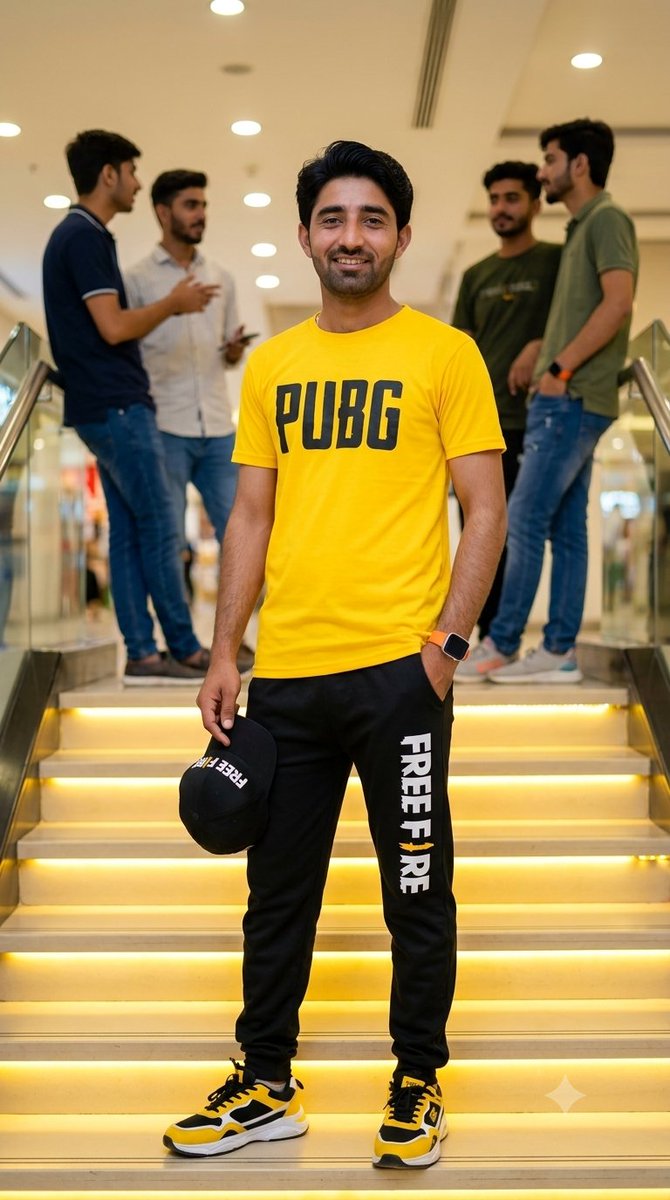
A high-quality, photorealistic portrait of a confident 19-year-old smiling at the camera. He wears a bright yellow short-sleeved t-shirt with "PUBG" on the chest, black sweatpants with "FREE FIRE" on the left leg, yellow/black/white sneakers, holds a black baseball cap with "FREE FIRE" in his right hand, left hand in pocket, and an orange-banded smartwatch on his left wrist. He stands on a modern indoor staircase with warm yellow LED strip lighting. The background is blurred, showing a shopping mall interior with other casually dressed young men. Vibrant colors, bright indoor lighting, 8k resolution. Keep original face and hairstyle 100% reference. Ratio 9:16.
Prompt
Using uploaded face 100% realistic. A high-quality, photorealistic portrait of a confident 19 years young smiling directly at the camera. He is wearing a bright yellow short-sleeved t-shirt with "PUBG" printed in bold black letters across the chest, and black sweatpants with "FREE FIRE" printed vertically in white on the left leg. He is wearing yellow, black, and white athletic sneakers. In his right hand, he is holding a black baseball cap with "FREE FIRE" in white text. His left hand is casually resting in his pocket, and he wears a smartwatch with an orange band on his left wrist. He is standing on a modern indoor staircase that features warm yellow LED strip lighting under the lip of each step. The background is blurred with a shallow depth of field, showing a modern building interior like a shopping mall, with a few other casually dressed young men standing and chatting on the stairs behind him. Vibrant colors, bright indoor lighting, 8k resolution. Keep original face and hairstyle 100% reference Ratio 9:16
Kynvio Prompt Workflow
How to use this prompt
Open it in Image Studio
Send the prompt to Kynvio AI without starting a generation.
Adapt the details
Replace the subject, setting, colors, text, or composition for your goal.
Review and generate
Choose your final settings, then click Generate when you are ready.
Related GPT Image 2 prompts
GPT Image 2 prompts
About this prompt
Will opening this prompt spend credits?
No. The button only prefills Image Studio. Credits are used only after you start a generation.
Can I edit the prompt first?
Yes. The transferred text is fully editable before you generate an image.