
Mecha Carnival Rampage Show Character Sheet
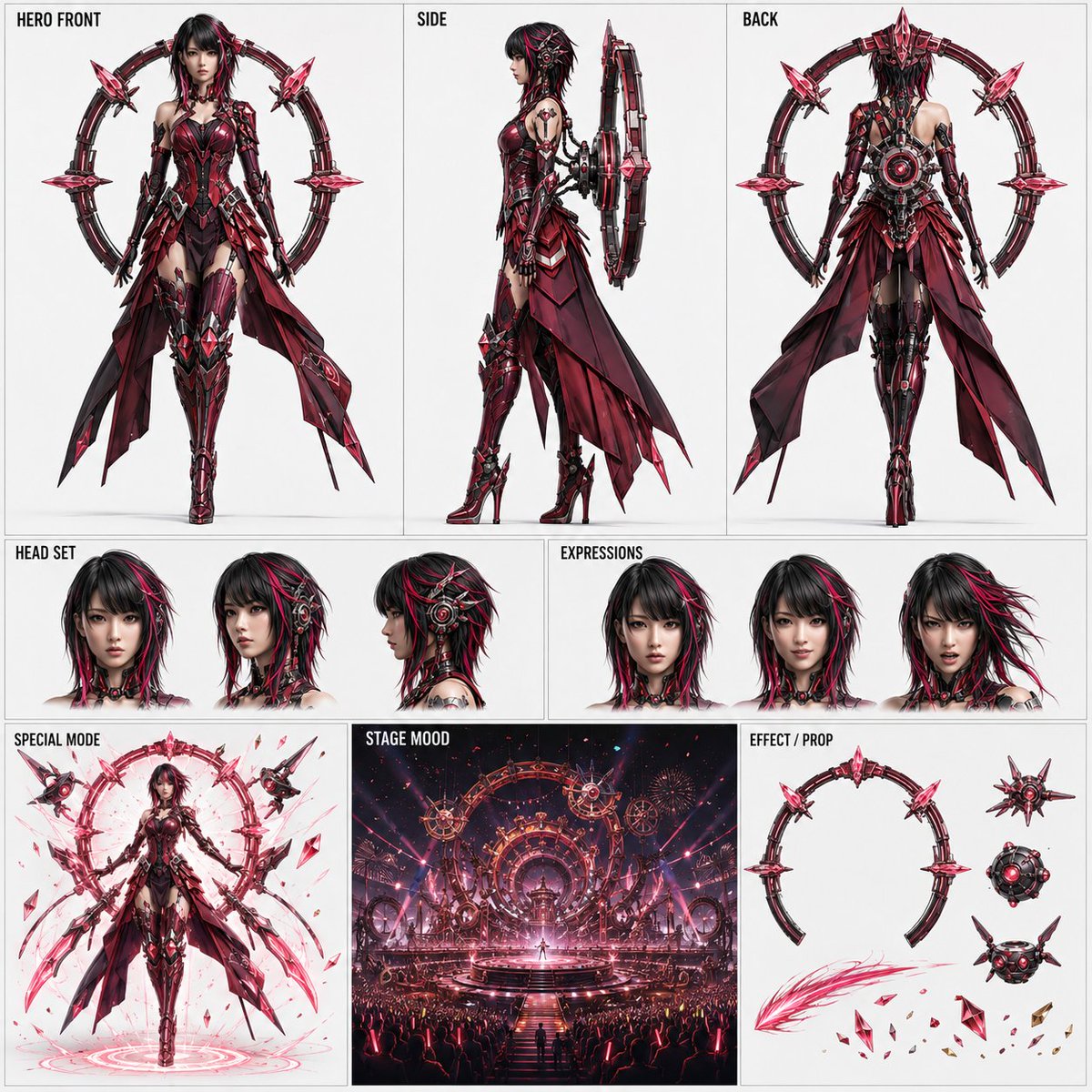
Create a 1:1 square simple character sheet based on a reference image to fix the appearance of the main cyborg in the 15-second animation "Mecha Carnival Rampage Show." Theatrical animation style, 3-tier layout including front, side, back, head, expressions, special mode, stage mood, and effects/props.
Prompt
Reference to use: One full-body reference image attached with this instruction. Supports real person or full-body illustration. Body: Based on the attached full-body reference image, create a 1:1 square simple character sheet for sharing and animation reference. Purpose: To fix the appearance of the main cyborg character appearing in the 15-second animation video "Mecha Carnival Rampage Show" and organize it into a single image that looks good for sharing. This image is a character fixation sheet, not a storyboard. Do not include chronological development, camera flow, or event reproduction. Expression: High-quality theatrical animation style. Even for real-life references, utilize the features of the reference person while converting the final image into a refined animation expression. Avoid cheap TV animation style, monotonous NPC style, rough mecha decoration, overly toy-like texture, and excessive information. Background: White to very light gray solid color. Organized publishable design, using only short English headings. Do not include explanatory text, long labels, number explanations, logos, watermarks, or decorative text. Inherit the following from the reference image: · Facial features · Eye shape · Hairstyle and hair color · Age impression · Gender impression · Physique · Head-to-body ratio · Overall silhouette tendency · Overall atmosphere of the person Do not directly reproduce the clothing shape, background, accessories, or world setting of the reference image. However, must inherit the visual impressions such as main color scheme, color temperature, brightness, saturation, material feel, elegance, strength, cuteness, calmness, and glamour that can be read from the entire reference image including clothing. Translate and reflect the colors and atmosphere of the reference image into cyborg armor, cloth parts, crystals, glowing lines, back ring, special mode, effects, and stage lighting. Do not converge all reference images into the same purple, blue, silver-white standard design. Do not fix crystal and glow colors to purple; vary according to the color design derived from the reference image. Do not create a look where only the face is placed on a mechanical body. Design the entire reference person or character as a naturally cyborgized form. Clearly retain the face as a human or anime character, adding mechanical structures that naturally connect to the temples, around the ears, back of the head, neck, and shoulders. Main concept: "Crystal Ring Stage Main Cyborg." A main performer who performs a show at the center of a glamorous mechanical festival, with a special mode to cope with the rampaging stage equipment. Equipped with a large ring unit on the back, balancing stage presence and readable mechanical structure. Layout: Prioritize composition stability with a 3-tier structure. [Upper tier: approx. 56%] Arrange 3 sections horizontally with equal width. Left: HERO FRONT Center: SIDE Right: BACK The three figures are the same character, same normal form, same costume, same armor design. Align with the same scale, same foot baseline, same head top position, and similar margin balance, placing each in the center of its section. Do not make the front view extremely large. Avoid extreme poses or action stances; use natural upright stances for easy comparison of full-body structure. HERO FRONT: Clearly show face, hairstyle, physique, head-to-body ratio, costume, armor, and full-body silhouette. SIDE: Clearly show head, chest, waist, legs, thickness of back ring, connection position to body, and front-back structure of the whole body. BACK: Clearly show back of head, back, waist, back of legs, and connection structure of back ring. Back ring unit maintains the same basic design in HERO FRONT, SIDE, BACK, SPECIAL MODE, and EFFECT / PROP. Unify ring diameter, number of segments, outer shape, positions of main decorations, crystal placement, central core, and connection method to the body. [Middle tier: approx. 18%] Divide a horizontal strip into left and right. Left: HEAD SET Right: EXPRESSIONS HEAD SET: Place front, three-quarter, and side views of the same face, one each. Allow confirmation of facial features, eyes, hairstyle, hair color, mechanical ears, temples, and neck structure. EXPRESSIONS: Place the following three expressions with the same face and hairstyle: neutral confident smile battle face Do not change facial features, hairstyle, mechanical parts, or costume other than expressions. [Lower tier: approx. 26%] Arrange 3 horizontal sections. Left: SPECIAL MODE Center: STAGE MOOD Right: EFFECT / PROP SPECIAL MODE: Do not change the character's normal form to a different design. Maintain the same face, hairstyle, physique, costume, and armor, and indicate the special form through expansion of the normal ring, enhanced glow, additional energy, floating crystals, and deployment of auxiliary parts. Background of SPECIAL MODE: Same as other character display frames, white to very light gray as base. Do not include environmental backgrounds such as stage, audience, buildings, or spotlights. Only use character-associated glow halos, floor energy rings, light particles, floating debris, and weak shadows. Use a stable full-body composition near front view that allows reading of the special form's structure. STAGE MOOD: Show one cut of the world of "Mecha Carnival Rampage Show." May include circular stage of mechanical festival, gear arches, ring-shaped stage devices, audience silhouettes, lighting, confetti, light particles, mechanical fireworks, etc. Reflect the color scheme and atmosphere derived from the reference image into the stage's color design. Do not include time progression or multiple scenes; limit to background and stage setting assistance. EFFECT / PROP: Organize only elements important for the animation, narrowed down to 2-4 systems. · Back ring with same design as normal form · Small effect drones or floating machines · Energy trails · Crystal shards, metal confetti, light particles, etc. Do not arrange many small decorations; display each element independently for easy reading of shape and color. Unify HERO FRONT, SIDE, BACK, HEAD SET, EXPRESSIONS, SPECIAL MODE, STAGE MOOD, and EFFECT / PROP with the same color scheme and design policy derived from the reference image. Overall, make it a single image with completeness and visual appeal for sharing. At the same time, ensure a clear and stable layout so that necessary sections such as HERO FRONT, HEAD SET, SPECIAL MODE, and STAGE MOOD can be easily cropped and used for animation reference.
Kynvio Prompt Workflow
How to use this prompt
Open it in Image Studio
Send the prompt to Kynvio AI without starting a generation.
Adapt the details
Replace the subject, setting, colors, text, or composition for your goal.
Review and generate
Choose your final settings, then click Generate when you are ready.
Related GPT Image 2 prompts
GPT Image 2 prompts
About this prompt
Will opening this prompt spend credits?
No. The button only prefills Image Studio. Credits are used only after you start a generation.
Can I edit the prompt first?
Yes. The transferred text is fully editable before you generate an image.