
BLUE BREAKER Resonance of Blue - Simple Character Sheet
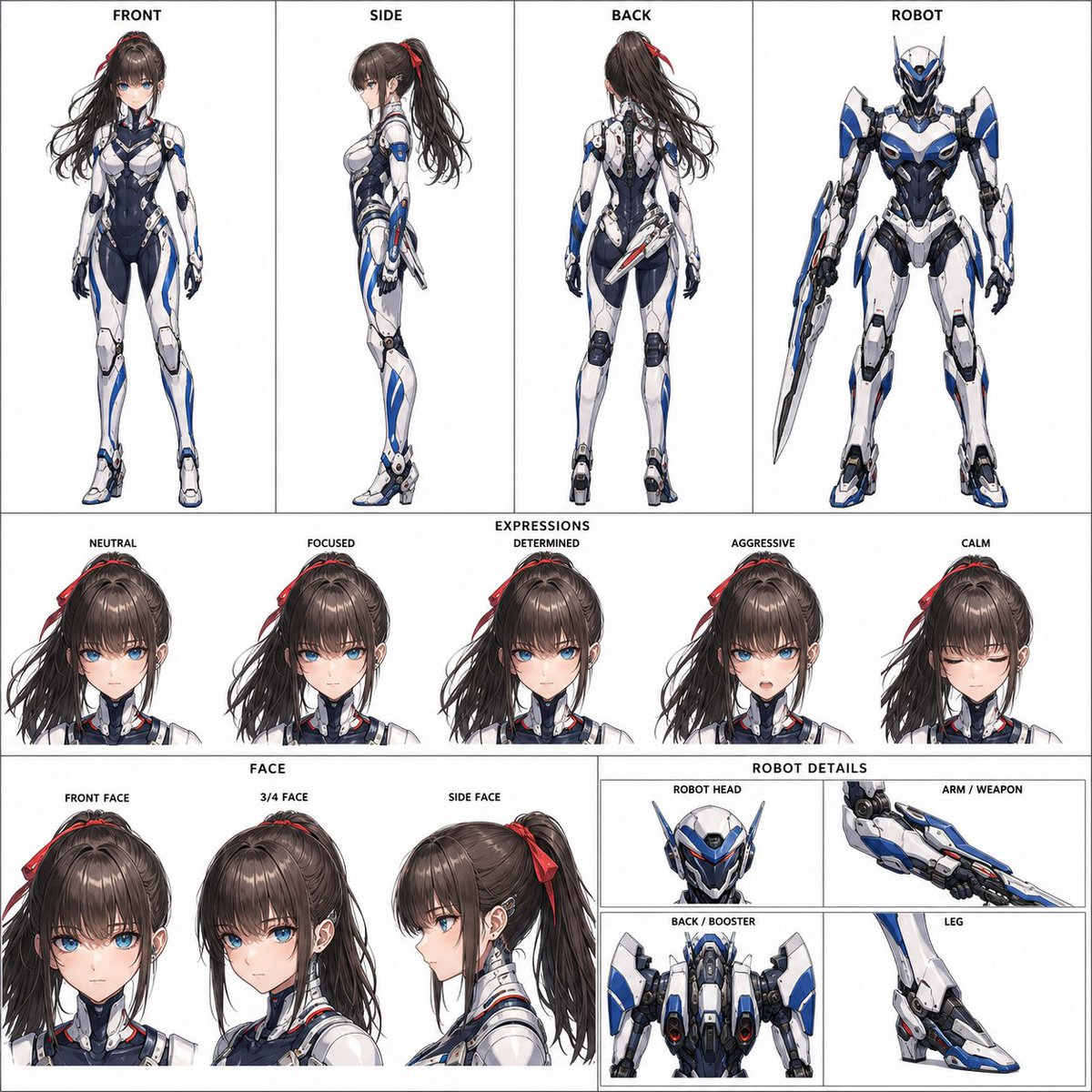
Create a 1:1 square simple character sheet based on a character reference image for a 15-second theatrical anime-style video 'Cyborg Woman and Robot Action'. Includes front/side/back views of the cyborg woman, expression set, face details, and full-body and structural details of the partner robot. Color scheme: White, Silver, Dark Navy, Samurai Blue with aircraft paint style.
Prompt
Reference: One character reference image attached with this instruction sheet. Supports both real person photos and character illustrations. Body: Based on the attached character reference image, create a 1:1 square simple character sheet for sharing and video reference. The purpose is to fix the main designs of a cyborg woman and her partner robot appearing in a 15-second theatrical anime-style video "Cyborg Woman and Robot Action" on a single sheet. This is a character fixing sheet, not a storyboard. Do not include battle scenes, time progression, background world, camera movement, or multi-scene development. [Handling of Reference Image] Inherit the woman's facial features, eyes, contour, hairstyle, bangs, hair color, age impression, and overall facial impression from the reference image. Body type, head-to-body ratio, full body proportions, cyborg body, combat suit, mechanical parts, weapons, and overall silhouette prioritize this instruction sheet; do not reproduce the reference image's body type, clothing, background, pose, or accessories. For real photo references, retain unique facial characteristics such as eye width, eyelids, nose bridge, mouth, and face width; do not overly lean towards a generic pretty girl face. Do not retain photographic feel; convert to a high-quality theatrical anime character with unified skin, eyes, hair, contour, and shading. For illustration references, inherit only character information centered on face and hairstyle. Do not inherit the reference illustration's art style, line art, coloring, shading, clothing, body type, composition, background, design density, screen composition, or layout; prioritize this instruction sheet. Do not make it photorealistic, semi-photorealistic, 3DCG style, excessively infantilized, look like a different person, or cheap TV anime style. Do not add large hair ornaments or symbolic accessories not present in the reference image. [Fixed Design and Colors] Basic color scheme: White, Silver, Dark Navy, Samurai Blue. External armor: White and Silver. Place sufficient Dark Navy or Charcoal on the torso, sides, waist, inner thighs, joints, and armor gaps to ensure clear silhouette even on a white background. Samurai Blue should be applied as large curved surfaces, streamlines, and diagonal bands resembling aircraft paint, not as thin glowing lines. Show it as clear painted surfaces, not light or aura; weak glow may be added at edges where necessary. If the reference image has a distinct characteristic color, extract one color and apply it as a secondary accent (about 3-8% of the whole) to the woman and robot. For the woman, use it in 3-5 places such as ear devices, chest, small armor areas, blade base. Only if the reference image has a hair ornament, it may also be inherited. For the robot, use it in 2-4 places such as visor area, shoulders, back unit, weapon base, arms/legs. If the reference image is centered on achromatic colors like black, blue-black, or gray, do not create non-existent vivid colors; instead, reflect it in the hue, brightness, and metallic feel of the predetermined dark parts. The reference color does not replace Samurai Blue. [Cyborg Woman] Young adult woman with a refined model physique. Slim with long legs, functional and beautiful full-body balance suitable for high-speed close combat. Place Samurai Blue color surfaces on shoulders to chest, sides to waist, forearms, outer thighs to shins. Do not mechanize the entire face; add delicate mechanical connections at temples, around ears, and neck. Avoid excessive exposure; wear a refined near-future combat suit covering the whole body. Basic armament is a retractable high-frequency blade; avoid over-armament. [Partner Robot] Slightly larger than the woman, a high-mobility humanoid or semi-humanoid robot capable of running alongside, jumping, close combat, and cooperating within the same frame. Features: slim aerodynamic silhouette, sharp head, visor-type sensors, back booster, high-mobility legs, one arm with variable weapon. Share the same color scheme and aircraft paint style as the woman. Place Samurai Blue as clear color surfaces on the side of the head, chest armor, forearms, outer legs, and back unit. Do not make it look like a mass-production model, giant weapon, old super robot style, toy style, extremely heavy armor, excessive protrusions, or overly complex structure. [Layout] 1:1 square. Background: plain white. Do not change the row structure, placement, order, or proportions. Top row: about 50%, 4 horizontal sections. 01 FRONT: Full front view of the woman. From top of head to soles of feet. 02 SIDE: Full side view of the woman. Show depth of hair, torso, legs, back structure. 03 BACK: Full back view of the woman. Show back of head, back structure, waist, legs, weapon storage. 04 ROBOT: Full front standing view of the partner robot. From top of head to toes, centered. Weapons in stored or downward standby state; do not hide the full silhouette. Do not use dynamic battle poses, angled views, half-body, or weapon alone. This full-body image serves as the reference for the 4 detail frames in the lower right. Middle row: about 22%. 05 EXPRESSIONS: Five faces of the woman at the same scale, same hairstyle, same features, arranged horizontally. NEUTRAL / FOCUSED / DETERMINED / AGGRESSIVE / CALM Bottom row: about 28%. Left about 60%: FACE; right about 40%: ROBOT DETAILS. FACE: Three faces of the woman at similar size. FRONT FACE / 3/4 FACE / SIDE FACE Clearly show eyes, contour, nose, mouth, bangs, hair parting, mechanical parts around ears. ROBOT DETAILS: Right about 40% fixed as 2 columns x 2 rows of 4 equal frames with dividing lines. Structural reference for the same robot as 04 ROBOT for video; each frame has a distinct role. Top left ROBOT HEAD: Head, visor, side armor, neck connection. Do not focus on chest or arms. Top right ARM / WEAPON: One arm and its attached variable weapon. Show arm, joint, weapon base, connection structure; not weapon alone. Bottom left BACK / BOOSTER: Upper back from directly behind. Clearly show back unit, booster, propulsion device, back armor, connections. Do not repeat head close-up or front chest. Bottom right LEG: One leg from knee to toe. Show knee joint, shin armor, ankle, toe, propulsion or landing mechanism. Do not mix arms, shoulders, or weapons. [Text, Quality, Prohibitions] Only specified short English headings inside the image. No titles, descriptions, character names, robot names, long labels, logos, watermarks, decorative text. High quality like official theatrical anime setting materials: bright, organized, shareable. The woman's 3 full-body views, 5 expressions, and 3 face views are unified as the same character. The robot's 1 full-body and 4 detail views are unified as the same machine. Avoid assimilation of white background and white armor, color scheme of only white and thin glowing lines, loss of reference color, or domination of overall color scheme by reference color. Do not include storyboard elements, background city, crowds, mass-produced machines, battle scenes, explosions, slash effects, light trails, afterimages, speed lines.
Kynvio Prompt Workflow
How to use this prompt
Open it in Image Studio
Send the prompt to Kynvio AI without starting a generation.
Adapt the details
Replace the subject, setting, colors, text, or composition for your goal.
Review and generate
Choose your final settings, then click Generate when you are ready.
Related GPT Image 2 prompts
GPT Image 2 prompts
About this prompt
Will opening this prompt spend credits?
No. The button only prefills Image Studio. Credits are used only after you start a generation.
Can I edit the prompt first?
Yes. The transferred text is fully editable before you generate an image.