
GPT Image 2image-generation
Makeup Analysis Infographic
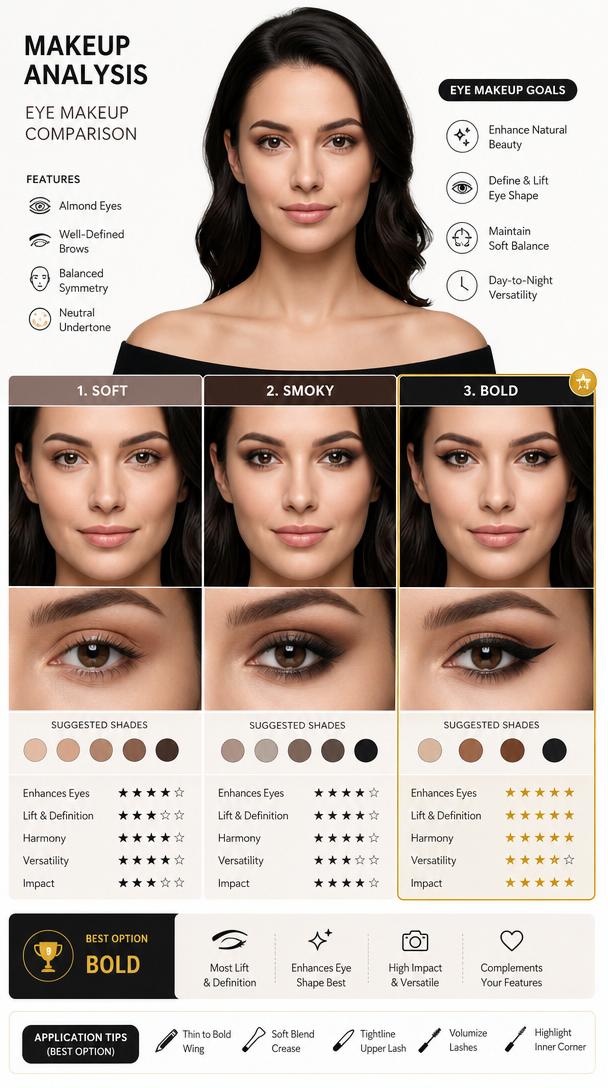
Create a makeup analysis graphic based on the portrait, comparing eyeliner and eyeshadow styles (soft, smoky, bold), highlighting the best option, using an infographic layout, no paragraphs.
Prompt
Create a makeup analysis graphic using this portrait, compare eyeliner and eyeshadow styles (soft, smoky, bold), highlight best option, infographic layout, no paragraphs
Kynvio Prompt Workflow
How to use this prompt
1
Open it in Image Studio
Send the prompt to Kynvio AI without starting a generation.
2
Adapt the details
Replace the subject, setting, colors, text, or composition for your goal.
3
Review and generate
Choose your final settings, then click Generate when you are ready.
Related GPT Image 2 prompts
GPT Image 2 prompts
About this prompt
Will opening this prompt spend credits?
No. The button only prefills Image Studio. Credits are used only after you start a generation.
Can I edit the prompt first?
Yes. The transferred text is fully editable before you generate an image.