
Hyper-realistic 8K Cinematic Chiaroscuro Portrait
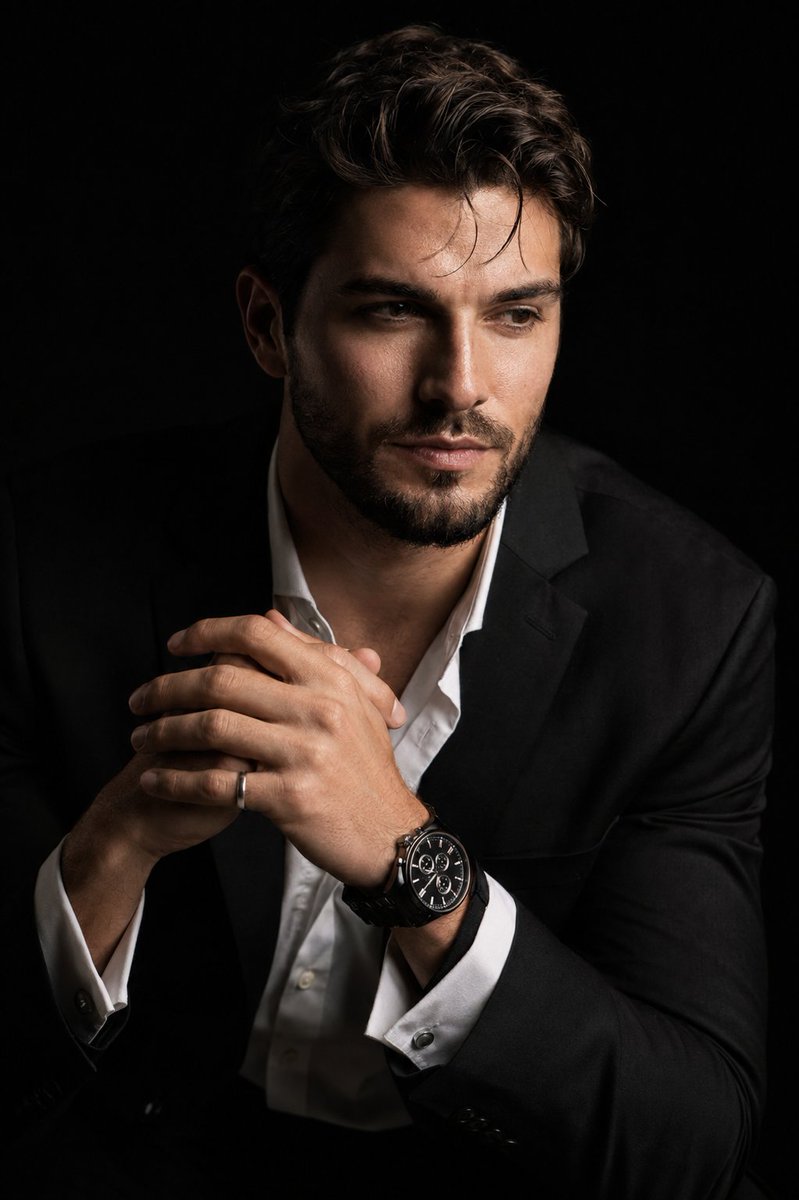
A hyper-realistic 8K cinematic portrait in dramatic chiaroscuro style. The subject is seated at a three-quarter angle, leaning forward with a contemplative expression, hands interlocked, wearing a luxury watch and silver ring, dressed in a black suit jacket and white shirt, against a solid black background with directional studio lighting highlighting fine details.
Prompt
Create a hyper-realistic 8K cinematic portrait of the uploaded person in a dramatic chiaroscuro style. The subject is seated at a three-quarter angle, leaning slightly forward with a relaxed yet commanding posture. His face is turned slightly away from the camera, not looking at the lens, with one side of the face sharply illuminated and the opposite side fading into deep, velvety black shadow. His expression is contemplative. His hands are near the chest in a natural, precise pose, with the fingers gently and correctly interlocked. One wrist clearly shows a luxury black chronograph watch with a detailed metal link bracelet, and one hand wears a subtle silver ring. He is dressed in a sharp black suit jacket over a white dress shirt with the top buttons open, showing refined fabric texture and natural folds. The background is solid seamless black. Use strong directional studio lighting with rich contrast, clean shadow falloff, and realistic skin texture. Highlight fine details such as hair strands, beard (if present) bristles, eye moisture, facial texture, the watch face, metal bracelet reflections, and the silver ring. Shot with an 85mm portrait lens look, shallow depth of field, premium commercial photography, ultra-sharp focus, smooth natural skin transitions, cinematic contrast, no artificial plastic skin, no extra fingers, no distorted hands, no messy anatomy.
Kynvio Prompt Workflow
How to use this prompt
Open it in Image Studio
Send the prompt to Kynvio AI without starting a generation.
Adapt the details
Replace the subject, setting, colors, text, or composition for your goal.
Review and generate
Choose your final settings, then click Generate when you are ready.
Related GPT Image 2 prompts
GPT Image 2 prompts
About this prompt
Will opening this prompt spend credits?
No. The button only prefills Image Studio. Credits are used only after you start a generation.
Can I edit the prompt first?
Yes. The transferred text is fully editable before you generate an image.