
High-Key Japanese Editorial Portrait
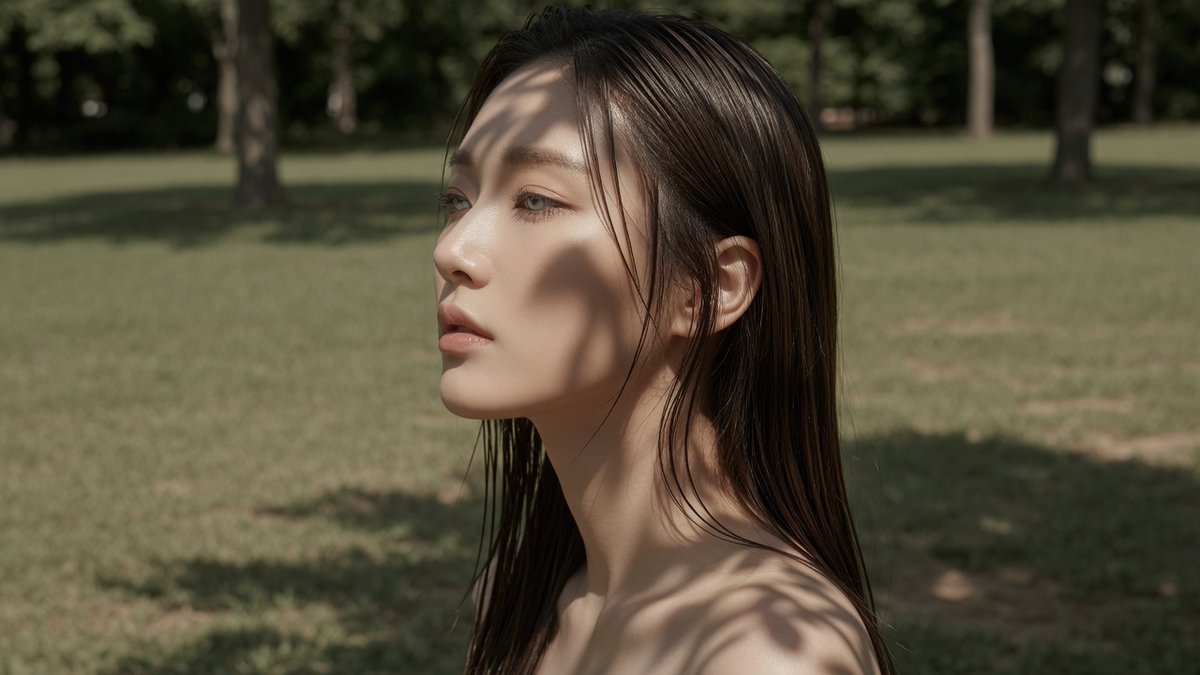
A photorealistic editorial portrait, facial detail close-up, left profile, of a seductive Japanese or Korean woman in her 20s with specific body proportions and features, set in a grassy park with midday sun and dappled light, inspired by Guy Bourdin, high-key Japanese color grade.
Prompt
Create a photorealistic editorial portrait. Facial-detail close-up, eye-level view, left profile view A 20s seductive stunning Japanese or Korean woman. sexy tall slim-curvy silhouette, about 168-173 cm visual height and 53-58 kg lean visual weight, 94-58-92 body proportion anchor, long legs with about 3.8:6.2 torso-to-leg balance, full F-to-G-cup-scale bust, narrow defined waist, rounded hips, flat abdomen, dramatic but lean bust-waist-hip curve, young beautiful Korean idol face, refined small face, clear bright eyes, straight medium-to-long hair with a sleek wet texture, clean straight lengths, separated damp strands, minimal wave, soft black-tea brown hair, muted brown-black salon tone, soft matte skin texture, refined pores, velvety smooth finish. Scene: The portrait takes place in small grassy park patch, uneven lawn texture, scattered tree trunks at varied depths, harsh midday environment, overhead summer sun position, dappled leaf-shadow light on the subject, broken sunlight patches across skin and clothing. Inspired by Guy Bourdin, bold narrative fashion image language. high-key Japanese portrait color grade, elevated exposure, creamy porcelain highlights, softened shadow floor, restrained saturation.
Kynvio Prompt Workflow
How to use this prompt
Open it in Image Studio
Send the prompt to Kynvio AI without starting a generation.
Adapt the details
Replace the subject, setting, colors, text, or composition for your goal.
Review and generate
Choose your final settings, then click Generate when you are ready.
Related GPT Image 2 prompts
GPT Image 2 prompts
About this prompt
Will opening this prompt spend credits?
No. The button only prefills Image Studio. Credits are used only after you start a generation.
Can I edit the prompt first?
Yes. The transferred text is fully editable before you generate an image.