
Fashion Capital Typographic Poster Template
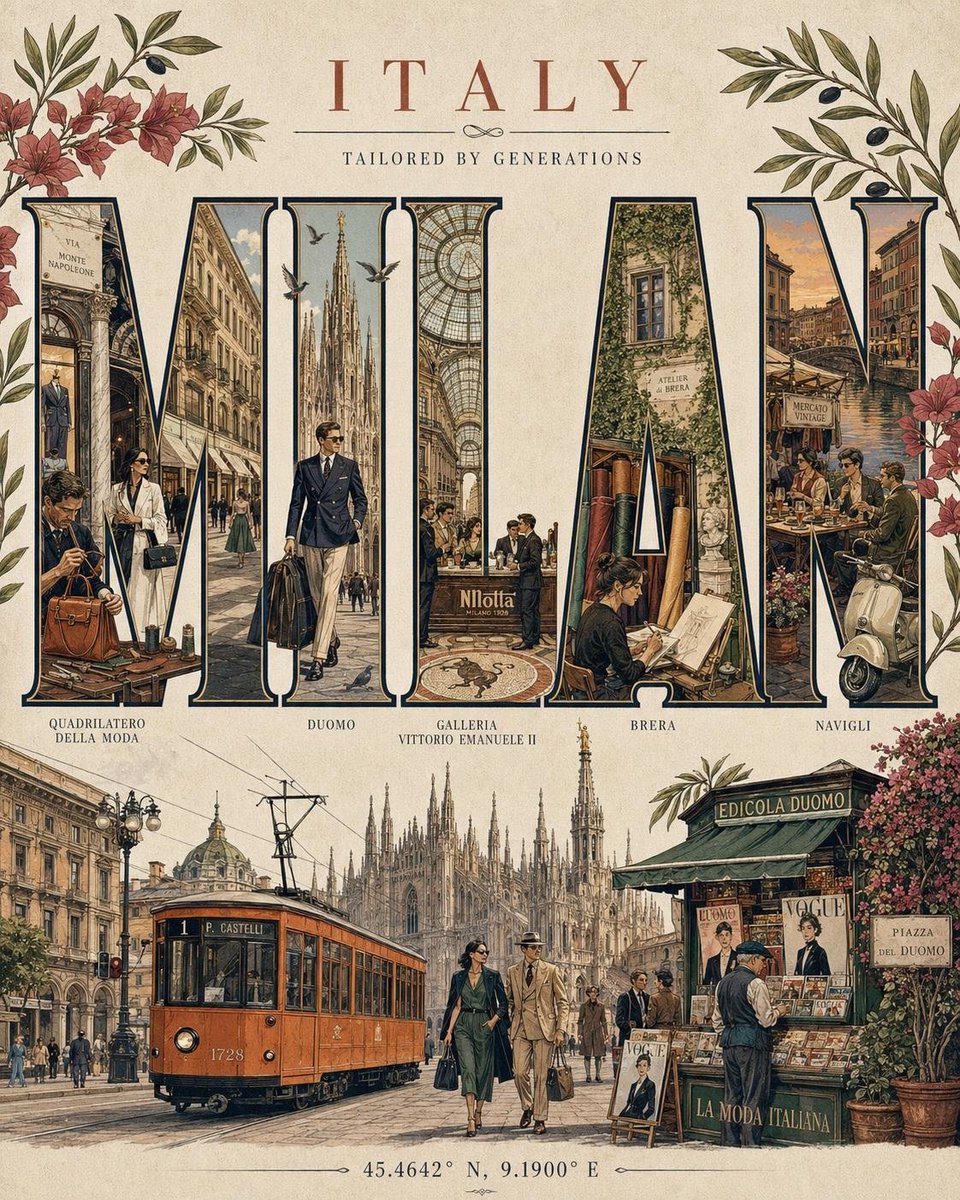
A detailed prompt template for generating a fashion capital typographic poster, including city name, letter map, palette, flora, objects, fashion figure, skyline, subtitle, and coordinates.
Prompt
FASHION CAPITAL TYPOGRAPHIC POSTER - [CITY], [COUNTRY] Luxury editorial travel poster in the style of the city's most iconic fashion heritage, luxury craftsmanship, and vintage travel posters. The word "[CITY]" in huge bold uppercase serif typography fills the composition. LETTER MAP (one district, landmark, or cultural fashion element per letter, max 3 motifs each): Each letter should represent a unique and recognizable part of the city's identity through its architecture, fashion culture, local traditions, iconic landmarks, cafés, markets, artisans, or everyday life. Adapt the motifs naturally to the selected destination while maintaining a refined luxury editorial aesthetic. SIGNATURE PALETTE: Use a color palette inspired by the city's visual identity-its architecture, landscapes, fashion heritage, and cultural atmosphere-while preserving soft vintage tones, elegant detailing, and museum-print quality. CITY FLORA: Include native or culturally significant flowers, plants, or botanical elements naturally spilling from or intertwining with the typography. CITY OBJECTS: Incorporate iconic local objects, vehicles, crafts, food items, street elements, or cultural symbols that authentically represent the destination. FASHION FIGURE: Include one elegant adult woman dressed in a fashion style inspired by the city's contemporary or historical aesthetic. She may interact naturally with the environment or local cultural elements and should never dominate the composition. Below typography: Feature the city's most recognizable skyline, architectural silhouettes, waterways, mountains, monuments, or landscapes in a subtle panoramic composition appropriate to the destination. SUBTITLE: A poetic tagline that captures the spirit, culture, or creative essence of the city. Footer coordinates: Use the accurate geographical coordinates of the selected city. Ultra detailed editorial vector illustration, clean linework, cream paper, soft vintage colors, collectible museum print, 4:5 vertical.
Kynvio Prompt Workflow
How to use this prompt
Open it in Image Studio
Send the prompt to Kynvio AI without starting a generation.
Adapt the details
Replace the subject, setting, colors, text, or composition for your goal.
Review and generate
Choose your final settings, then click Generate when you are ready.
Related GPT Image 2 prompts
GPT Image 2 prompts
About this prompt
Will opening this prompt spend credits?
No. The button only prefills Image Studio. Credits are used only after you start a generation.
Can I edit the prompt first?
Yes. The transferred text is fully editable before you generate an image.