
Cinematic Black-and-White Studio Portrait
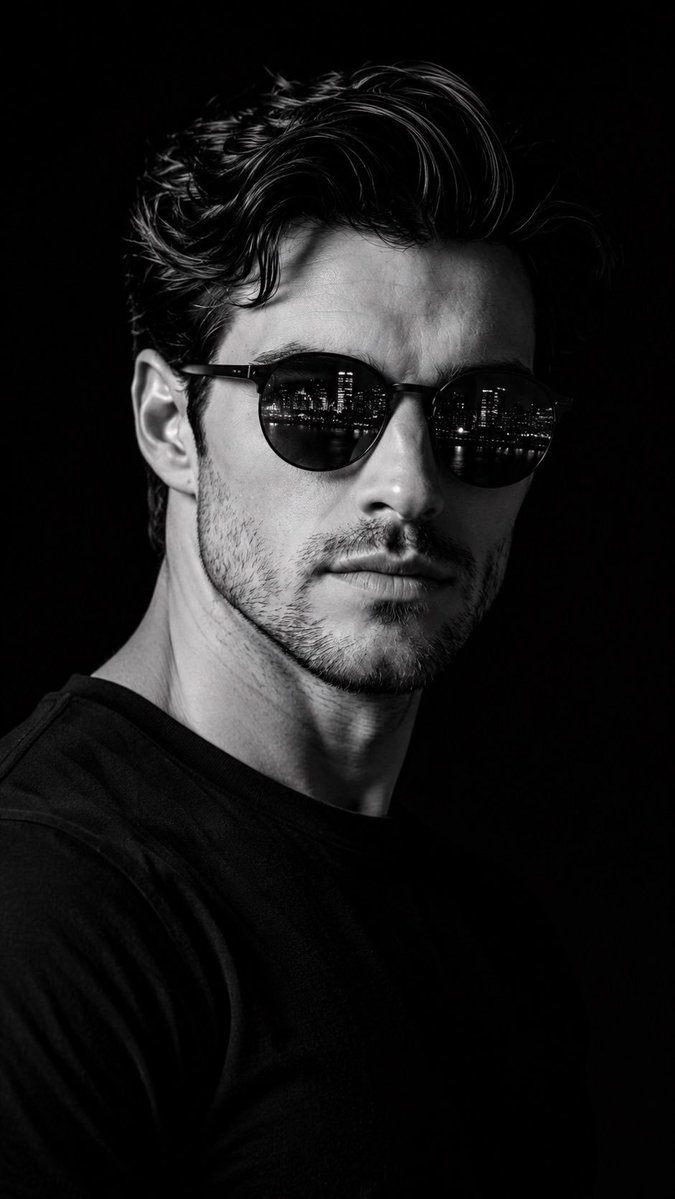
Generate a photorealistic cinematic black-and-white studio portrait using GPT Image 2, preserving the exact identity of the uploaded face with dramatic lighting and low-angle composition conveying confidence and strength.
Prompt
Create a photorealistic cinematic black-and-white studio portrait using the uploaded face as the exact identity. Preserve the facial structure, skin tone, hairstyle, beard details (if any), and overall likeness without changing the person’s identity. Frame the shot as a tight chest-up portrait with a strong, centered composition against a pure black seamless background. Position the camera slightly below eye level, creating a subtle low-angle perspective that conveys confidence, strength, and authority. Turn the head approximately three-quarters to the right while keeping the eyes directed toward the camera. Use dramatic hard directional lighting from one side to sculpt the face with deep shadows and high contrast, emphasizing the jawline, cheekbones, skin texture, and masculine features. Dress the subject in a simple black crew-neck T-shirt. Add premium matte black round sunglasses with realistic reflections of a modern city skyline at night visible in both lenses. Keep the expression calm, serious, and confident with relaxed lips. Render in ultra-detailed monochrome, luxury editorial photography style, razor-sharp focus, cinematic contrast, professional studio lighting, medium-format camera quality, 85mm lens, shallow depth of field, HDR, 8K, magazine cover quality.
Kynvio Prompt Workflow
How to use this prompt
Open it in Image Studio
Send the prompt to Kynvio AI without starting a generation.
Adapt the details
Replace the subject, setting, colors, text, or composition for your goal.
Review and generate
Choose your final settings, then click Generate when you are ready.
Related GPT Image 2 prompts
GPT Image 2 prompts
About this prompt
Will opening this prompt spend credits?
No. The button only prefills Image Studio. Credits are used only after you start a generation.
Can I edit the prompt first?
Yes. The transferred text is fully editable before you generate an image.