
Championship Moment: Handcrafted Paper-Cut Football Celebration Illustration
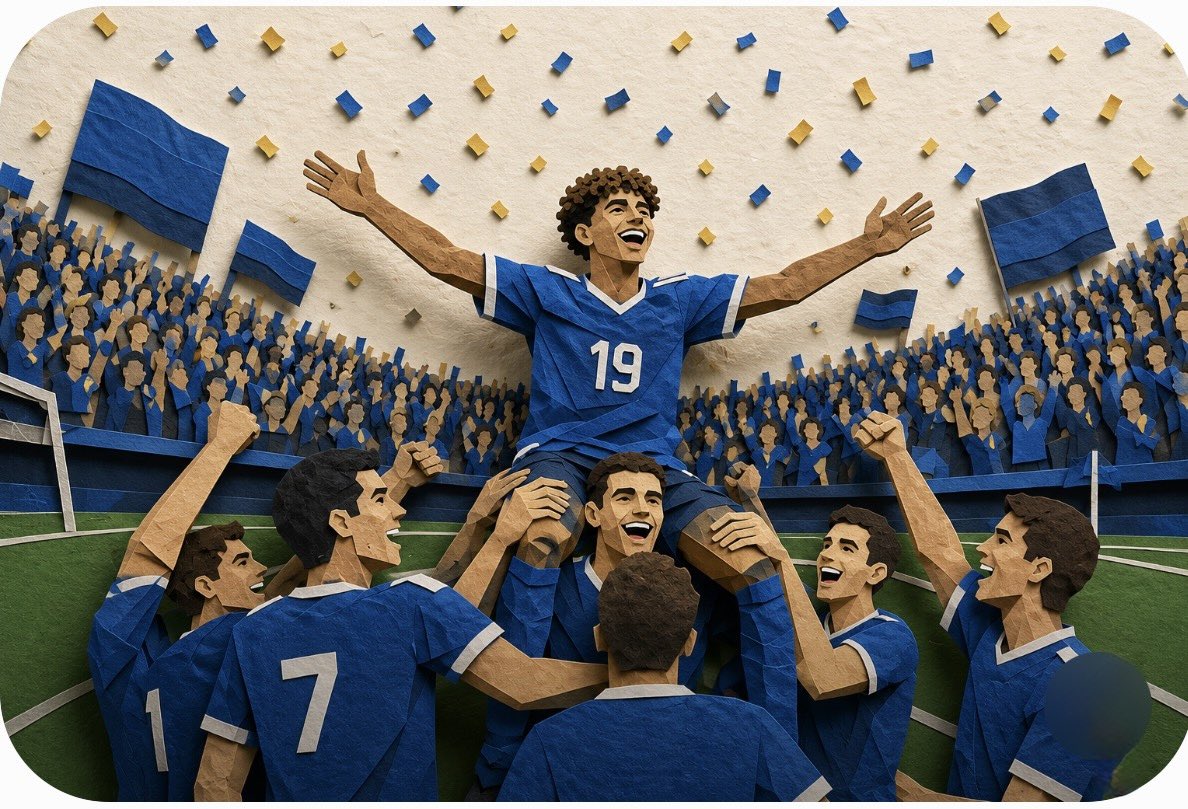
A premium handcrafted layered paper-cut illustration generated by GPT Image 2, depicting a football team celebrating a championship victory in a packed stadium. The central player in a blue jersey with number 19 is lifted by teammates, surrounded by cheering fans and blue-and-gold confetti. The artwork uses stacked cardstock and cardboard layers with realistic paper fibers, folded edges, and dimensional shadows, creating cinematic lighting and parallax depth.
Prompt
A premium handcrafted layered paper-cut illustration of a football team celebrating a championship victory inside a packed stadium. The central football player wearing a vibrant royal blue jersey with the number 19 is lifted high on the shoulders of his teammates, arms stretched wide in triumph and smiling with joy. The surrounding teammates also wear matching blue jerseys with white trim, raising their fists and cheering. Thousands of stylized paper-cut fans fill the stadium, waving large blue flags while blue and gold paper confetti rains from the sky. The football pitch is visible below with crisp white field markings. Every element is built from stacked colored cardstock and textured cardboard layers, featuring realistic paper fibers, folded edges, die-cut shapes, subtle imperfections, and deep dimensional shadows. Rich parallax depth between foreground, midground, and background creates a handcrafted diorama effect. Warm cinematic lighting, ultra-detailed craftsmanship, premium editorial composition, vibrant colors, clean negative space, high realism, stop-motion aesthetic, award-winning paper art, studio-quality render, 8K, highly detailed, visually striking, professional sports poster, consistent characters, dynamic yet balanced composition.
Kynvio Prompt Workflow
How to use this prompt
Open it in Image Studio
Send the prompt to Kynvio AI without starting a generation.
Adapt the details
Replace the subject, setting, colors, text, or composition for your goal.
Review and generate
Choose your final settings, then click Generate when you are ready.
Related GPT Image 2 prompts
GPT Image 2 prompts
About this prompt
Will opening this prompt spend credits?
No. The button only prefills Image Studio. Credits are used only after you start a generation.
Can I edit the prompt first?
Yes. The transferred text is fully editable before you generate an image.