
Ultra-Realistic Smartphone Selfie: East Asian Woman Portrait
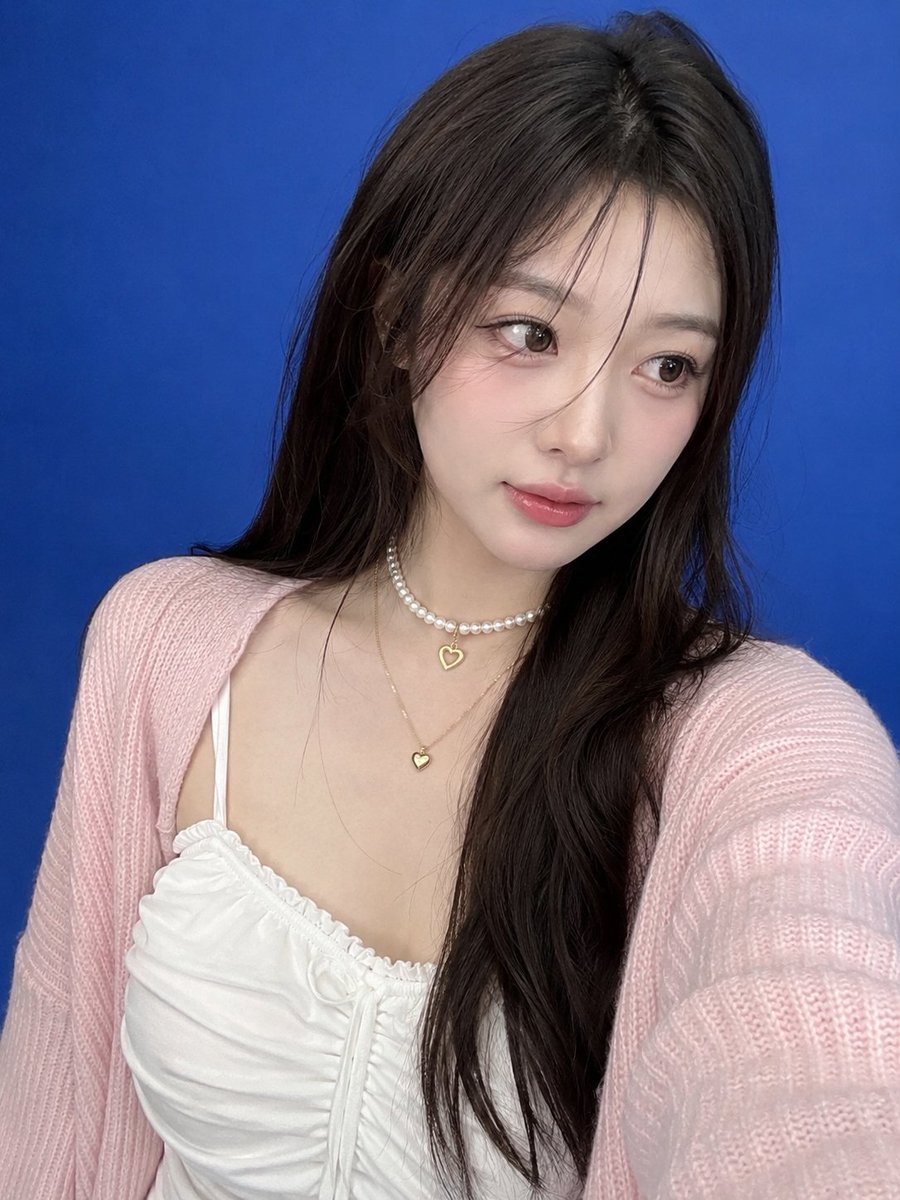
An ultra-realistic smartphone selfie depicting a beautiful young East Asian woman with fair porcelain skin, long dark brown hair, and natural Korean makeup. She wears a white camisole dress and pink cardigan, with a pearl choker and gold heart necklace. Blue seamless backdrop, soft studio lighting, sharp focus, authentic mobile camera texture.
Prompt
Ultra-realistic smartphone selfie, genuinely captured with a modern mobile phone, not a DSLR or AI render. A beautiful young East Asian woman with fair porcelain skin, long silky dark brown hair cascading naturally over her shoulders, soft wispy face-framing strands, large expressive brown eyes, natural Korean makeup with subtle blush and glossy peach-pink lips. She is wearing a delicate white ruched camisole dress with a soft pastel pink knitted cardigan draped loosely over her shoulders. Around her neck are a white pearl choker featuring a small golden heart pendant and a delicate gold necklace with a matching heart charm. She is standing inside a professional photography studio with a clean seamless blue backdrop that fills the entire frame. The composition is a close-up smartphone selfie with the phone held at arm’s length, slightly above eye level. She is looking slightly to the side rather than directly at the camera, displaying a gentle, dreamy expression. The studio environment is minimal and distraction-free, with complete focus on her face and upper body. Soft diffused studio lighting illuminates her features evenly, creating flattering highlights in her eyes and subtle dimension on her face while maintaining a realistic smartphone-camera appearance. Sharp focus on her face, eyes, hair, and jewelry, with the blue background remaining smooth and unobtrusive. Authentic mobile HDR processing, natural skin texture, visible pores, fine hair strands, slight handheld framing imperfections, subtle smartphone digital noise, realistic color rendition, candid social-media aesthetic, photorealistic, ultra-detailed, looks exactly like an unedited iPhone/mobile front-camera selfie, no DSLR look, no cinematic effects, no studio equipment visible, no watermark, no text, no logos, no AI-generated appearance.
Kynvio Prompt Workflow
How to use this prompt
Open it in Image Studio
Send the prompt to Kynvio AI without starting a generation.
Adapt the details
Replace the subject, setting, colors, text, or composition for your goal.
Review and generate
Choose your final settings, then click Generate when you are ready.
Related GPT Image 2 prompts
GPT Image 2 prompts
About this prompt
Will opening this prompt spend credits?
No. The button only prefills Image Studio. Credits are used only after you start a generation.
Can I edit the prompt first?
Yes. The transferred text is fully editable before you generate an image.