
Turning a Name into Art: Soaima 3D Character Poster
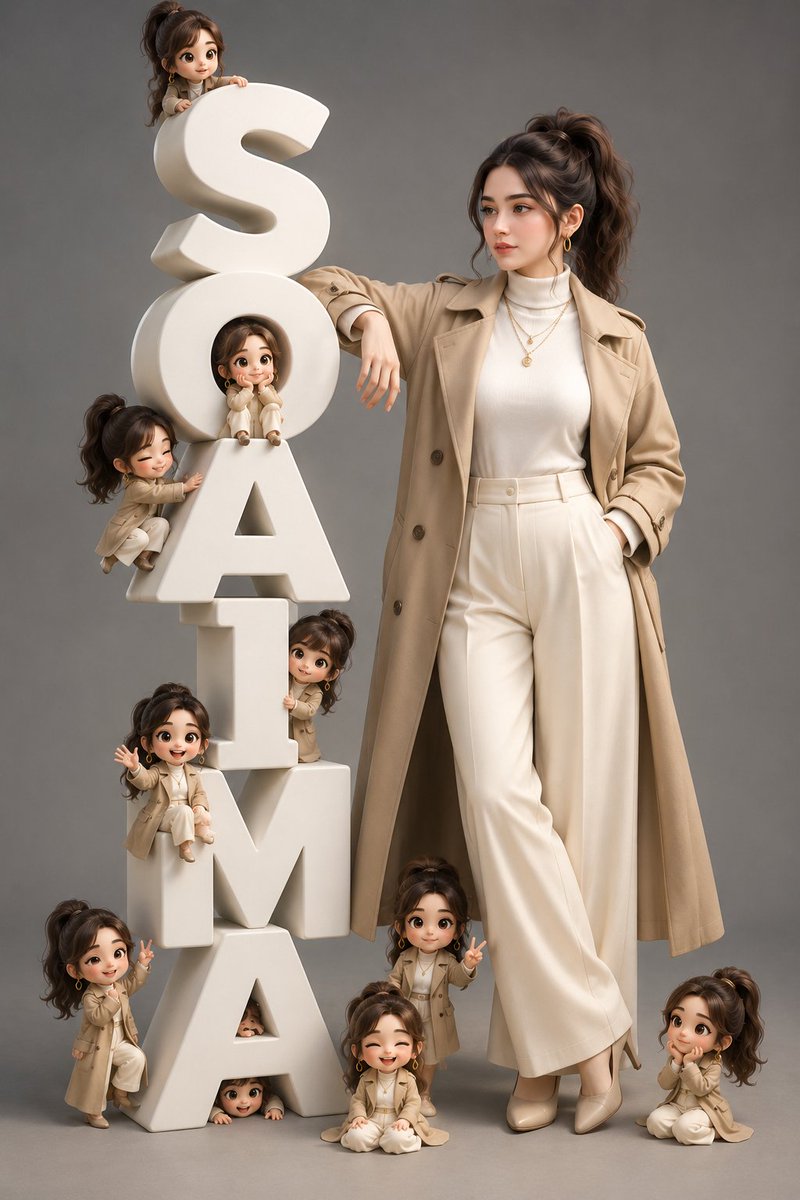
Using the uploaded girl's face as identity reference, create a premium 3D character poster. On the left, matte-white 3D block letters spell 'SOAIMA', with the girl leaning against them and 10-12 chibi mini versions around. Soft studio lighting, grey background, Pixar-quality rendering, 8K resolution.
Prompt
Use the uploaded girl's face as the identity reference. Create a premium 3D character poster inspired by the reference composition. On the left, build a tall stack of large matte-white 3D block letters spelling exactly: S O A I M A Every letter must be correctly spelled and fully visible. The girl stands on the right, leaning naturally against the letters with one hand resting on them and one hand in her pocket. Keep her facial features recognizable, but give her a completely new appearance with a stylish messy high ponytail, soft face-framing strands, elegant makeup, gold hoop earrings, layered necklace, and a modern beige trench coat over a white turtleneck with wide-leg cream trousers and heels. Add 10–12 adorable chibi mini versions of the same girl sitting, climbing, waving, peeking through the letters, making peace signs, laughing, and relaxing around the typography. Soft studio lighting, clean grey background, cinematic shadows, premium Pixar-quality 3D rendering, ultra-detailed textures, realistic proportions, elegant fashion editorial vibe, high-end CGI, sharp focus, 8K resolution. No watermark, no extra text, no spelling mistakes, and the name must read exactly "Soaima"
Kynvio Prompt Workflow
How to use this prompt
Open it in Image Studio
Send the prompt to Kynvio AI without starting a generation.
Adapt the details
Replace the subject, setting, colors, text, or composition for your goal.
Review and generate
Choose your final settings, then click Generate when you are ready.
Related GPT Image 2 prompts
GPT Image 2 prompts
About this prompt
Will opening this prompt spend credits?
No. The button only prefills Image Studio. Credits are used only after you start a generation.
Can I edit the prompt first?
Yes. The transferred text is fully editable before you generate an image.