
Sunshine & Soulmates
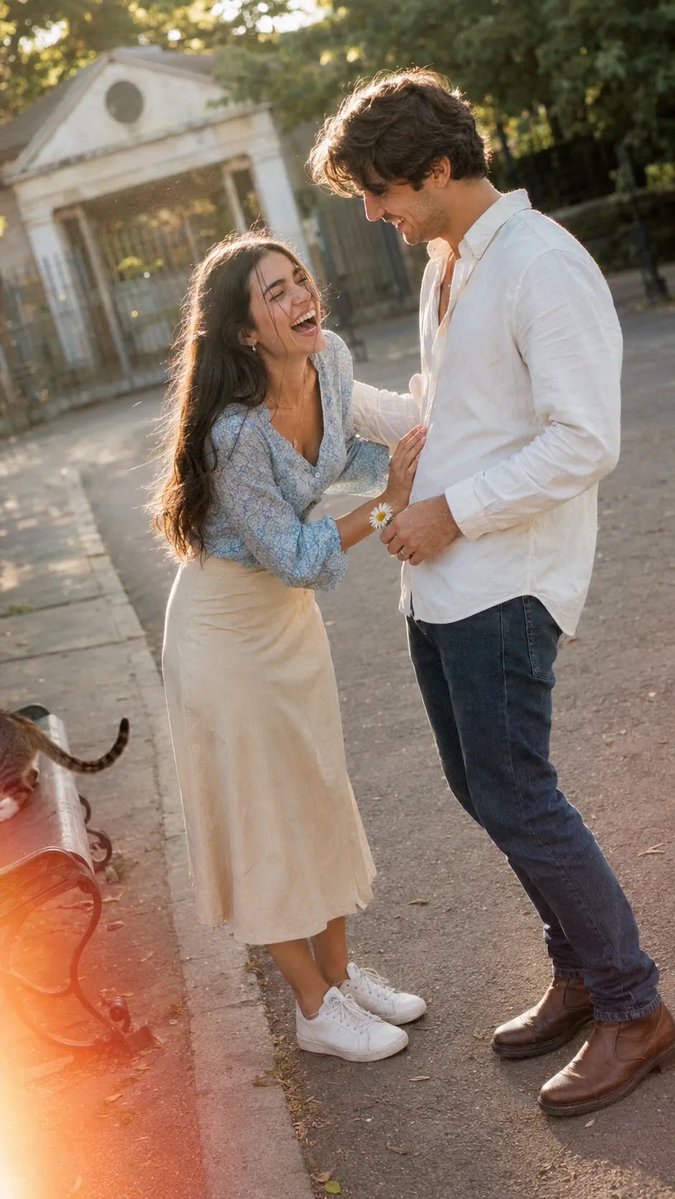
A spontaneous snapshot taken on a paved path in the late afternoon, capturing a young couple mid-laugh. She leans forward with laughter, hand on his chest; he looks down with a warm smile, holding a daisy. The photo features slight overexposure, motion blur, soft grain, and a light leak. Dutch angle, 9:16 aspect ratio.
Prompt
A spontaneous snapshot taken on a paved path in the late afternoon, looks like someone caught them mid-laugh as they stopped walking. A young couple stands facing each other, she leaning forward with laughter, her hand resting on his chest, her eyes squeezed shut, mouth wide open, a strand of hair falling across her face. He looks down at her with a warm affectionate smile, one hand resting on her shoulder, the other holding a small daisy he picked. He wears a white button-up shirt unbuttoned at the collar, dark blue denim jeans, brown leather boots with a scuff on the toe, and a simple silver ring on his finger. She wears a light blue long-sleeved blouse with a small floral print, high-waisted beige midi skirt, white sneakers with a small dirt mark, a thin gold chain necklace slightly twisted, and small gold hoop earrings. Her long dark hair is loose and flowing, tucked behind one ear, a few strands sticking to her lip gloss. The background is blurred with trees and a gatehouse. The photo is slightly overexposed on her hair and his shoulder, a bit of motion blur on her leaning motion and his hand shifting, soft grain, warm faded colors, a small light leak creeping from the bottom left corner. A stray cat is mostly out of frame, only its tail naturally appearing near a park bench leg. Dutch angle from the left, 9:16
Kynvio Prompt Workflow
How to use this prompt
Open it in Image Studio
Send the prompt to Kynvio AI without starting a generation.
Adapt the details
Replace the subject, setting, colors, text, or composition for your goal.
Review and generate
Choose your final settings, then click Generate when you are ready.
Related GPT Image 2 prompts
GPT Image 2 prompts
About this prompt
Will opening this prompt spend credits?
No. The button only prefills Image Studio. Credits are used only after you start a generation.
Can I edit the prompt first?
Yes. The transferred text is fully editable before you generate an image.