
Street Art Style Portrait of a Woman in Red Hat with Red Splash
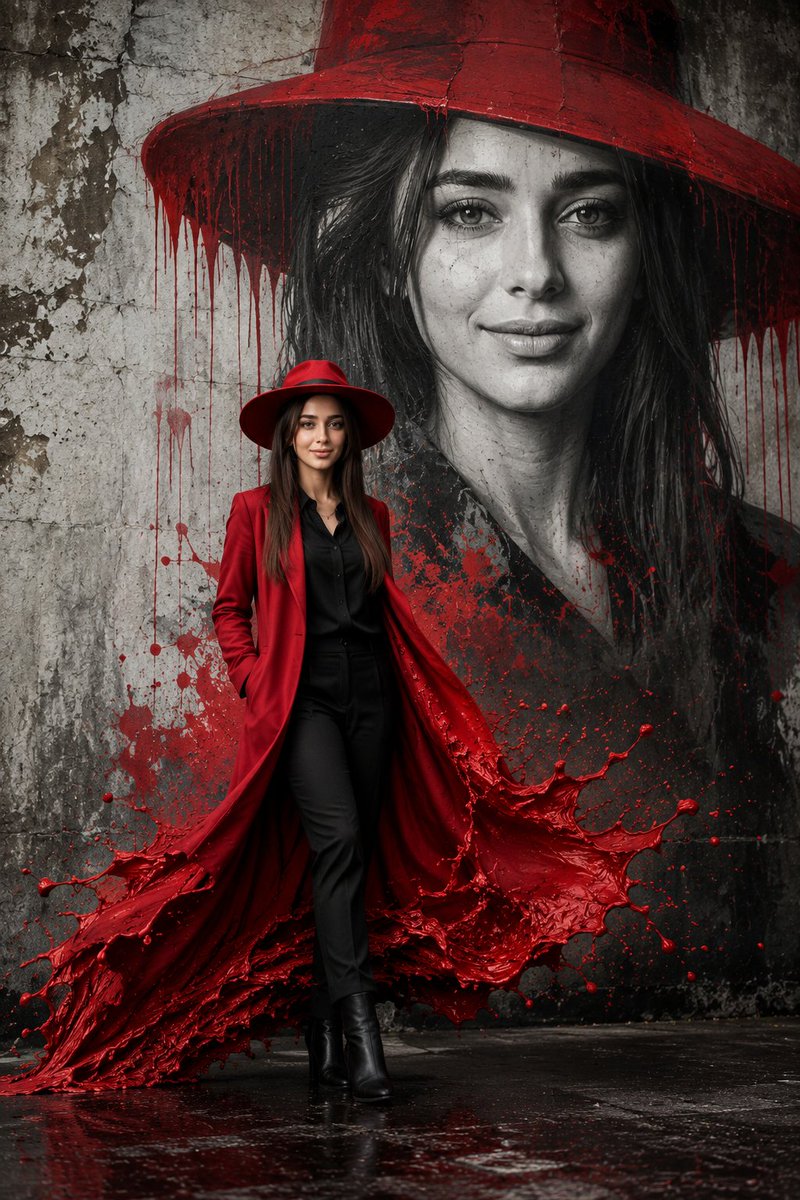
A surreal cinematic image inspired by street art, featuring a grayscale portrait of a woman on a weathered concrete wall, with a foreground woman in a red coat whose hem transforms into a red paint splash merging with the mural.
Prompt
The composition, inspired by street art and imbued with a cinematic and surreal aesthetic, is set against a weathered concrete wall. The wall features a huge grayscale portrait of a mysterious woman with strong feminine features, a defined jawline, well-groomed hair, and a confident expression, wearing a stunning wide-brimmed red hat. The red pigment appears to be melting, dripping from the brim of the hat and the contours of the portrait to create a dynamic and fluid visual effect. In the foreground is an elegant woman wearing a deep red tailored long coat over a black shirt and fitted black pants, complemented by polished black boots and a matching wide-brimmed red hat. The bottom of her coat transforms into a dramatic splash of vibrant red paint, extending outward with a powerful impulse, as if merging seamlessly with the mural behind it. The paint forms fluid and natural shapes with droplets frozen in mid-air, blending reality and artistic expression into a cohesive visual. The ground, with its dark tones, rough texture, and slight moisture, further enhances the unique atmosphere. The background wall is marked by cracks, stains, and peeling plaster, adding depth and realism to the scene. The soft, cinematic lighting and high contrast emphasize the vivid red splash against the grayscale environment. Rich in detail and texture, the image employs a shallow depth of field and dynamic composition to offer an 8K masterpiece quality visual experience that fuses surrealism with artistic photography. Ensure the subject's face is 100% consistent with the uploaded image.
Kynvio Prompt Workflow
How to use this prompt
Open it in Image Studio
Send the prompt to Kynvio AI without starting a generation.
Adapt the details
Replace the subject, setting, colors, text, or composition for your goal.
Review and generate
Choose your final settings, then click Generate when you are ready.
Related GPT Image 2 prompts
GPT Image 2 prompts
About this prompt
Will opening this prompt spend credits?
No. The button only prefills Image Studio. Credits are used only after you start a generation.
Can I edit the prompt first?
Yes. The transferred text is fully editable before you generate an image.