
Steampunk Angel Automaton
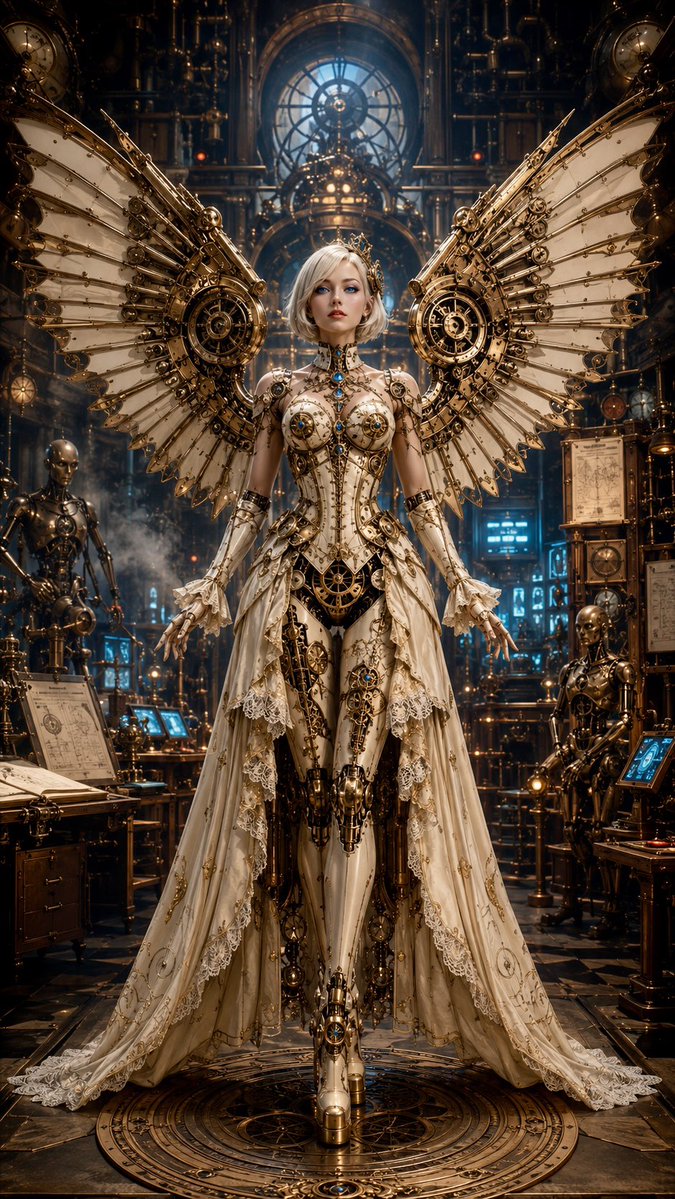
An elegant female steampunk automaton with porcelain skin, piercing blue eyes, and a short platinum bob, wearing an ivory corset dress built from engraved brass, copper gears, pistons, rivets, clockwork mechanisms, lace, and jewel accents. Massive symmetrical mechanical wings with turbine hubs, brass ribs, and layered ivory panels spread behind her like an angelic machine. Set inside a Victorian inventor's workshop filled with steam pipes, analog gauges, blueprints, glowing control panels, and unfinished automatons. Warm amber gaslight contrasts with cool cyan monitor glow and subtle crimson indicator lights. Intricate engineering, retro-futurist Victorian design, ultra-detailed mechanical textures, centered symmetrical composition, full-body fashion portrait, dramatic cinematic lighting, atmospheric steam, elegant, regal, highly refined steampunk aesthetic.
Prompt
An elegant female steampunk automaton with porcelain skin, piercing blue eyes, and a short platinum bob, wearing an ivory corset dress built from engraved brass, copper gears, pistons, rivets, clockwork mechanisms, lace, and jewel accents. Massive symmetrical mechanical wings with turbine hubs, brass ribs, and layered ivory panels spread behind her like an angelic machine. Set inside a Victorian inventor's workshop filled with steam pipes, analog gauges, blueprints, glowing control panels, and unfinished automatons. Warm amber gaslight contrasts with cool cyan monitor glow and subtle crimson indicator lights. Intricate engineering, retro-futurist Victorian design, ultra-detailed mechanical textures, centered symmetrical composition, full-body fashion portrait, dramatic cinematic lighting, atmospheric steam, elegant, regal, highly refined steampunk aesthetic.
Kynvio Prompt Workflow
How to use this prompt
Open it in Image Studio
Send the prompt to Kynvio AI without starting a generation.
Adapt the details
Replace the subject, setting, colors, text, or composition for your goal.
Review and generate
Choose your final settings, then click Generate when you are ready.
Related GPT Image 2 prompts
GPT Image 2 prompts
![Vintage Propaganda Illustration: Hand Gripping [SUBJECT]](https://prompt-media.kynvio.ai/public/prompts/019f82fd-7154-75d8-9665-fa450bafb9dc/019f82fd-746e-70bf-bf91-24f4be3b06de/original.jpg)
About this prompt
Will opening this prompt spend credits?
No. The button only prefills Image Studio. Credits are used only after you start a generation.
Can I edit the prompt first?
Yes. The transferred text is fully editable before you generate an image.