
Shy High School Girl Idol-Style Anime Illustration
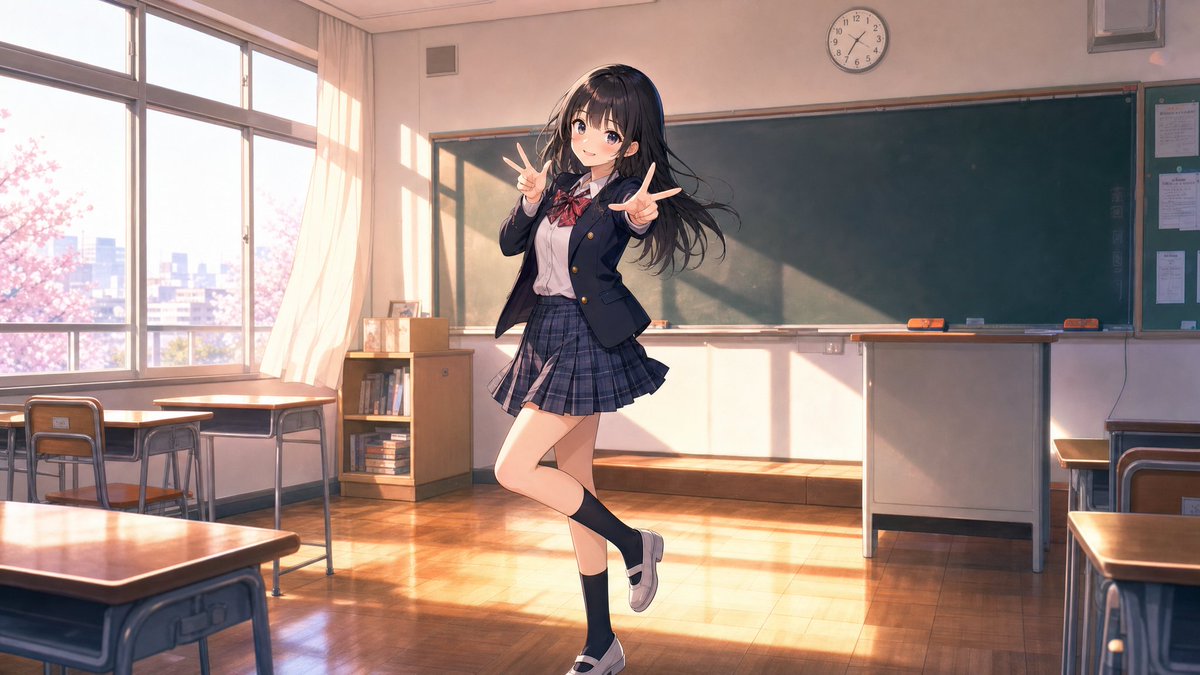
High-quality Japanese anime illustration of a shy but cute 17-18 year old high school girl dancing in a classroom after school in uniform, dynamic pose, cinematic lighting, social media-friendly.
Prompt
High-quality Japanese anime illustration. A slightly shy high school girl idol-style girl who looks around 17-18 years old. Rather than a professional idol, she is a very ordinary, approachable, and cute high school girl who might become popular on TikTok. Semi-long black hair, natural bangs, large clear eyes. Slightly blushing cheeks, a moment of dancing shyly but happily. Soft smile looking at the camera. The uniform is a clean Japanese high school uniform (blazer, ribbon, pleated skirt). Not flashy decorations or stage costumes, but everyday uniform. The dance is a cute choreography popular on TikTok, with hand gestures, light steps, natural dynamism. Background is a Japanese classroom after school. No one else in the classroom except this girl. Full-body composition. Dynamic pose. Anime movie-level drawing quality. Delicate line art, vibrant colors, natural lighting, soft shading, beautiful hair depiction, high-density details. Shallow depth of field, cinematic atmosphere. Social media-friendly composition. Emphasizing cuteness, youthfulness, transparency. masterpiece, best quality, ultra detailed, highly detailed anime illustration, vibrant colors, cinematic lighting, dynamic pose. Natural and clear depiction, smooth lines and coloring, soft shading, not rough or grainy depiction. Negative prompt: low quality, worst quality, blurry, low resolution, bad anatomy, bad hands, extra fingers, missing fingers, deformed body, duplicated limbs, multiple people, crowd, teacher, classmates, stage, concert, microphone, idol costume, heavy makeup, mature appearance, childlike proportions, chibi, nsfw, text, logo, watermark, frame, cropped, out of frame, oversaturated, noisy background
Kynvio Prompt Workflow
How to use this prompt
Open it in Image Studio
Send the prompt to Kynvio AI without starting a generation.
Adapt the details
Replace the subject, setting, colors, text, or composition for your goal.
Review and generate
Choose your final settings, then click Generate when you are ready.
Related GPT Image 2 prompts
GPT Image 2 prompts
About this prompt
Will opening this prompt spend credits?
No. The button only prefills Image Studio. Credits are used only after you start a generation.
Can I edit the prompt first?
Yes. The transferred text is fully editable before you generate an image.