
Red Carpet Star: GPT-Image2 Image Generation Prompt
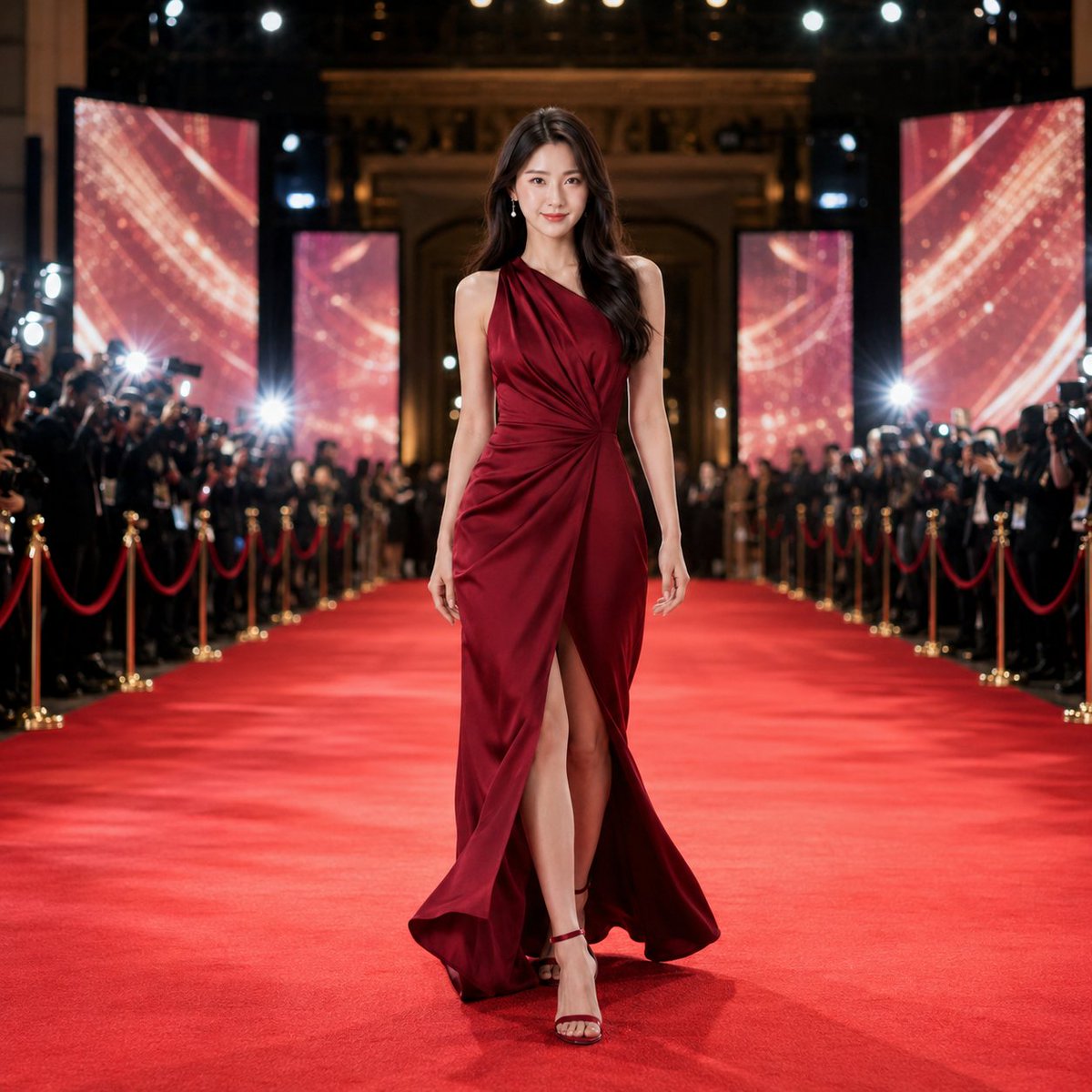
This is a GPT-Image2 prompt for generating a full-body image of a red carpet star. Users need to provide a full-body reference photo and select style (live-action/anime), dress color, and aspect ratio. The prompt details how to transform the reference person into a star standing on the red carpet at an international film premiere, wearing a high-end gown, including pose, composition, background, giant screen, etc., and prohibits various undesirable effects.
Prompt
GPT-Image2 Prompt Sharing Red Carpet You're a Movie Star! As usual, an instruction sheet created as material for shared videos. ※How to use · Supports live-action/anime (full-body images) · Input items, choose as you like · Attach an image and submit the instruction sheet ※Image Generation Instruction Sheet (Recommended for GPT-Image2) 👇️👇️👇️ 【Input Items】 Style: Live-action / Anime Dress Color: Black / Champagne Gold / Deep Navy / Emerald Green / Silver Gray / Bordeaux / Leave to AI Aspect Ratio: 1:1 / 9:16 【Reference】 One full-body reference image of a single person attached simultaneously with this instruction sheet. Use an image where the entire body from head to toe is visible. An image as close to front-facing as possible is recommended, but images with slight angles, crossed legs, one-foot weight, or body twists are also acceptable. 【Main Text】 Create a final shared image with the aspect ratio specified in the input items, featuring the person from the attached full-body reference image as the sole protagonist. The purpose is to first create the completed state of a "star woman walking the red carpet" to be later expanded into a 10-second or 15-second video. Maintain the reference person's facial features, hairstyle, hair color, age impression, atmosphere, body shape, head-to-body ratio, and full-body silhouette. Prioritize the style specified in the input items. Do not replace with another person's body shape or create an appearance where only the face is composited onto a different body. Do not inherit the background, floor, shadows, lighting, original pose, or original clothing from the reference image. While preserving the identity and full-body balance of the reference person, restructure the image as if they have changed into a high-end dress and appeared at a red carpet venue reminiscent of an international film premiere. Completely change the outfit to a luxurious long red carpet dress based on the color specified in the input items. Do not inherit the color, neckline, sleeves, length, seams, slits, ribbons, drapes, decorations, or material feel of the reference outfit; design it as a new fashion dress. The dress should be elegant and luxurious, beautifully complementing the reference person's body shape and full-body silhouette. Avoid excessive exposure, unnatural constriction, excessive fabric, or overly long trains. A modest slit or hem opening that makes walking leg movements look natural is acceptable. Shoes should be slender, elegant strap heels or pumps that harmonize with the dress. Avoid platform shoes or extreme thick soles. Depict the person at the decisive moment of naturally slowing down while walking the red carpet, just before stopping. Do not make it a completely still commemorative photo pose. The face and upper body should be front-facing or slightly angled, with one leg naturally stepping forward. Do not cross both legs strongly; keep shoulders, arms, and hands relaxed and natural. Leave a slight sense of flow and movement in the hair, dress, and hem to convey that they were just walking. While the still image should exude star quality and glamour, the pose should allow natural reverse calculation of the walking motion toward this moment in the subsequent video. Place the protagonist full-body near the center of the red carpet. Align the person, red carpet, and venue depth naturally, ensuring the entire figure from head to toe and dress hem is fully within the frame. The camera should not be too close; use a sufficiently wide full-body fashion photography composition. Ensure ample space around and behind the person to convey the length of the red carpet, audience, and venue depth. Avoid exaggeration of head, limbs, or front foot due to wide-angle; maintain natural full-body proportions. For 9:16, utilize the vertical orientation to beautifully display the person's full body and the depth of the red carpet. For 1:1, do not enlarge or compress the person; maintain the full-body appearance based on 9:16, expanding the left and right red carpet, audience, lighting, and venue background to form a square. The setting should be a fictional international film premiere venue with dignity and glamour. Place press cameras, flashes, audience, barriers, and high-quality venue decorations on both sides. Avoid overcrowding the background; ensure the protagonist's face, full body, and dress outline are clearly visible. Place a giant screen at the back of the venue or symmetrically on both sides flanking the person. Design the giant screen so that its light intensifies with the woman's walk and arrival in the subsequent video, reaching its most brilliant state at the moment of the final image. The giant screen should display only abstract light, particles, rays, luminous patterns, and cinematic colors. Do not display people, faces, full-body images, silhouettes, movie titles, event names, text, logos, or brand names. For live-action style, create a fusion of high-quality live-action fashion advertising and film stills. Naturally maintain the reference person's facial features, hairstyle, body shape, head-to-body ratio, and full-body silhouette; depict detailed skin, hair, dress texture, high-quality film lighting, and realistic venue space. If the reference image is anime or illustration, convert it to natural live-action while preserving the person's characteristics. For anime style, use high-quality theatrical anime style. Maintain the reference person's facial features, hairstyle, body shape, head-to-body ratio, and full-body silhouette; unify the person, dress, audience, giant screen, and venue background in anime style. If the reference image is anime or illustration, preserve the original lines, coloring, shading, texture, and art style as much as possible. If the reference image is live-action, convert it to refined theatrical anime while preserving the person's characteristics. Overall, create a single image that is glamorous and highly finished, instantly conveying a "star-level woman appearing at a global film event." The image should stand alone as a shareable picture, and in subsequent video production, allow natural reverse calculation of the woman's walk and venue staging leading to this completed state. 【Prohibitions】 Character sheet style, panel division, multiple scenes, turning the reference person into someone else, changing body shape or head-to-body ratio, inheriting the shape of the reference outfit, appearance of face composited onto a different body, reusing the reference image background, composition that cuts off the full body, excessive close-up of the person, pose with both legs strongly crossed, platform shoes or extreme thick soles, overly long train, displaying people on the giant screen, text, logos, brand names, sponsor names, watermarks.
Kynvio Prompt Workflow
How to use this prompt
Open it in Image Studio
Send the prompt to Kynvio AI without starting a generation.
Adapt the details
Replace the subject, setting, colors, text, or composition for your goal.
Review and generate
Choose your final settings, then click Generate when you are ready.
Related GPT Image 2 prompts
GPT Image 2 prompts
About this prompt
Will opening this prompt spend credits?
No. The button only prefills Image Studio. Credits are used only after you start a generation.
Can I edit the prompt first?
Yes. The transferred text is fully editable before you generate an image.