
Rainy Night Street Selfie in Front of a Convenience Store
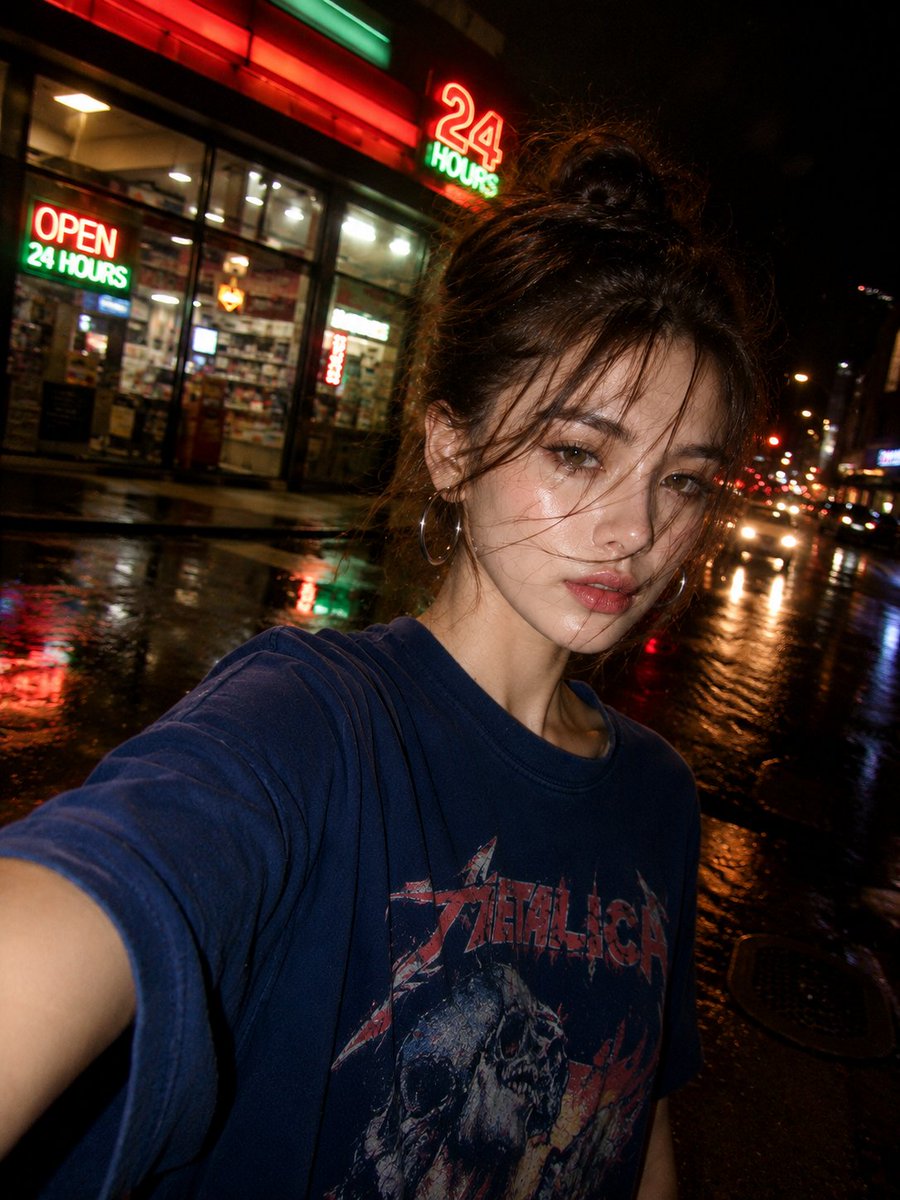
An ultra-realistic nighttime street selfie of a beautiful young East Asian woman standing on a rain-soaked urban sidewalk outside a brightly lit 24-hour convenience store. The selfie is captured at arm's length with a smartphone from a slightly low, close-up angle, creating a spontaneous, candid social media aesthetic. She has flawless porcelain skin, almond-shaped dark brown eyes, naturally full lips, and delicate facial features. Her long dark hair is loosely tied into a messy updo with wispy bangs, and she wears large silver hoop earrings. She has a relaxed expression with slightly parted lips, looking directly into the camera. She is dressed in an oversized vintage navy-blue graphic band T-shirt with a distressed faded print. The background features a neon-lit convenience store with glowing red and green "OPEN 24 HOURS" signage, illuminating the wet sidewalk and casting colorful reflections.
Prompt
Create an ultra-realistic nighttime street selfie of a beautiful young East Asian woman standing on a rain-soaked urban sidewalk outside a brightly lit 24-hour convenience store. The selfie is captured at arm's length with a smartphone from a slightly low, close-up angle, creating a spontaneous, candid social media aesthetic. She has flawless porcelain skin with a soft dewy glow, almond-shaped dark brown eyes with subtle eyeliner, naturally full lips, and delicate facial features. Her long dark hair is loosely tied into a messy updo with wispy bangs and windblown strands falling naturally across her face, adding movement and a cinematic mood. She wears large silver hoop earrings and a relaxed expression with slightly parted lips, looking directly into the camera. She is dressed in an oversized vintage navy-blue graphic band T-shirt with a distressed faded print, giving an effortless streetwear vibe. The background features a neon-lit convenience store with glowing red and green "OPEN 24 HOURS" signage, illuminating the wet sidewalk and casting colorful reflections.
Kynvio Prompt Workflow
How to use this prompt
Open it in Image Studio
Send the prompt to Kynvio AI without starting a generation.
Adapt the details
Replace the subject, setting, colors, text, or composition for your goal.
Review and generate
Choose your final settings, then click Generate when you are ready.
Related GPT Image 2 prompts
GPT Image 2 prompts

About this prompt
Will opening this prompt spend credits?
No. The button only prefills Image Studio. Credits are used only after you start a generation.
Can I edit the prompt first?
Yes. The transferred text is fully editable before you generate an image.