
Profile Portrait with Sea Blue on Shoulders
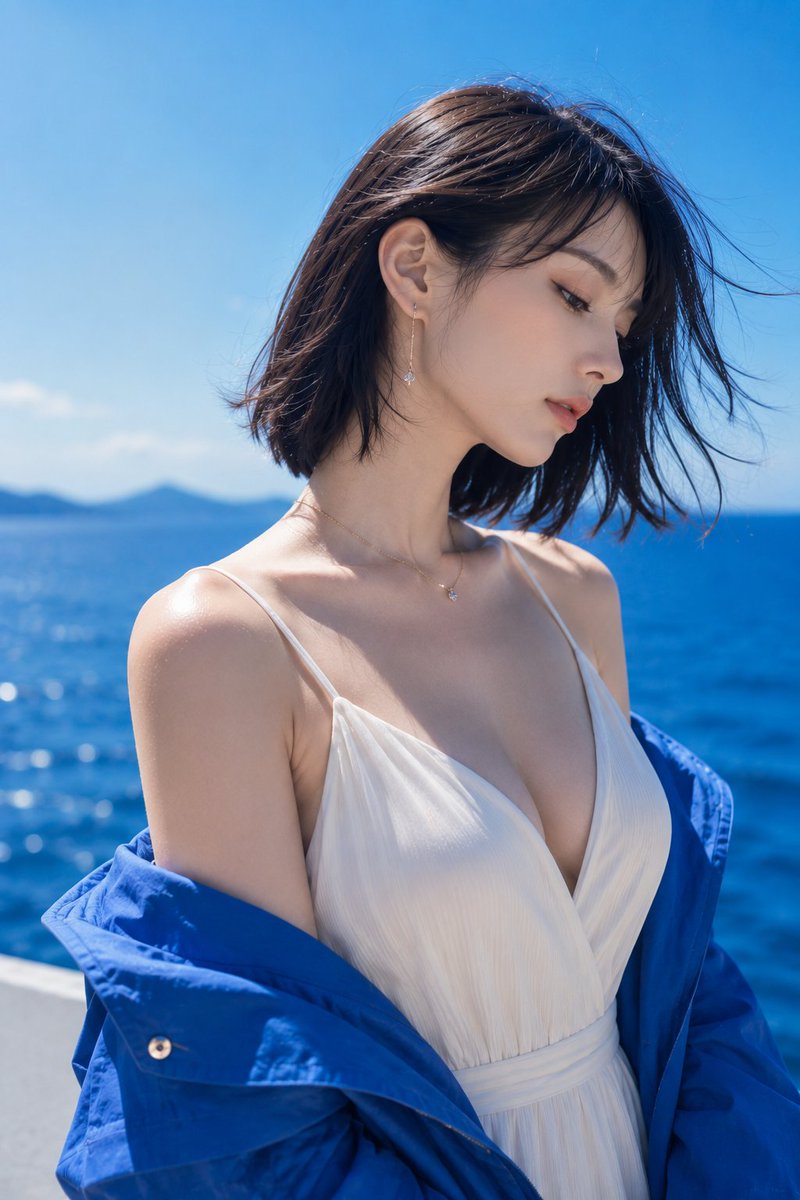
A profile portrait on a sunny beach, where a bright blue outer garment is draped off the shoulders, creating an impressive contrast between the white V-neck dress and the blue sea. A calm, mature Japanese woman lets her hair flow in the sea breeze, her quiet gaze directed into the distance. Natural light around noon casts highlights on skin and hair, finished in a clean color palette of blue and white, evoking a high-quality summer fashion photograph.
Prompt
Leaving the blue of the sea on my shoulders, only my gaze quietly goes far away. 🌊💙✨ #AIart #AI写真 #SeasidePortrait [GPT Image2 Prompt] Theme: Profile wrapped in blue Subject: One adult woman standing on a sunny beach. The person is placed slightly left of center, a vertical 2:3 fashion portrait capturing from chest to top of head. She wears a bright blue outer garment draped low off both shoulders, creating an impressive contrast between the white V-neck dress and the blue sea. Person & Expression: A natural Japanese woman with a calm, mature atmosphere. Dark brown blunt bob cut close to black, showing a clean neckline. The sea breeze lightly blows her bangs and hair ends to the right. Head slightly tilted forward, face turned to the right in a three-quarter profile. Gaze cast diagonally downward, lips slightly parted, a quiet and composed expression. Translucent light beige skin, coral lip color, delicate eyeliner and natural lashes. Clothing & Pose: Ivory white V-neck dress with thin shoulder straps. The neckline is deep but elegant, with soft vertical ribbing on lightweight fabric that naturally follows the curves of a mature body. A bright cobalt blue lightweight jacket is pushed down to above the elbows, exposing the shoulders and collarbone. Shoulders relaxed, upper body slightly twisted to the left. At the ears, delicate drop earrings with small transparent stones dangling from thin gold chains. A thin necklace with a small single stone. Background & Light: Background is a deep blue sea extending to the horizon and clear sky. A small blurred island silhouette in the upper left, a white seaside railing at the bottom. Strong natural light around noon comes from the upper left, creating bright highlights on the hair surface, left shoulder, collarbone, and cheek. Soft blue reflected light on the right side of the face, natural thin shadows under the nose and chin. Fine light reflections sparkle on the sea surface, clearly separating the blue of sky and sea. Composition & Camera: Vertical 2:3, medium close-up bust shot. The person occupies about 75% of the frame, with a small amount of sky above the head and sea space on the right. Camera at slightly above chest level, nearly eye-level. Equivalent to 85mm medium telephoto, shallow depth of field with precise focus on the eyes and profile, smoothly blurring the sea and island in the background. Texture & Style: High-quality summer fashion photography. Natural skin with slight texture and fine hairs, no excessive skin smoothing. Precise depiction of fine weave of white fabric, light wrinkles of the blue jacket, small reflections of metal accessories. High saturation but clean color tone with blue and white as main colors, fresh contrast, delicate film grain. Negative: Underage-looking person, unnatural chest or body shape, excessive exposure, unnatural face, unnatural gaze, extra fingers, missing fingers, fused limbs, broken joints, clothing digging in, disappearing shoulder straps, asymmetrical accessories, unnatural gravity, shadows inconsistent with light source, text, logos, watermarks, excessive skin smoothing, plastic-like skin.
Kynvio Prompt Workflow
How to use this prompt
Open it in Image Studio
Send the prompt to Kynvio AI without starting a generation.
Adapt the details
Replace the subject, setting, colors, text, or composition for your goal.
Review and generate
Choose your final settings, then click Generate when you are ready.
Related GPT Image 2 prompts
GPT Image 2 prompts
About this prompt
Will opening this prompt spend credits?
No. The button only prefills Image Studio. Credits are used only after you start a generation.
Can I edit the prompt first?
Yes. The transferred text is fully editable before you generate an image.