
Poolside Selfie Over Water Surface
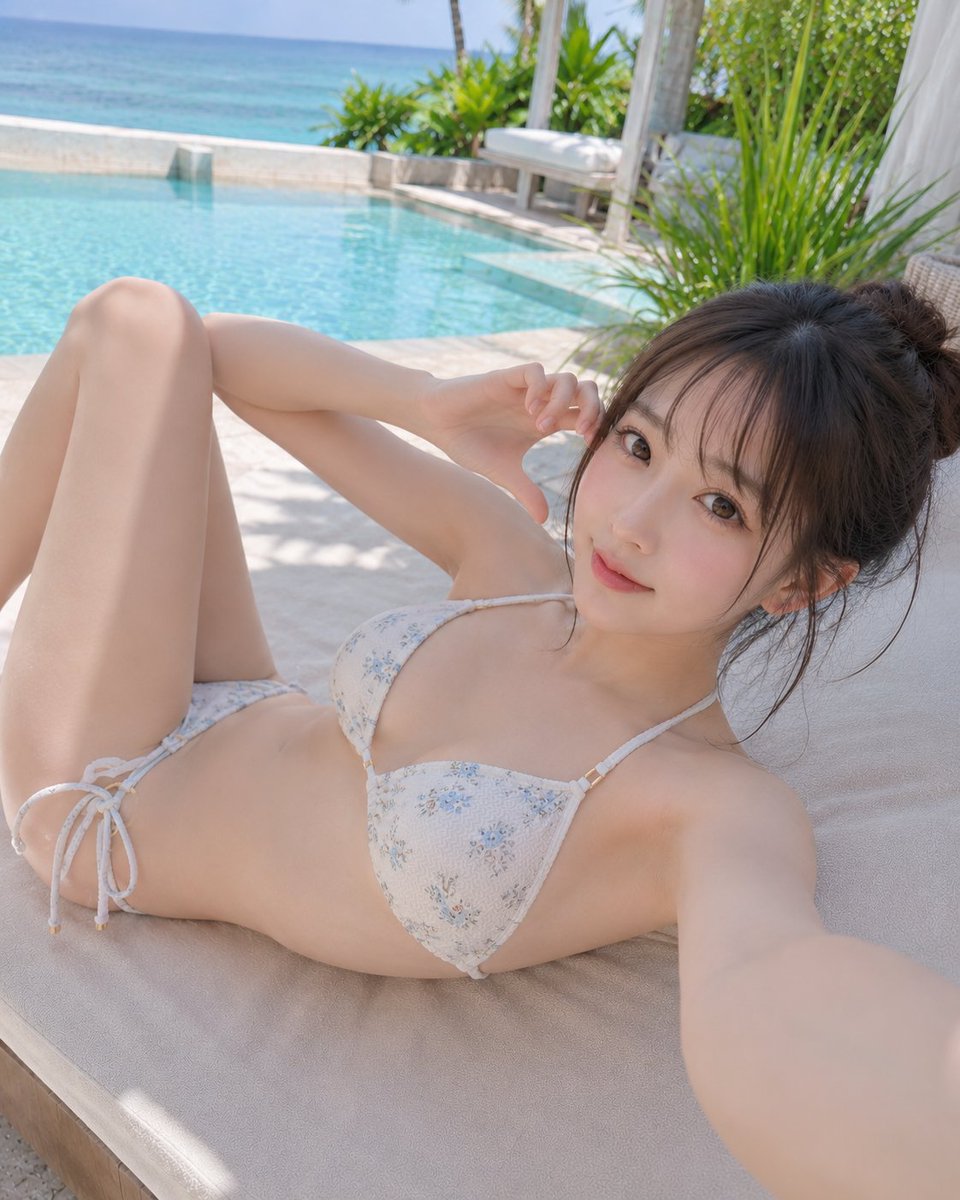
A quiet resort moment where the blue water makes skin look soft. A selfie taken while lying by the pool.
Prompt
A day when the blue of the water makes even the bare skin look soft. 📷🏖️☀️ A quiet resort moment captured while lying down. #AIart #AI写真 #プールサイド [GPT Image2 Prompt] Subject: Selfie over the water surface Main subject: Vertical composition poolside selfie photo. In a bright outdoor resort, a woman in her 20s lies on a white lounger, extending one arm forward to take a selfie. The person is placed on the right side of the frame, with the upper body to thighs prominently visible, and on the left, bent legs and the blue pool expanse. The sea, pool, plants, and lounger naturally connect in one frame. Person & Expression: Bright ivory-beige white skin with a slight pinkish complexion, smooth skin. Soft highlights on cheeks, nose tip, shoulders, and collarbone, not excessive skin retouching but natural skin texture. Soft and elegant facial features, precise doll-like Japanese makeup. Light rose pink blush, champagne beige and pink brown eyeshadow, thin long eyelashes, natural tear troughs, light brown fluffy eyebrows, sheer pink beige gloss lips. Small clear catchlights in the eyes. Expression is calm and gentle smile, lips lightly closed, gaze straight at the camera. Clothing & Pose: White-based delicate floral print triangle bikini. Thin straps and side ribbon ties, subtle gold hardware, clean and elegant impression. Right arm extended long toward the front holding a smartphone in selfie pose. Left hand placed near the temple, fingers slightly bent. Body reclined diagonally along the lounger, left leg bent large and upright, right leg naturally extended back. Shoulders and collarbone relaxed for a laid-back feel. Background & Light: Quiet outdoor space reminiscent of a luxury resort. In the left background, a transparent turquoise blue pool, beyond it a low stone wall and calm sea. In the right background, tall green foliage plants, white fabric, and a light wooden frame daybed. Floor is light stone tiles. Main light is sunny natural light softly entering from the upper left. Light hits forehead, cheeks, nose bridge, décolletage, upper thighs. Plant shadows faintly fall on the lounger and arms, pool reflections soften the atmosphere. Composition & Camera: Natural selfie perspective like taken with a smartphone front camera. Vertical 4:5-ish composition. Camera position slightly high, angle gently descending from face to body. Extended arm creates perspective, face draws the strongest attention. Face of the person near upper right, chest center, bent legs large on the left. Background slightly blurred but pool and sea boundary visible. Clean, airy feel with conscious negative space. Texture & Style: Realistic high-quality AI photo. Soft resolution, natural skin texture, delicate hair flow carefully depicted. Hair is light milk tea ash brown, thin see-through bangs, layers around the face, medium-long to below shoulders. Ends loosely curled inward, fluffy airy feel and natural strands. Each hair strand, fine highlights, soft shine, a few stray hairs carefully expressed. Overall bright and transparent color tone, cool summer resort photo based on white, light blue, and pale green. Negative: Unnatural face, unnatural gaze, extra fingers, missing fingers, fused limbs, broken joints, poor contact with objects, floating, unnatural gravity, incorrect perspective, shadows inconsistent with light source, garbled text, logos, watermarks, excessive skin retouching, plastic-like skin
Kynvio Prompt Workflow
How to use this prompt
Open it in Image Studio
Send the prompt to Kynvio AI without starting a generation.
Adapt the details
Replace the subject, setting, colors, text, or composition for your goal.
Review and generate
Choose your final settings, then click Generate when you are ready.
Related GPT Image 2 prompts
GPT Image 2 prompts
About this prompt
Will opening this prompt spend credits?
No. The button only prefills Image Studio. Credits are used only after you start a generation.
Can I edit the prompt first?
Yes. The transferred text is fully editable before you generate an image.