
Phone Photography Realism: A Natural Moment in a Dessert Shop
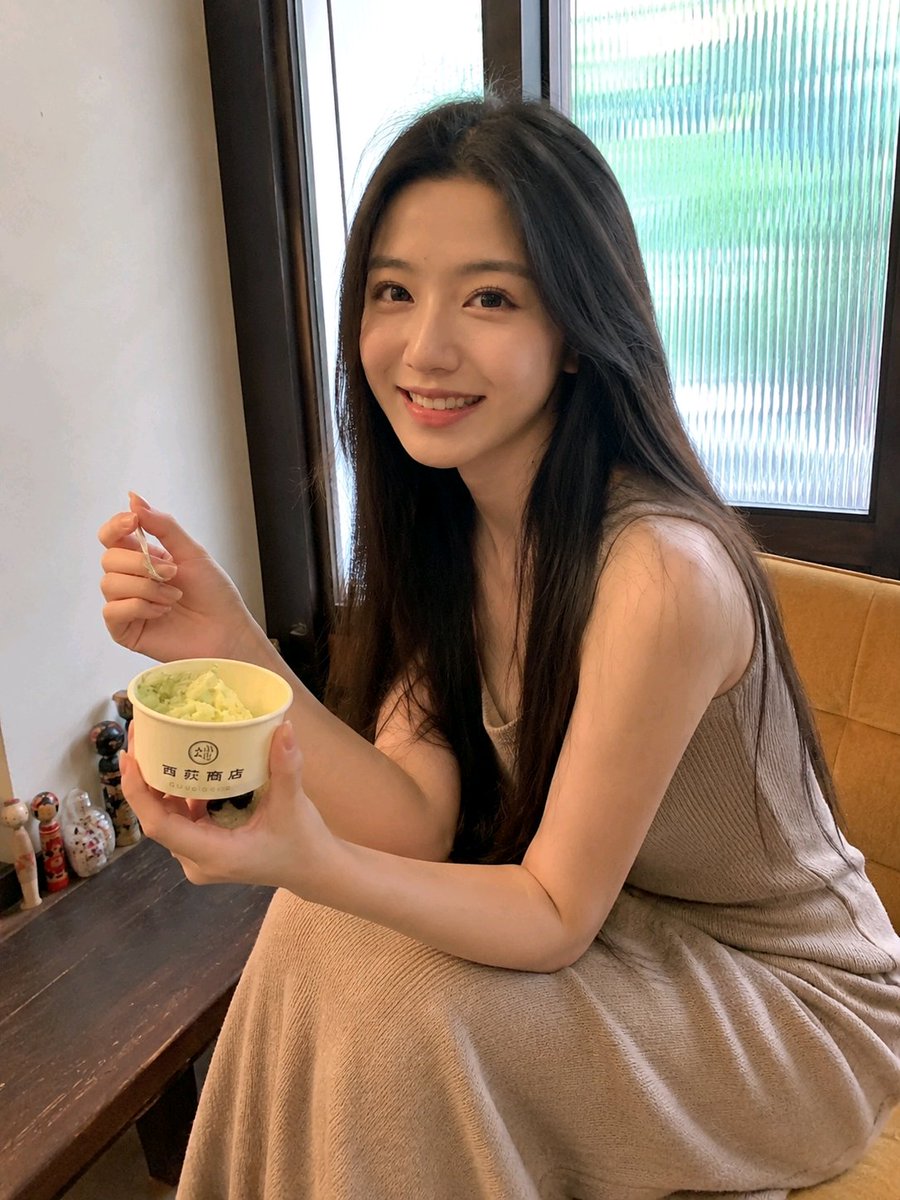
This is a detailed prompt for generating an image in a real-life phone photography candid style: a young Asian woman sitting by the window in a dessert shop, naturally turned sideways, holding ice cream, with a natural, happy, slightly shy expression. Emphasizes real skin texture, natural lighting, and a lifelike atmosphere, avoiding excessive retouching and AI feel. Aspect ratio 3:4 vertical.
Prompt
Vertical phone photography, real-life candid style. A young Asian woman sits by the window in a quiet, cozy dessert shop. Her body is naturally turned sideways and slightly leaning forward, elbow resting lightly on the table. She faces the camera with a natural, happy, and slightly shy smile, eyes bright and expressive, as if a friend suddenly called her to look at the camera and snapped a candid shot. She has naturally falling black straight hair with a center part, slightly fluffy with a few stray strands. She wears a light gray-beige sleeveless knit dress, soft and fitted but not overly emphasizing her figure. Her left hand holds a paper cup of light green ice cream or dessert, and her right hand holds a small spoon, paused naturally at the moment before taking the next bite. She sits on a light yellow fabric sofa. The background includes a wooden window frame with vertically striped translucent glass, through which soft green plants are faintly visible outside. On the left is an off-white wall, and the table is a dark old wooden table with a few small figurine decorations in the corner. The indoor environment is quiet, clean, and full of life, not a luxurious restaurant feel. Natural window light comes from the right rear of the subject. The face is brightly and softly exposed, with naturally warm skin tone, retaining real skin texture, slight pores, small imperfections, and natural glow. No skin smoothing, no plastic skin. Black hair retains clear strands and layers, with slight backlighting on the face edges. Shot with a regular phone rear camera, approximately 26mm wide-angle perspective, medium close-up composition. The camera is slightly above eye level, with a slight downward angle. The face is positioned in the upper-middle area of the frame. The composition is slightly casual, with arms and skirt naturally entering the frame, showing slight phone wide-angle distortion, but the face should not be noticeably deformed. Overall, it presents a real Xiaohongshu lifestyle photo, a friend's casual snapshot, with a natural atmosphere without professional lighting. Slight warm tone, low contrast, soft highlights, subtle phone noise reduction artifacts, local slight overexposure. The image is clear but not oversharpened. No cinematic feel, no studio feel, no influencer retouching. Real, natural, highly realistic. Negative prompt: Excessive skin smoothing, plastic skin, wax face, AI influencer face, exaggerated big eyes, pointed chin, excessive face slimming, facial distortion, facial asymmetry, fake smile, stiff expression, heavy makeup, exaggerated eyelashes, excessive whitening, oil painting style, anime, illustration, 3D rendering, studio lighting, commercial advertisement, cinematic feel, strong depth of field, heavy background blur, excessive sharpening, HDR, cool tones, high contrast, clumpy hair, deformed fingers, extra fingers, twisted arms, deformed cup, bent spoon, floating objects, garbled text, watermark, platform logo. Aspect ratio: 3:4 vertical. Straight out of a regular phone camera, unedited, slight exposure instability, real skin, real hand structure, lifelike casual snapshot, not a professional model pose.
Kynvio Prompt Workflow
How to use this prompt
Open it in Image Studio
Send the prompt to Kynvio AI without starting a generation.
Adapt the details
Replace the subject, setting, colors, text, or composition for your goal.
Review and generate
Choose your final settings, then click Generate when you are ready.
Related GPT Image 2 prompts
GPT Image 2 prompts
About this prompt
Will opening this prompt spend credits?
No. The button only prefills Image Studio. Credits are used only after you start a generation.
Can I edit the prompt first?
Yes. The transferred text is fully editable before you generate an image.