
One Night in the Apartment - Part 17: The Sky Doesn't Know What Happened
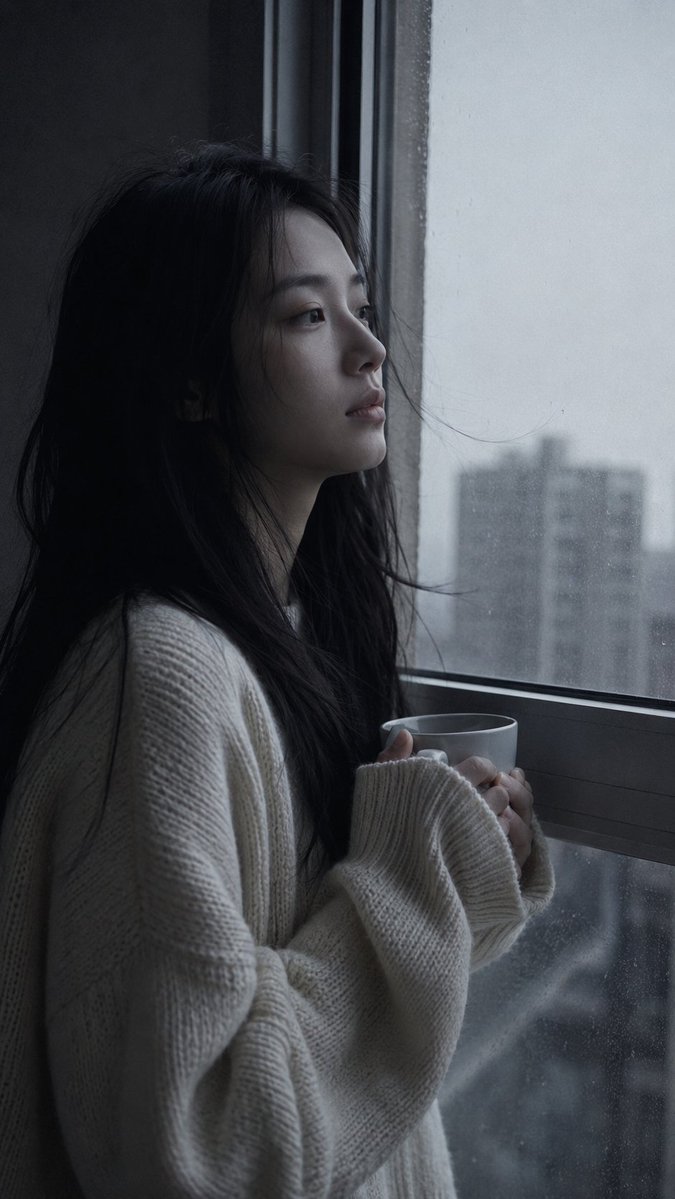
A young woman stands at the apartment window in pre-dawn light, holding a warm cup, gazing at the pale grey sky. Cold grey tones, Morandi palette, film grain, 9:16 vertical.
Prompt
Medium close-up portrait, 85mm f/1.8, a young East Asian woman in her early 20s stands at the apartment window in pre-dawn light, holding a cup of something warm with both hands, not drinking, looking out at the grey sky beginning to pale, authentic daily life photography, natural candid moment. Almond-shaped eyes aimed outward at the sky — not searching, just witnessing. Face with a settled blankness, past the night's weight. Straight black hair loose, unstyled from the night, some pieces resting against the glass. Fair skin under pre-dawn cold grey light, all warmth drained from the palette. Subsurface scattering visible in the flat cool light, skin tone pale and slightly grey-cool. She wears an oversized cream knit sweater over whatever she has on, sleeves loose over hands holding the cup. Window condensation faint on glass. City buildings in grey pre-dawn visible outside, no color, shapes only. One or two stray hairs resting on the glass or drifting free. Pre-dawn cold grey light from window — no warmth, no color, just the light that comes before light. Palette: pale grey-white outside, cool blue-grey interior shadow, cream sweater the only warm element — even it appears desaturated. Morandi pre-dawn palette at its most drained. Subtle ISO 400 film grain in mid-tones and shadow, photographic texture not CG render smoothness. Aspect ratio 9:16. No watermark, no text overlay, not cartoon, not digitally painted, not illustration, not anime.
Kynvio Prompt Workflow
How to use this prompt
Open it in Image Studio
Send the prompt to Kynvio AI without starting a generation.
Adapt the details
Replace the subject, setting, colors, text, or composition for your goal.
Review and generate
Choose your final settings, then click Generate when you are ready.
Related GPT Image 2 prompts
GPT Image 2 prompts
About this prompt
Will opening this prompt spend credits?
No. The button only prefills Image Studio. Credits are used only after you start a generation.
Can I edit the prompt first?
Yes. The transferred text is fully editable before you generate an image.