
One Night in the Apartment - Part 12: The Window Doesn't Answer Either
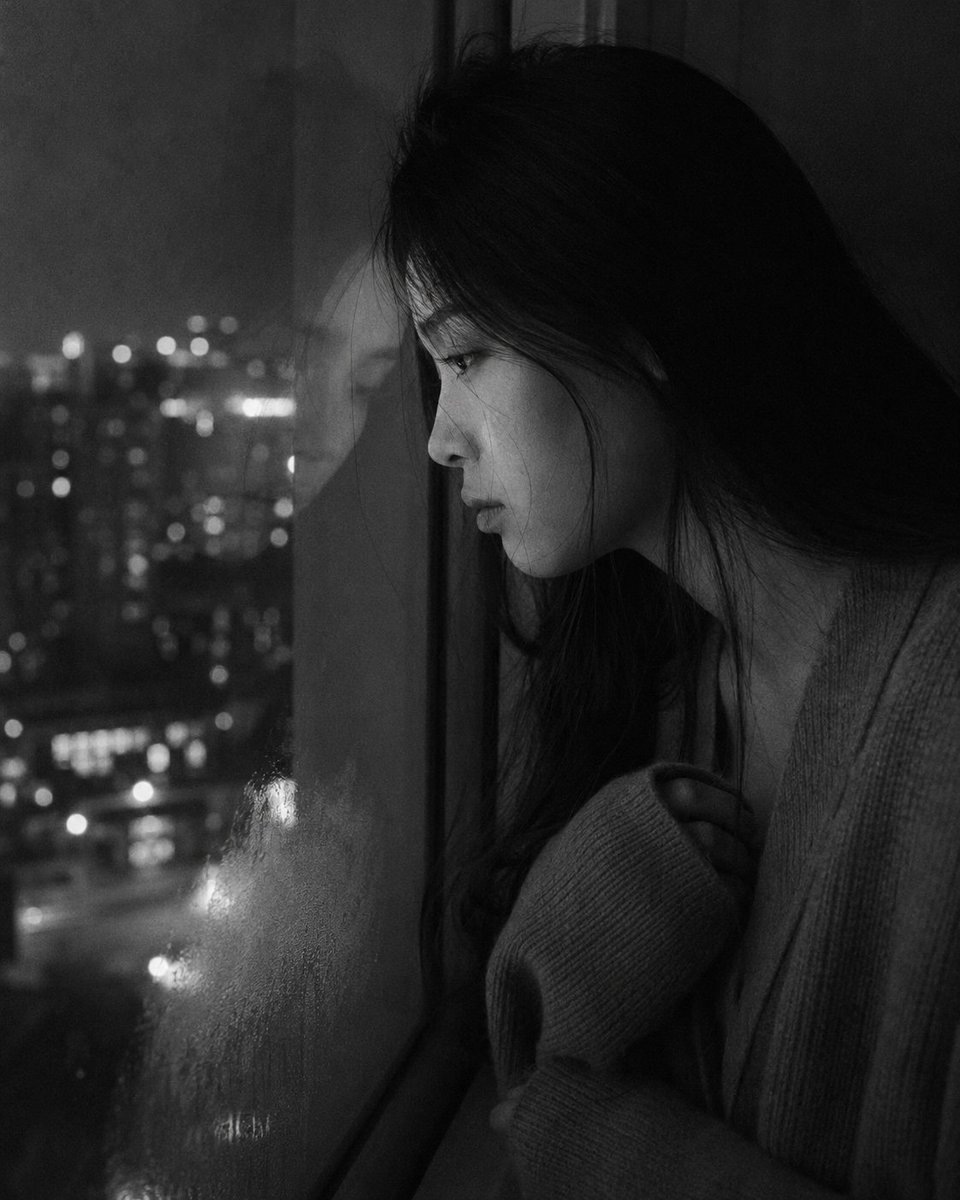
Part 12 of the emotional series 'One Night in the Apartment'. A young East Asian woman stands at the apartment window in deep night, forehead against the glass, looking down at the street. Black and white low-key photography, natural candid style.
Prompt
Medium close-up portrait, 85mm, a young East Asian woman in her early 20s stands at the apartment window in deep night, forehead resting lightly against the cold glass, eyes open, looking down at the street below, authentic daily life photography, natural candid moment. Profile or near-profile view, almond eyes aimed downward through the glass, expression contained and unseeing — watching without watching. Straight black hair falls along the side of her face and neck. Forehead in contact with glass, breath faintly fogging lower corner of window. Skin with natural texture, subsurface scattering from faint street-light glow on glass. She wears an oversized knit sweater, sleeves long and slightly pulled over fingers. Arms hanging or loosely crossed at chest. The dark street and distant building lights are barely visible through the glass in soft bokeh. One or two stray hairs between her face and the glass, pressed flat or floating free. Black and white rendering. Low key: near-total interior darkness, only city ambient light filtering through the window glass providing any illumination — cool, flat, indirect. Her face and hair receive faint frontal light from outside, the rest of the room is black. Window reflections subtle and not distracting. Shadow side of face retains skin tonal gradation clearly. ISO 800 grain structure, fine and present. Photographic texture not CG render smoothness. Aspect ratio 4:5. No watermark, no text overlay, not cartoon, not digitally painted, not illustration, not anime.
Kynvio Prompt Workflow
How to use this prompt
Open it in Image Studio
Send the prompt to Kynvio AI without starting a generation.
Adapt the details
Replace the subject, setting, colors, text, or composition for your goal.
Review and generate
Choose your final settings, then click Generate when you are ready.
Related GPT Image 2 prompts
GPT Image 2 prompts
About this prompt
Will opening this prompt spend credits?
No. The button only prefills Image Studio. Credits are used only after you start a generation.
Can I edit the prompt first?
Yes. The transferred text is fully editable before you generate an image.