
One Night in the Apartment - Final - 20
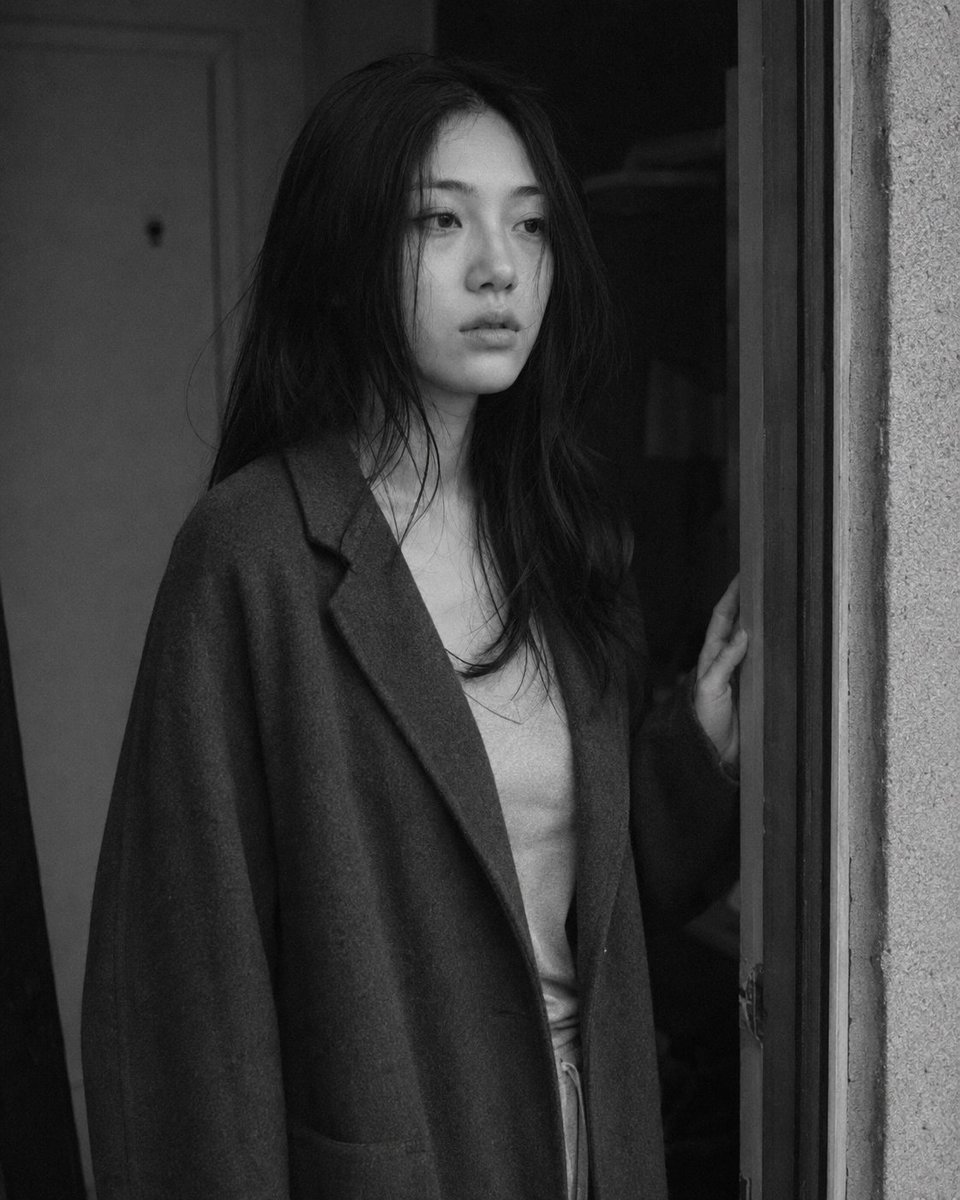
Final image 20 of the emotional series 'One Night in the Apartment'. A young East Asian woman stands at the apartment doorway at dawn, in a liminal state between entering and leaving. Black and white photography, cool sidelight, film grain texture.
Prompt
Medium close-up portrait, 85mm f/1.8, a young East Asian woman in her early 20s stands in the apartment doorway at dawn, one hand on the door frame, neither entering nor leaving — paused at the threshold, authentic daily life photography, natural candid moment. Almond-shaped eyes aimed at the middle distance beyond the door, expression settled into the particular blankness that comes after a long night of feeling — not sad, not resolved, simply continued. Straight black hair loose and unstyled, some pieces across shoulder. Skin with undereye shadow and tiredness visible, natural texture. Subsurface scattering in cool early morning sidelight. She wears a long loose coat over indoor clothes, as if she returned from outside or is about to leave again — or hasn't decided. One hand on doorframe, body at rest in the indecision. Two or three stray hairs cross her face, not resettled. Black and white rendering. Early morning cold grey sidelight from a window near the doorway — soft, diffuse, flat. Low key with open shadow: face receives gentle frontal-side light, door frame and wall behind in deep shadow. Interior behind her darker than the doorway space. Shadow areas with retained texture — coat fabric, wall surface, door frame grain — not crushed. A sense of suspension in the light itself, neither night nor day. ISO 800 film grain throughout, photographic texture not CG render smoothness. Aspect ratio 4:5. No watermark, no text overlay, not cartoon, not digitally painted, not illustration, not anime.
Kynvio Prompt Workflow
How to use this prompt
Open it in Image Studio
Send the prompt to Kynvio AI without starting a generation.
Adapt the details
Replace the subject, setting, colors, text, or composition for your goal.
Review and generate
Choose your final settings, then click Generate when you are ready.
Related GPT Image 2 prompts
GPT Image 2 prompts
About this prompt
Will opening this prompt spend credits?
No. The button only prefills Image Studio. Credits are used only after you start a generation.
Can I edit the prompt first?
Yes. The transferred text is fully editable before you generate an image.