
Nano Banana 2 vs ChatGPT Image 2: Image Generation Model Comparison
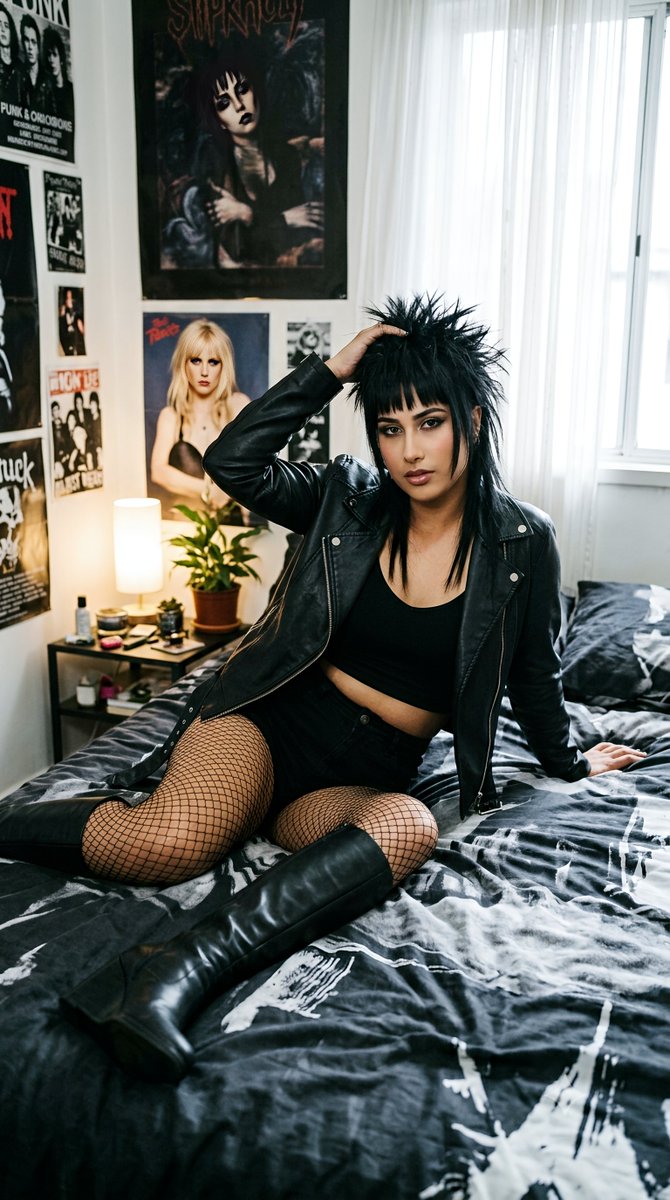
The author compares image generation quality of Gemini 3.1 Pro (with extended thinking), ChatGPT GPT-5 (presumably GPT-5 or ChatGPT Image 2), and Seedream 5 Pro using the same selfie and edgy punk-rock-hair prompt. ChatGPT excels in semantic understanding, composition, and creativity, with ~80% face fidelity. Gemini lags in quality but extended thinking helps. Seedream 5 Pro achieves 95% face fidelity but prompt understanding is inconsistent. The author questions whether AI aggregators sell a low-thinking cut-down version of GPT Image 2.
Prompt
"Nano Banana 2" versus "ChatGPT Image 2" I tried the same selfie and edgy punk-rock-hair prompt in free mode: - Left: @GeminiApp "3.1 Pro" + "Extended thinking" - Right: @ChatGPTapp "GPT 5-5" - Quote-repost: Seedream 5 Pro ChatGPT clearly: - better semantic prompt understanding - better global composition - better creativity (e.g. the hairstyle) - 80% face fidelity (selfie application) Gemini did nearly the same but the quality makes it hard to take it seriously. The "higher thinking" clearly made a difference. It gave better direction to its diffusion model. Seedream 5 Pro (in Capcut) is better at selfie application (95%), but prompt understanding may be flaky depending on token sacrifices. It pays to have a good prompt interpreter (high thinking level) that directs the image model. IMO, Grok Imagine (quality images) just adds a higher thinking layer. When your AI aggregator sells you an image generation service, ask them what API "thinking level" and "prompt truncation" techniques they employ to save on tokens. E.g. My prompts are safe, but due to prompt simplification/truncation, the model may return an "unsafe prompt" warning. I then get billed for a null generation. What are the chances that your aggregator is selling you a cut-down version of GPT Image 2 with low-thinking?
Kynvio Prompt Workflow
How to use this prompt
Open it in Image Studio
Send the prompt to Kynvio AI without starting a generation.
Adapt the details
Replace the subject, setting, colors, text, or composition for your goal.
Review and generate
Choose your final settings, then click Generate when you are ready.
Related GPT Image 2 prompts
GPT Image 2 prompts
About this prompt
Will opening this prompt spend credits?
No. The button only prefills Image Studio. Credits are used only after you start a generation.
Can I edit the prompt first?
Yes. The transferred text is fully editable before you generate an image.