
Multiple Ways to Easily Create Webcomics with GPT-image2
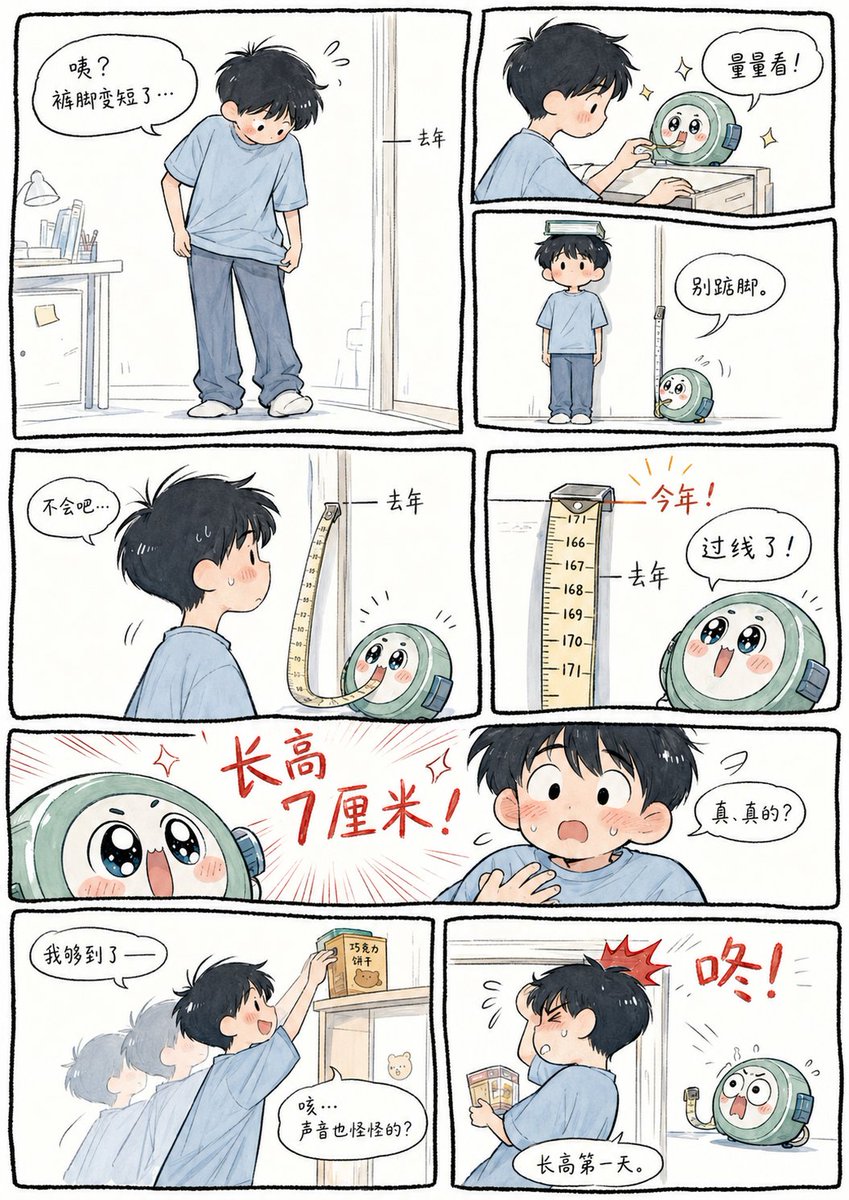
Explore how to use GPT-image2 combined with webcomics, assigned topics, and aesthetic prompts to easily create webcomics. Covers profitable directions such as psychology and knowledge popularization, and mentions the importance of character three-view drawings.
Prompt
GPT2 x webcomic x assigned topic x aesthetic prompts Just provide a storyline Let GPT-image2 freely arrange the scenes Easily create webcomics This approach can actually be played in many ways This direction also has many profitable self-media projects Especially psychology-related~ Such as parenting psychology, marriage psychology, interpersonal psychology Knowledge popularization direction is also very suitable If you can create character three-view drawings, you can achieve a very exciting level Opportunity to produce a series of tutorials specifically on these topics
Kynvio Prompt Workflow
How to use this prompt
Open it in Image Studio
Send the prompt to Kynvio AI without starting a generation.
Adapt the details
Replace the subject, setting, colors, text, or composition for your goal.
Review and generate
Choose your final settings, then click Generate when you are ready.
Related GPT Image 2 prompts
GPT Image 2 prompts

About this prompt
Will opening this prompt spend credits?
No. The button only prefills Image Studio. Credits are used only after you start a generation.
Can I edit the prompt first?
Yes. The transferred text is fully editable before you generate an image.