
Luxury Portrait of a South Asian Woman in a Mughal Palace
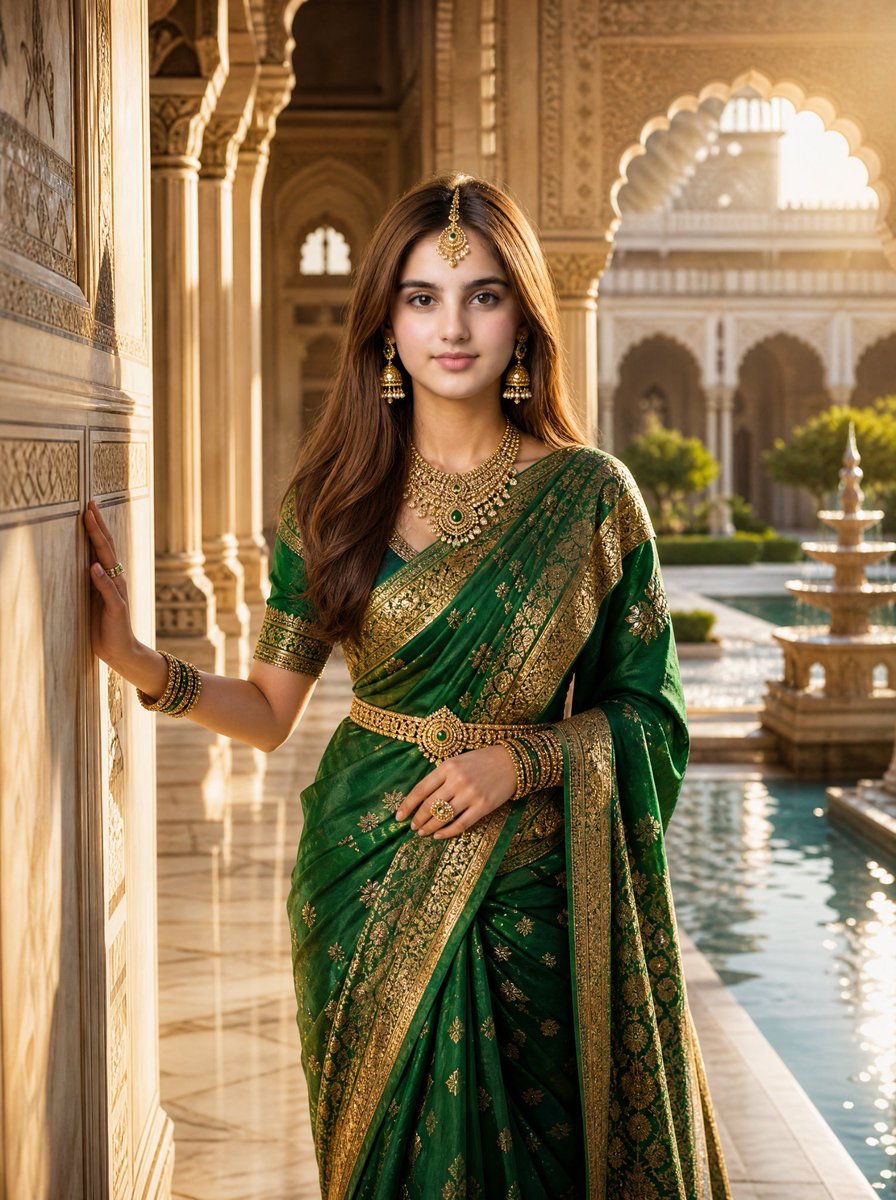
An ultra-realistic cinematic luxury portrait of a young South Asian woman walking through a magnificent Mughal palace, wearing an emerald green Banarasi saree and traditional gold jewelry, with dramatic sunlight streaming through arches.
Prompt
Use the uploaded image as the exact identity reference. Preserve the woman's face with perfect accuracy. Create an ultra-realistic cinematic luxury portrait in 9:16 format. A breathtaking young South Asian woman walking through a magnificent Mughal palace with grand white marble arches, intricately carved pillars, royal fountains, lush Mughal gardens, and timeless royal architecture. She gently touches the polished marble wall while confidently looking toward the camera. Warm golden sunlight streams through the arches, creating dramatic cinematic shadows, volumetric light rays, and an elegant royal atmosphere. She wears a luxurious emerald green Banarasi saree with rich woven silk texture and intricate heavy gold embroidery. She is adorned with traditional gold jhumka earrings, layered royal necklaces, elegant bangles, gemstone rings, a detailed maang tikka, and a beautifully crafted kamarband. Her hair flows gracefully, and every expression is natural, confident, and regal. Every fabric fold, jewelry detail, marble carving, fountain, garden, and architectural element is rendered with museum-quality realism. Hyper-realistic skin texture, natural eyes, realistic hair strands, cinematic depth of field, soft global illumination, HDR lighting, premium luxury fashion editorial styling, IMAX-quality composition. Masterpiece, best quality, ultra-realistic, photorealistic, 16K, cinematic color grading, luxury editorial portrait, museum-quality realism, breathtaking details, highly detailed environment, award-winning photography, volumetric lighting, global illumination, sharp focus.
Kynvio Prompt Workflow
How to use this prompt
Open it in Image Studio
Send the prompt to Kynvio AI without starting a generation.
Adapt the details
Replace the subject, setting, colors, text, or composition for your goal.
Review and generate
Choose your final settings, then click Generate when you are ready.
Related GPT Image 2 prompts
GPT Image 2 prompts


About this prompt
Will opening this prompt spend credits?
No. The button only prefills Image Studio. Credits are used only after you start a generation.
Can I edit the prompt first?
Yes. The transferred text is fully editable before you generate an image.