
Ink-to-Clay Transformation in a Travel Journal
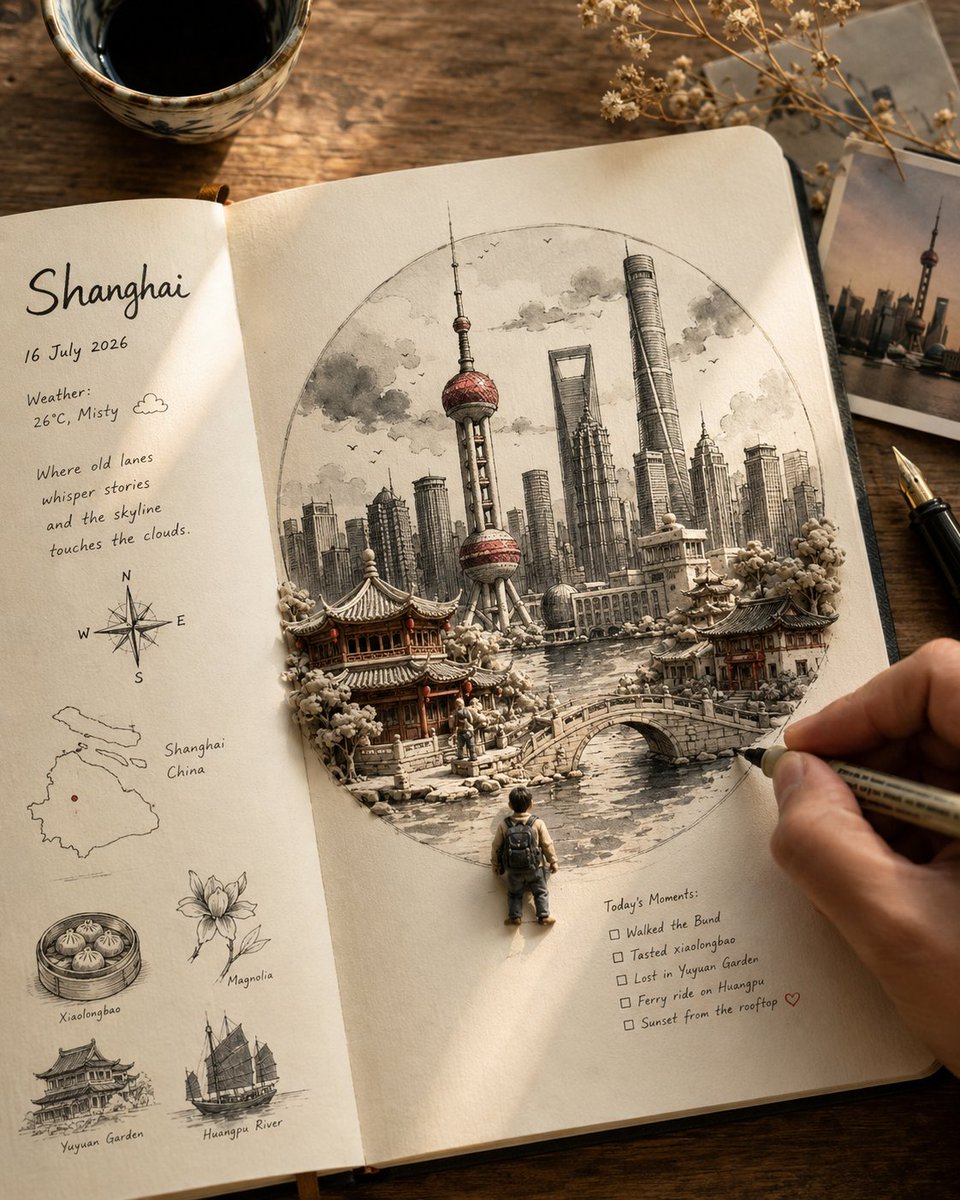
A warm overhead close-up of an open cream travel journal with a large circular ink-wash illustration on the right page, depicting iconic landmarks and landscape of [LOCATION]. Elements transition from flat ink to dimensional handcrafted clay models, maintaining a 60-70% flat to 30-40% dimensional ratio. Color is mostly monochrome with a sparing accent color associated with [LOCATION]. A small traveler figure with a backpack stands at the bottom edge.
Prompt
Warm, photorealistic overhead close-up of an open cream-paper travel journal on a rustic wooden table. Destination: [LOCATION]. Central artwork: Large circular composition, centered on the right-hand page — black-and-white sumi-e/ink-wash + fine-liner illustration of [LOCATION]'s most iconic architecture, landscape, and atmosphere (auto-select the defining landmarks/features). Ink-to-clay transformation: From the flat ink drawing, key landmarks physically emerge as miniature handcrafted clay models — pencil → fine ink → ink wash → tactile matte clay, seamless and magical. Keep the split 60–70% flat ink / 30–40% dimensional clay so it reads as a sketch becoming real, not a pop-up book. Clay pieces: visible handmade texture, small imperfections, real depth. Color: Mostly monochrome/neutral. One signature [LOCATION]-associated accent color, used sparingly on a few key details only. Tiny traveler: One small handcrafted figure at the circle's lower edge, mostly from behind, backpack, looking toward the emerging scene.
Kynvio Prompt Workflow
How to use this prompt
Open it in Image Studio
Send the prompt to Kynvio AI without starting a generation.
Adapt the details
Replace the subject, setting, colors, text, or composition for your goal.
Review and generate
Choose your final settings, then click Generate when you are ready.
Related GPT Image 2 prompts
GPT Image 2 prompts
About this prompt
Will opening this prompt spend credits?
No. The button only prefills Image Studio. Credits are used only after you start a generation.
Can I edit the prompt first?
Yes. The transferred text is fully editable before you generate an image.