
Golden Hour Ultra-Realistic Car Portrait
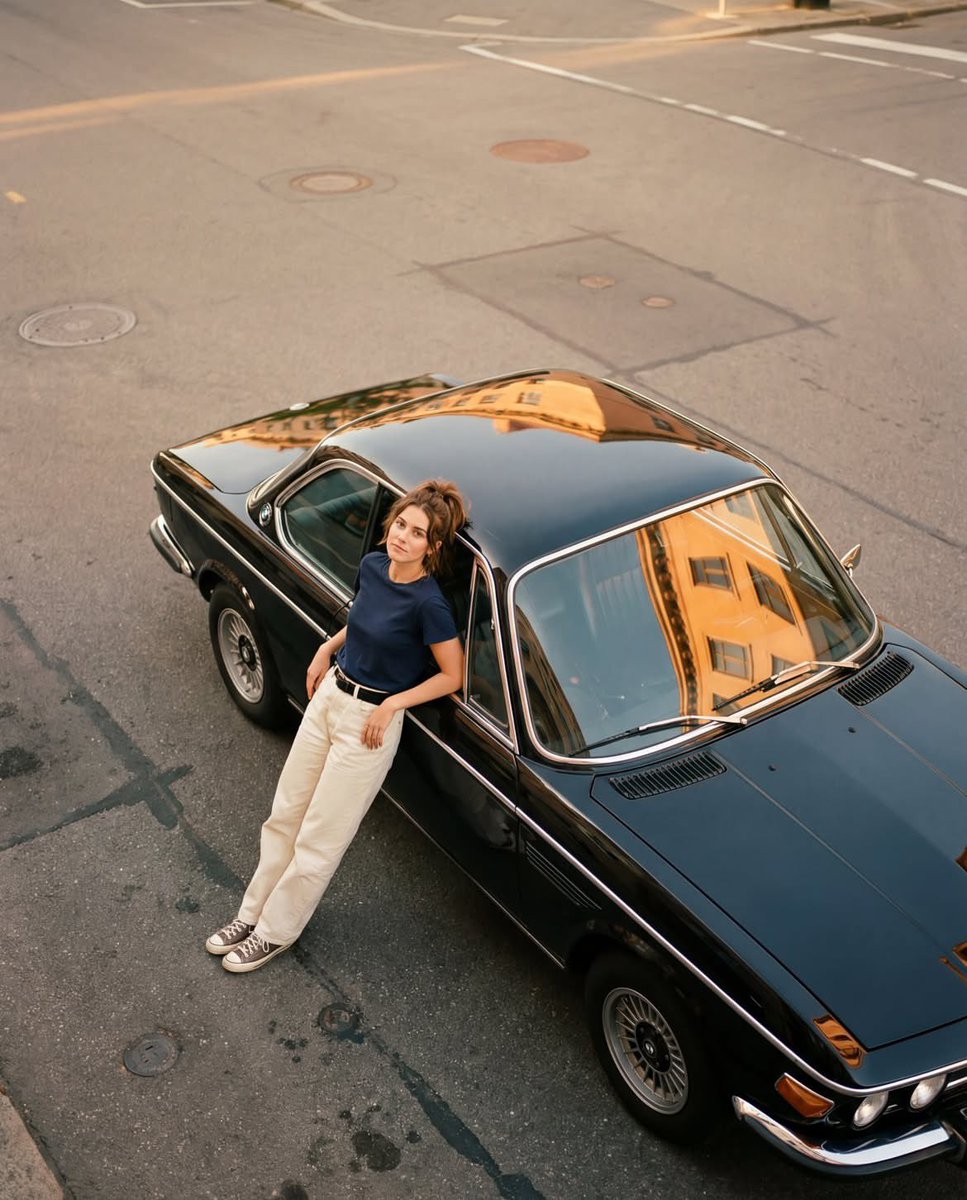
An ultra-realistic golden-hour editorial lifestyle photo shot from a high overhead angle, featuring a black classic coupe and a young woman leaning against it. Warm tones, rich details, emphasis on light and reflections.
Prompt
Ultra-realistic warm golden-hour editorial lifestyle photo, portrait 4:5, shot from a high overhead angle looking down at a black classic 2-door coupe parked diagonally on an empty city street. The car runs diagonally from bottom-right (front) to upper-left (rear). Glossy black paint with chrome window trim and clean body lines. Silver mesh/BBS-style wheels with polished lips. Windshield and side glass show strong warm reflections of a golden building façade with rectangular window shapes. Roof also reflects light softly. A young woman stands leaning against the driver-side door area, hips resting on the car, body relaxed. She faces the camera with calm confident expression and direct eye contact. Pose: one hand resting on the car near the window/door frame, legs crossed casually at the ankles. Hair pulled back in a messy ponytail/bun with loose strands around the face. Wearing a thin necklace with a small pendant. Outfit: fitted navy/dark blue short-sleeve t-shirt slightly cropped showing a small strip of midriff; white/cream loose trousers with a visible black belt; black-and-white low-top sneakers. Background: gray asphalt street with faint white lane markings and long pale stripes, several round manhole covers near the top of the frame, subtle road seams and patches, no other cars or pedestrians. Lighting is warm golden-hour sunlight with soft shadows and gentle film-like contrast, slight 35mm film softness, natural color grading, high resolution. NEGATIVE PROMPT: low angle, front-facing car close-up, different car color, modern car, no chrome trim, different wheels, crowded street, buildings visible in background, people, heavy HDR, oversharp, harsh flash, night, rain, neon, cartoon, illustration, CGI, blurred subject, wrong outfit colors, no reflections on windshield
Kynvio Prompt Workflow
How to use this prompt
Open it in Image Studio
Send the prompt to Kynvio AI without starting a generation.
Adapt the details
Replace the subject, setting, colors, text, or composition for your goal.
Review and generate
Choose your final settings, then click Generate when you are ready.
Related GPT Image 2 prompts
GPT Image 2 prompts
About this prompt
Will opening this prompt spend credits?
No. The button only prefills Image Studio. Credits are used only after you start a generation.
Can I edit the prompt first?
Yes. The transferred text is fully editable before you generate an image.