
Gaze Across the Shelf: A Natural Moment in a Cosmetics Shop
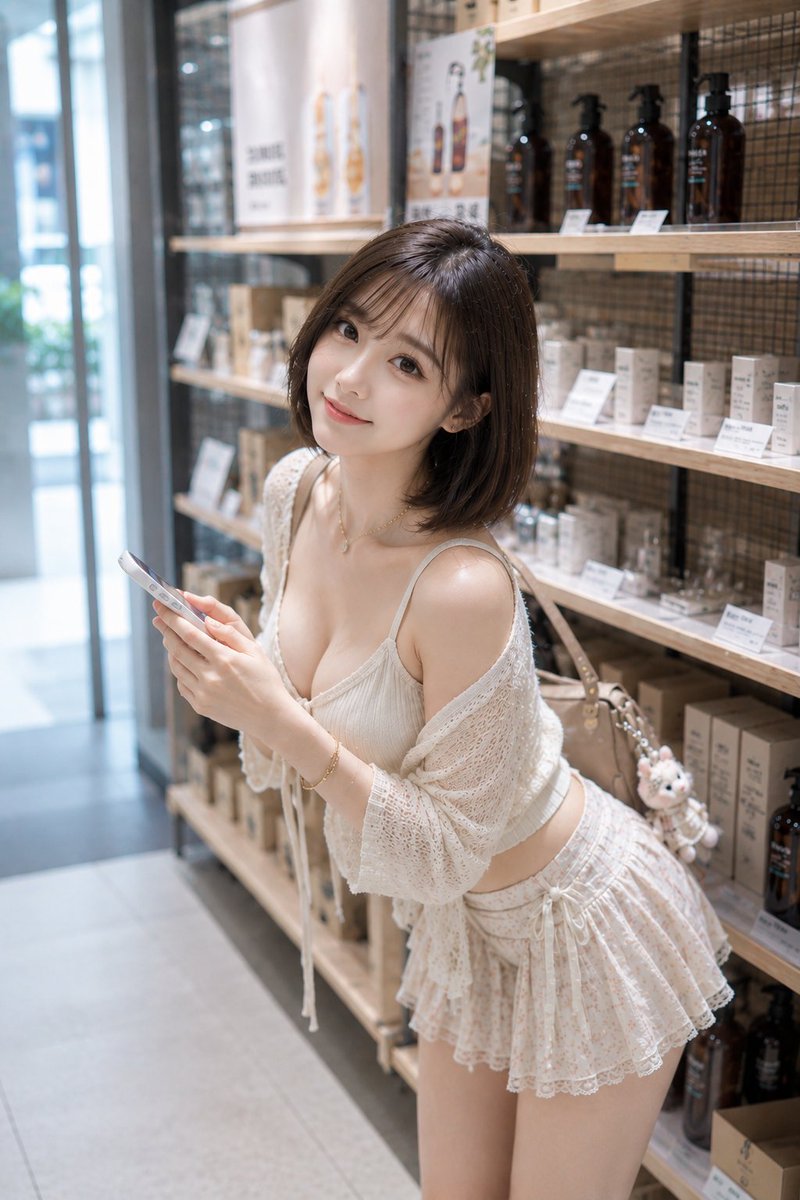
In a bright natural cosmetics shop, a woman holding a smartphone leans forward and looks back with a smile. The vertical 2:3 composition places the person slightly right of center, with aisle space on the left and product shelves on the right. Natural light from the left entrance creates soft shadows. The style is high-definition photorealistic, evoking a clean Japanese fashion magazine snapshot.
Prompt
Subject: Gaze across the shelf Main body: Vertical 2:3 realistic lifestyle portrait. In a bright natural cosmetics shop aisle, an adult woman holding a smartphone with both hands leans forward slightly from the waist and looks back at the camera. The person is positioned slightly right of center, framed from head to upper thigh. The figure occupies about 65% of the frame, with bright aisle space on the left and a long product shelf on the right. Character & expression: Natural and elegant adult woman. Shoulder-length dark brown bob hair with light inward curls at the ends, thin see-through bangs. Pink-beige eye makeup, thin eyeliner, natural aegyosal (under-eye bags), light coral lips. Head tilted slightly to her left, chin slightly tucked, looking at the lens with a soft smile. Skin is bright and smooth but retains pores and natural shadows. Clothing & pose: Ivory ribbed camisole with thin straps, loosely draped with an openwork knit summer cardigan over the shoulders. A tiered mini skirt with light peach floral pattern and lace trim. Delicate gold necklace and bracelet, beige shoulder bag with a small white plush charm. Holding a white smartphone with both hands around chest height, fingertips naturally touching the screen. Upper body leaning forward, hips pulled back, legs stable to support the center of gravity. Natural gravity and fine fabric wrinkles on cardigan sleeves and skirt hem. Background & lighting: A clean natural cosmetics shop in a Japanese urban area. On the right side, wooden shelves neatly display brown pump bottles, white or beige cosmetic boxes, and small beauty items. Price tags and poster text are blurred and unreadable. In the far left background, a glass entrance and pale green plants are visible, with natural perspective continuing into the aisle. Main light is soft daytime natural light from the left entrance. Creates bright highlights on the left side of the face, shoulder, collarbone, and arm, with a light shadow on the right side. Warm reflected light from the wooden shelves, overall tone in ivory and light brown. Composition & camera: Vertical 2:3, medium full shot taken from slightly above eye level. The face is in the upper center, smartphone in the lower left, bag and plush in the right center. A bit of shelf and poster at the top, naturally cropped at mid-thigh at the bottom. Equivalent 50mm, F1.8. Accurate focus on the eyes and face, hands and clothes sharp, background shelf and entrance smoothly blurred. The tilt of the person and the horizontal lines of the shelf create a composition with quiet movement. Texture & style: High-definition photorealistic image. Natural skin texture, fine vellus hair, individual strands of bangs, openwork knit fibers, ribbed fabric and lace details meticulously rendered. Bright exposure with suppressed highlights, low contrast, creamy highlights, light film-like color. Finished like a clean snapshot from a Japanese fashion magazine or cosmetics brand. Negative prompt: Unnatural face, unnatural gaze, overly childish impression, extra fingers, missing fingers, fused hands, poor contact with smartphone, distorted arms or legs, unnatural forward lean, floating clothing, broken bag strap, incorrect perspective, shadows contradicting light source, readable product names, garbled text, logos, watermarks, excessive skin smoothing, plastic-like skin.
Kynvio Prompt Workflow
How to use this prompt
Open it in Image Studio
Send the prompt to Kynvio AI without starting a generation.
Adapt the details
Replace the subject, setting, colors, text, or composition for your goal.
Review and generate
Choose your final settings, then click Generate when you are ready.
Related GPT Image 2 prompts
GPT Image 2 prompts
About this prompt
Will opening this prompt spend credits?
No. The button only prefills Image Studio. Credits are used only after you start a generation.
Can I edit the prompt first?
Yes. The transferred text is fully editable before you generate an image.