
Food Atlas: Edible Miniature World
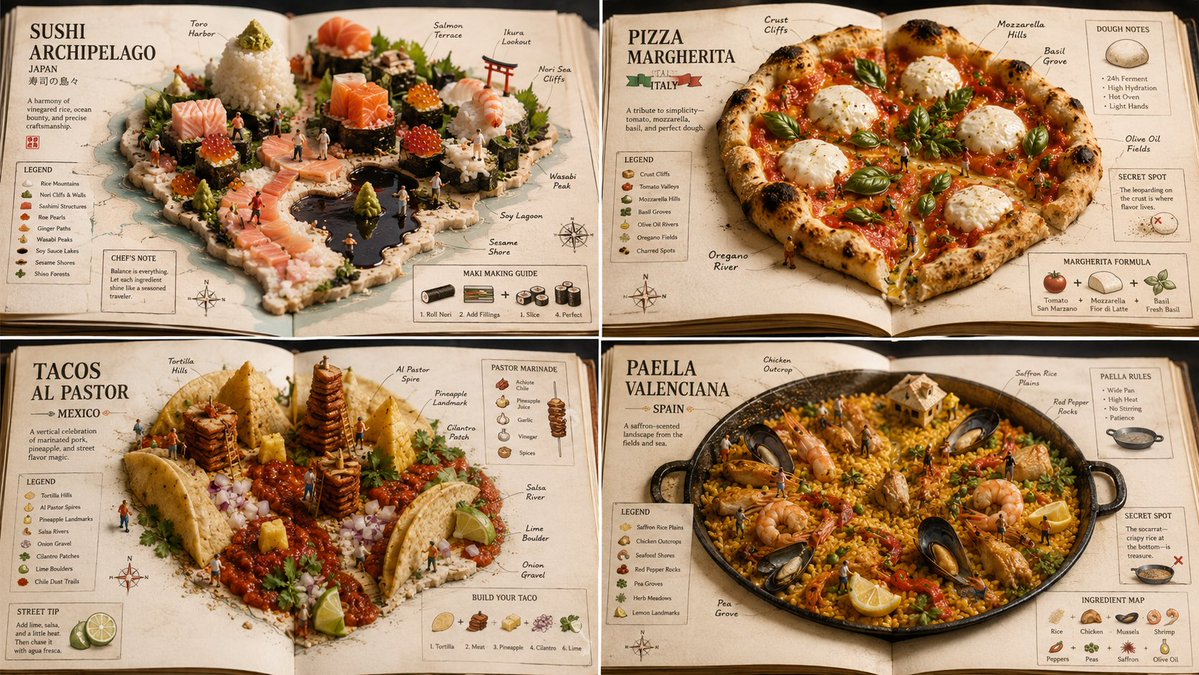
A food atlas prompt for GPT Image 2 that transforms any food into an edible miniature world presented inside an open atlas or cookbook. Uses macro photography, shallow depth of field, warm tones, and adds map-like labels and ingredient callouts.
Prompt
A food atlas prompt for GPT Image 2. It should work for any kind of food but I went popular dishes. 2x2 grid, 16:9, do this for 4 famous international dishes: CONCEPT ANCHOR 1: "Sushi miniature world — rice terrain, sashimi architecture, nori panels, roe beads, sesame debris, plated macro craftsmanship" :: CONCEPT ANCHOR 2: "Open food atlas — ingredients arranged as geographic terrain, edible map relief, cookbook page layout, culinary cartography, warm tabletop realism" :: CONCEPT ANCHOR 3: "Annotated miniature diorama guide — tiny figures, object callouts, side labels, ingredient diagrams, secret-spot markers, collectible educational layout" INSTRUCTION: Find the exact visual center of these three concepts. Ignore the literal astronaut, national flag, named foods, and specific maps. Capture only the reusable style DNA. Render $ SUBJECT as an edible miniature world presented inside an open atlas or cookbook. STYLE RULES: - Convert the subject into a tiny handcrafted scene built from edible materials. - Broad landforms become rice, grains, noodles, bread, pastry, sauce, puree, or layered ingredients. - Important structures become sashimi blocks, vegetable cuts, nori sheets, grilled pieces, dumplings, cubes, or carved food components. - Small repeated details become roe pearls, sesame seeds, herbs, spices, crumbs, seeds, or garnish clusters. - Present the subject on an open book, plate, tray, or cookbook spread. - Add map-like labels, ingredient callouts, tiny arrows, region markers, recipe notes, and small explanatory diagrams. - Use warm macro photography, shallow depth of field, tactile food texture, and precise miniature staging. OUTPUT: A culinary atlas-diorama where $ SUBJECT becomes a tiny edible world that is both delicious and educational.
Kynvio Prompt Workflow
How to use this prompt
Open it in Image Studio
Send the prompt to Kynvio AI without starting a generation.
Adapt the details
Replace the subject, setting, colors, text, or composition for your goal.
Review and generate
Choose your final settings, then click Generate when you are ready.
Related GPT Image 2 prompts
GPT Image 2 prompts
About this prompt
Will opening this prompt spend credits?
No. The button only prefills Image Studio. Credits are used only after you start a generation.
Can I edit the prompt first?
Yes. The transferred text is fully editable before you generate an image.