
Editorial Collage Poster
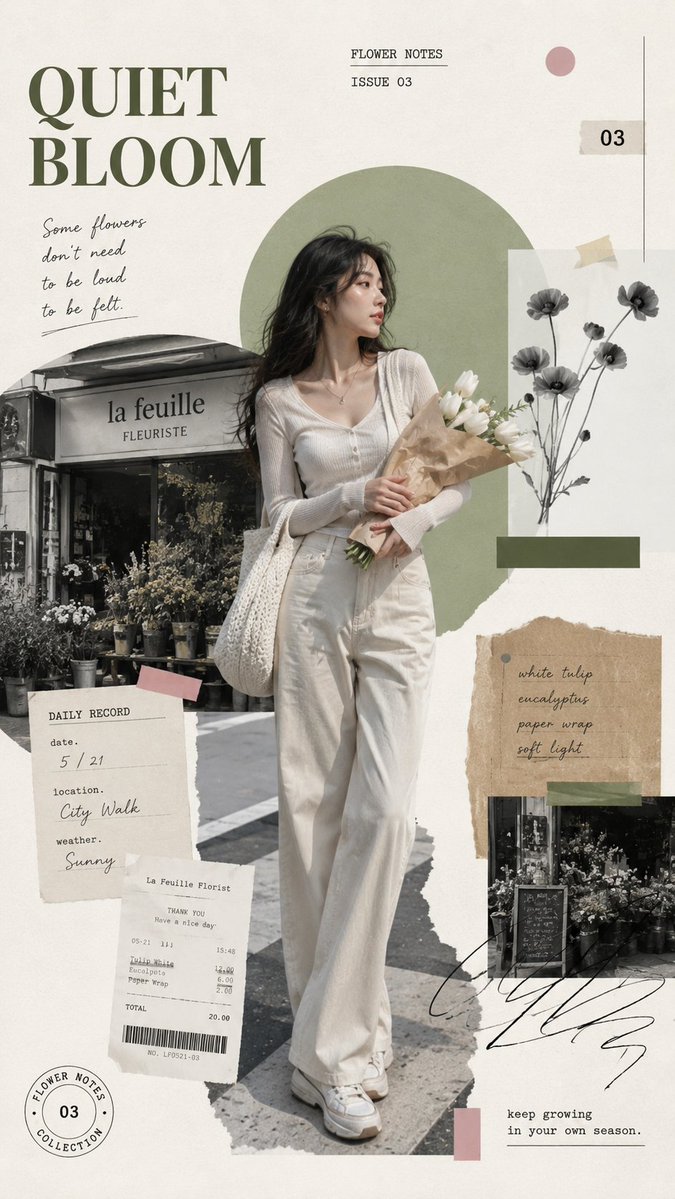
A 9:16 vertical editorial collage poster with theme, series title, subtitle, main subject, setting, main colors, accent color, and small text elements. Uses warm off-white paper background, realistic full-body subject, layered torn-paper photography, and geometric color blocks.
Prompt
Create a 9:16 vertical editorial collage poster. Theme: [THEME] Series title: [TITLE] Subtitle: [SUBTITLE] Main subject: [PERSON / PRODUCT / SCENE] Setting: [CITY STREET / COAST / FLOWER SHOP / CAFÉ / OTHER] Main colors: [COLOR 1] + [COLOR 2] Accent color: [ACCENT COLOR] Small text elements: [TIME / LOCATION / ISSUE NUMBER / SHORT PHRASES] Use a warm off-white paper background with generous negative space. Place one realistic full-body subject as the main visual anchor, occupying around 60–70% of the poster height. The subject should feel natural and alive, with realistic skin, hair, clothing texture, body proportions, and a relaxed everyday action rather than a stiff fashion pose. Build the composition with layered torn-paper photography, grayscale environment fragments, receipts, tickets, handwritten notes, small labels, stamps, paper tape, and 1–2 bold geometric color blocks. Keep all supporting elements secondary to the main subject. Use a balanced mix of large editorial typography, small typewriter-style labels, and a few handwritten line…
Kynvio Prompt Workflow
How to use this prompt
Open it in Image Studio
Send the prompt to Kynvio AI without starting a generation.
Adapt the details
Replace the subject, setting, colors, text, or composition for your goal.
Review and generate
Choose your final settings, then click Generate when you are ready.
Related GPT Image 2 prompts
GPT Image 2 prompts
About this prompt
Will opening this prompt spend credits?
No. The button only prefills Image Studio. Credits are used only after you start a generation.
Can I edit the prompt first?
Yes. The transferred text is fully editable before you generate an image.