
Disney Princesses and Characters Realistic Studio Portrait Prompts Collection
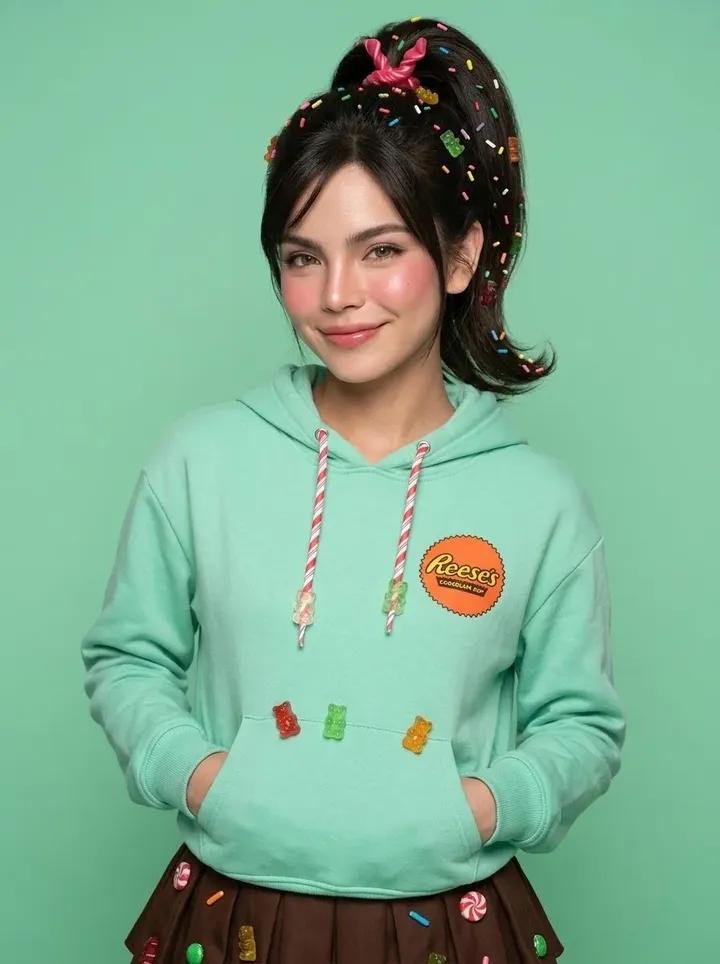
A collection of realistic studio portrait prompts for Disney characters including Vanellope, Moana, Elsa, Alice, Anna, and Sofia, generated using GPT Image 2. Each prompt includes mid-closeup composition, solid color backdrop, detailed clothing descriptions, natural makeup, and specific camera settings.
Prompt
GPT IMAGE 2 on CHATGPT Vanellope von Schweetz – Candy Princess Prompt: Mid-closeup true-to-life studio portrait of Vanellope von Schweetz, plain mint green seamless backdrop, signature mint hoodie with candy-themed details over a chocolate brown skirt, striped leggings partially visible, high ponytail with colorful candy sprinkles, youthful natural makeup, rosy cheeks, playful smile, hands tucked casually into the hoodie pocket, centered composition, soft studio lighting, Nikon Z8, 85mm portrait lens, ultra-realistic photography, 3:4 aspect ratio. Moana – Island Chief Elegance Prompt: Mid-closeup true-to-life studio portrait of Moana, plain warm terracotta seamless backdrop, signature Polynesian-inspired red patterned crop top and cream woven skirt visible from the waist, shell necklace, sash belt details, long naturally wavy dark hair, sun-kissed glowing skin, warm bronze eyeshadow, soft coral blush, glossy nude lips, confident smile, hands resting naturally at the waist, eye-level composition, professional beauty lighting, deep depth of field, ultra-realistic textures, Canon EOS R5, 85mm lens, 3:4 aspect ratio. Elsa – Snow Queen Glamour Prompt: Mid-closeup true-to-life studio portrait of Queen Elsa, plain icy blue seamless backdrop, signature shimmering ice-blue gown with translucent glittering cape, platinum blonde side braid, luminous porcelain skin, cool champagne eyeshadow, soft pink lips, subtle highlighter, elegant confident expression, graceful posture with one hand gently raised, eye-level framing, Canon EOS R3, 85mm lens, realistic textures, professional beauty lighting, 3:4 aspect ratio. Alice – Wonderland Classic Prompt: Mid-closeup true-to-life studio portrait of Alice, plain sky blue seamless backdrop, signature light blue Victorian-style dress with crisp white apron, black ribbon headband, blonde shoulder-length hair softly curled at the ends, youthful natural makeup, rosy cheeks, glossy pink lips, curious cheerful smile, hands gently folded in front, centered composition, professional studio beauty lighting, Sony A1, 85mm portrait lens, ultra-realistic photography, 3:4 aspect ratio. Anna – Arendelle Royal Style Prompt: Mid-closeup true-to-life studio portrait of Princess Anna, plain teal seamless backdrop, signature black bodice embroidered with colorful floral patterns, royal blue skirt visible from the waist, magenta cape draped over the shoulders, twin braids with bangs, fresh rosy complexion, peach blush, soft pink lips, cheerful smile, hands lightly clasped together, centered composition, beauty studio lighting, Sony A1, 85mm portrait lens, ultra-realistic photography, 3:4 aspect ratio. Sofia the First – Young Royal Elegance Prompt: Mid-closeup true-to-life studio portrait of Sofia the First, plain lavender seamless backdrop, signature lavender princess gown with delicate silver accents, jeweled tiara, shoulder-length chestnut hair in soft curls, fresh natural makeup, rosy cheeks, glossy pink lips, warm friendly smile, elegant posture with hands lightly clasped, centered eye-level composition, Canon EOS R5, 85mm portrait lens, deep depth of field, ultra-realistic photography, 3:4 aspect ratio.
Kynvio Prompt Workflow
How to use this prompt
Open it in Image Studio
Send the prompt to Kynvio AI without starting a generation.
Adapt the details
Replace the subject, setting, colors, text, or composition for your goal.
Review and generate
Choose your final settings, then click Generate when you are ready.
Related GPT Image 2 prompts
GPT Image 2 prompts
About this prompt
Will opening this prompt spend credits?
No. The button only prefills Image Studio. Credits are used only after you start a generation.
Can I edit the prompt first?
Yes. The transferred text is fully editable before you generate an image.