
Dior-Style Fashion Editorial: Purple Ao Dai with Bougainvillea Hair Mural
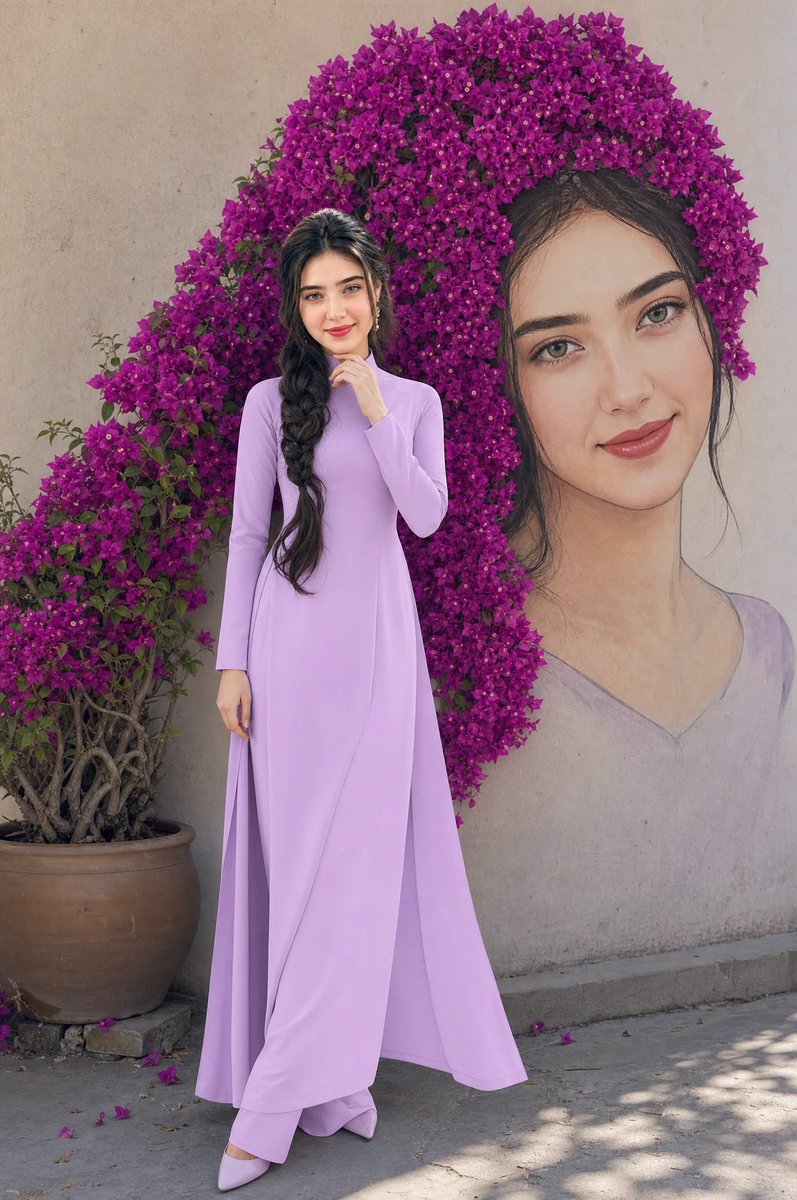
Generate a high-end fashion editorial photograph in Dior style based on a reference image. The subject's face matches the reference exactly, wearing a solid pastel purple silk ao dai. The mural behind her features her hair formed by real purple bougainvillea flowers. Soft lighting, cinematic tones, ultra-realistic details.
Prompt
Create a high-end fashion editorial photograph in Dior style of a young woman based on the attached image. Her face, hairstyle, and facial structure must match the reference exactly (eyes, nose, lips 100% identical, ultra-precise eye detail). She has a thick, long, loosely braided hairstyle draped over her shoulder to her waist. She stands with her body slightly turned sideways, one hand gently touching her chin, the other arm relaxed along her body, legs softly crossed at the ankles, elegant and introspective pose. Her expression is calm and slightly dreamy, with soft eyes and a gentle closed-mouth smile. She is wearing a luxury Vietnamese áo dài in a single solid pastel purple color made from premium silk with a smooth, flowing couture finish. The color must be completely uniform — no gradients, no color variation, no secondary tones. Matching pants in identical color. The mural behind her shows her face. The mural's hair is NOT painted. It is physically formed by real purple bougainvillea flowers growing from a potted plant beside the wall. The flowers extend and precisely shape the hair of the mural. The transition must be seamless and clearly structured as hair, not decoration. Lighting: soft natural daylight mixed with high-end fashion editorial lighting, glowing skin, subtle highlights, refined shadows, cinematic tone, luxury magazine look. Skin is flawless, radiant, high-detail. Shot with 35mm lens, f/2.8, shallow depth of field, ultra-realistic, 8K, sharp focus. strict color control, strict composition control, preserve original concept Negative prompt: multi-color outfit, gradient fabric, color shift, incorrect flowers placement, decoration flowers, inconsistent color.
Kynvio Prompt Workflow
How to use this prompt
Open it in Image Studio
Send the prompt to Kynvio AI without starting a generation.
Adapt the details
Replace the subject, setting, colors, text, or composition for your goal.
Review and generate
Choose your final settings, then click Generate when you are ready.
Related GPT Image 2 prompts
GPT Image 2 prompts
About this prompt
Will opening this prompt spend credits?
No. The button only prefills Image Studio. Credits are used only after you start a generation.
Can I edit the prompt first?
Yes. The transferred text is fully editable before you generate an image.