
Codex Jay Chou Skin Concept Design
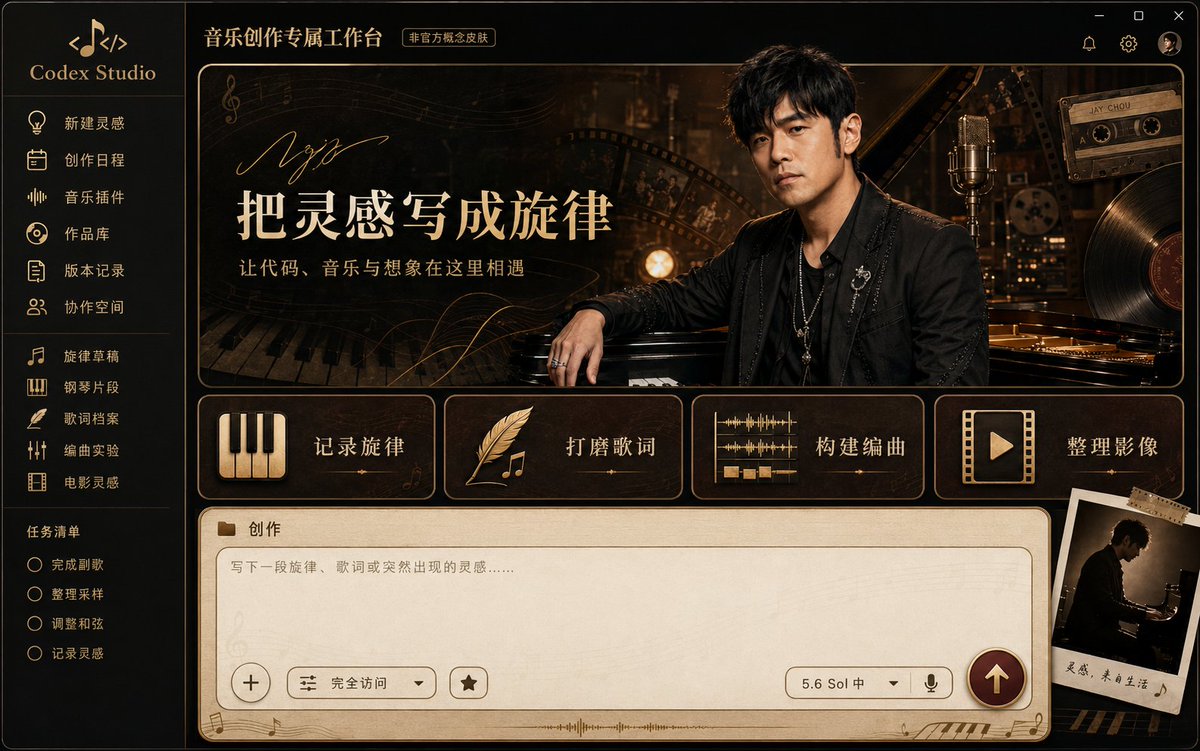
A high-end Codex desktop application skin concept art featuring Jay Chou, blending Chinese pop music, classical piano, vintage cinema, and recording studio aesthetics, presenting a calm, mysterious, and romantic visual style. The interface includes navigation bar, hero card, function cards, and creation panel, with piano black, walnut brown, brass gold color scheme, 16:10 aspect ratio, 4K quality.
Prompt
A high-end Codex desktop application skin concept art featuring Jay Chou as the character theme, fully displaying the Windows desktop software interface in a front-facing, flat screenshot composition without perspective tilt. The overall design blends Chinese pop music, classical piano, vintage cinema, recording studio, and modern digital creation studio aesthetics, presenting a calm, mysterious, romantic, and narrative visual style. This is an unofficial tribute concept design, without any official licensed logos. Color palette: piano black, dark walnut brown, parchment cream white, vintage brass gold, and dark wine red, with low-saturation sapphire blue highlights in some areas. Interface materials: black piano lacquer, dark wood, brass metal, vinyl record texture, and fine film grain. Background decorations: restrained use of staff lines, piano keys, vinyl records, cassette tapes, film reels, and golden sound wave curves. Lighting: warm recording studio side light and stage rim light, creating a quiet, nostalgic, slightly dreamlike atmosphere. Left side: a narrow dark navigation bar. Top: simple "Codex Studio" text and an abstract icon composed of musical notes and code brackets. Navigation items: "New Inspiration", "Creation Schedule", "Music Plugins", "Works Library", "Version History", "Collaboration Space". Below: project list including "Melody Draft", "Piano Clip", "Lyrics Archive", "Arrangement Experiment", "Film Inspiration"; task list including "Complete Chorus", "Organize Samples", "Adjust Chords", "Record Inspiration". Icons: uniform thin brass gold lines, including piano keys, notes, vinyl records, microphones, film reels, and quills. Main content area top: "Music Creation Workbench" with small text "Unofficial Concept Skin" beside it. Center: a large horizontal rounded hero card. Left side: title and description. Right side: a realistic portrait of Jay Chou. The character has recognizable East Asian male facial features, short black hair, a calm and confident expression, wearing a black layered jacket or vintage dark stage suit with understated silver accessories. Body slightly turned toward the camera, one hand naturally near piano keys, relaxed and restrained posture. Behind the character: faintly visible grand piano, recording studio microphone, film reels, and warm golden stage lights. Cinematic soft lighting, natural skin texture, fine hair strands, natural integration with the interface background. Hero card left side: prominent Chinese title "把灵感写成旋律" (Turn Inspiration into Melody), subtitle "让代码、音乐与想象在这里相遇" (Let Code, Music, and Imagination Meet Here). Above the title: abstract handwritten line decoration, not copying real signatures or proprietary wordmarks. Background: faint staff lines, piano key shadows, and golden sound waves, ensuring ample whitespace and clear text. Below the hero card: four rounded function cards arranged horizontally in cream white, dark brown, and brass gold. First card: piano key icon, text "记录旋律" (Record Melody). Second: quill and note icon, text "打磨歌词" (Polish Lyrics). Third: multi-track sound wave icon, text "构建编曲" (Build Arrangement). Fourth: film reel and play button icon, text "整理影像" (Organize Visuals). Cards: uniform size, fine brass stroke, soft shadow, even spacing, icons with slight golden highlights. Directly below the hero card: a separate large horizontal rounded creation panel, aligned with the left and right edges of the main content area, nearly full width, height about one quarter of the main content area. It must be a stable full panel at the bottom of the page, not a floating chat bubble, search bar, capsule input, terminal, or standalone popup. Creation panel outer background: themed light walnut beige to low-saturation parchment gradient, with very faint wood grain, vinyl concentric rings, and film grain. Outline: thin brass stroke and soft brown shadow. Overall color lighter and quieter than the hero area, clear and usable, consistent with piano, recording studio, and vintage film theme, not plain white or smoky black glass. Top left of outer panel: small folder icon and section text "创作" (Creation). Inside the panel: a large rounded input area with clear, thin brass-brown stroke, inner background clean warm cream white, ample clean writing space. Placeholder text at top left: "写下一段旋律、歌词或突然出现的灵感……" (Write a melody, lyrics, or sudden inspiration...). Input area background: only very faint staff watermark, no texture or decoration interfering with text. Within the same input panel: a full bottom control bar. Far left: circular plus button with thin border. Next: "Full Access" mode control and bookmark icon. Right: model status "5.6 Sol 中", dropdown arrow, and microphone icon. Far right: solid circular send button with dark wine red to brass gold gradient, clear upward arrow inside. Bottom edge of panel: only a few golden notes, small piano keys, and a short sound wave line, decorations concentrated at corners, not entering the main writing area. Bottom right: a slightly tilted vintage Polaroid photo showing the character's silhouette sitting at the piano, fixed with a small piece of film-strip tape. The Polaroid must not obscure the send button, model selector, or input text. The interface must maintain a realistic, complete, operable desktop application structure, not a character promotional poster. The character occupies about one third of the hero card's right side; left side title and function cards are clear and complete. High-end commercial UI/UX design, precise grid, clear visual hierarchy, generous whitespace, uniform rounded corners, fine strokes, restrained shadows, realistic materials, cinematic color grading. All specified Chinese text clearly legible, accurately presenting short texts like "新建灵感", "创作日程", "作品库", "把灵感写成旋律", "记录旋律", "打磨歌词", "构建编曲", "整理影像", "创作". Ultra-high detail, 4K product showcase quality, full window boundaries, no cropping of important components. Aspect ratio: 16:10 Negative constraints: low resolution, blurry, pixelated, oversharpened, overexposed, oversaturated colors, cheap neon effects, pink girly style, roses, heart stickers, cartoon idol style, cluttered background, excessive decoration, chaotic interface hierarchy, misaligned components, cropped window, severe perspective distortion, duplicate cards, duplicate characters, overlapping text, garbled Chinese, random English letters, wrong menu text, bottom input box too small, input box turned into narrow search bar, capsule-shaped input box, floating chat bubble, input panel detached from page, input panel turned into terminal or popup, missing outer large panel, missing inner input stroke, missing bottom control bar, missing circular plus or send button, input area filled with decorations, input box using irrelevant pink floral background, input box using pure black smoky glass, character face drift, wrong hairstyle, wrong age representation, props inconsistent with musician identity, exaggerated expression, wax figure feel, plastic skin, wrong body proportions, deformed hands, extra fingers, extra arms, fused fingers, harsh edge between character and background, copying real signature, fake official logo, appearing as official collaboration or licensed product, watermark.
Kynvio Prompt Workflow
How to use this prompt
Open it in Image Studio
Send the prompt to Kynvio AI without starting a generation.
Adapt the details
Replace the subject, setting, colors, text, or composition for your goal.
Review and generate
Choose your final settings, then click Generate when you are ready.
About this prompt
Will opening this prompt spend credits?
No. The button only prefills Image Studio. Credits are used only after you start a generation.
Can I edit the prompt first?
Yes. The transferred text is fully editable before you generate an image.