
Cat in the Summer Sky
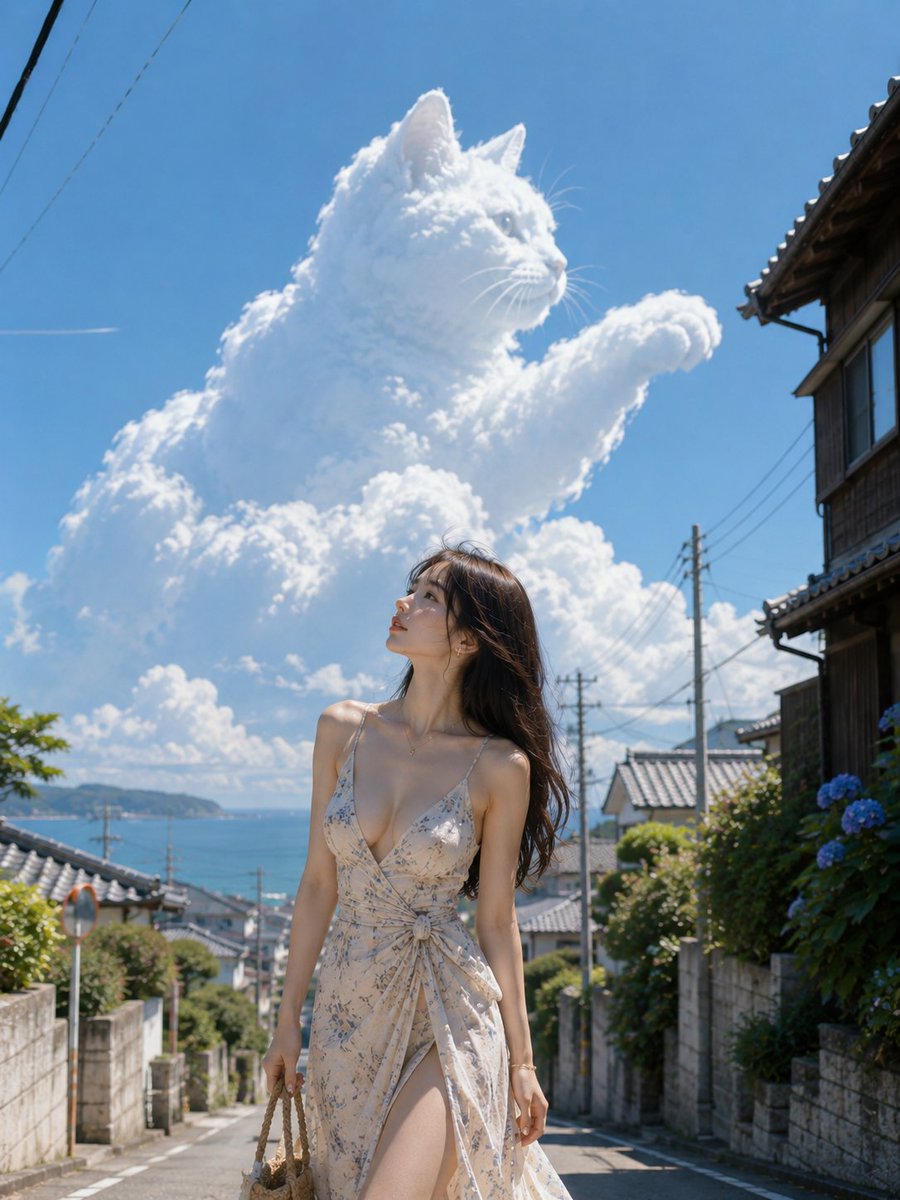
Beyond the slope, a cat in the summer sky gently stretched its front paw. Looking up, I forget to walk for a moment.
Prompt
Beyond the slope, a cat in the summer sky gently stretched its front paw. Looking up, I forget to walk for a moment. 🐈☁️🌊✨ #AIart #AI写真 #SummerSky [GPT Image2 Prompt] Theme: A cat walking in the summer sky. Subject: A vertical 4:5 photographic work. Against the backdrop of a quiet Japanese slope leading to the sea, a woman stands slightly to the right of center. Above, a huge white cumulonimbus cloud forms the shape of a cat. The woman occupies about 40% of the lower half of the frame, while the cloud cat covers a vast area of the sky, emphasizing the scale difference between human and cloud—a summer scene where reality and fantasy naturally connect. Character/Facial Expression: A natural, realistic adult woman. Tall, with long limbs, a well-proportioned figure like a sophisticated fashion model. Long dark brown hair waves loosely, slightly blown back by the summer breeze. Elegant Japanese-style makeup, translucent skin, gentle eyebrows, and clear eyes. Her face is turned to the upper left, looking up at the giant cat cloud. Her mouth is slightly open, with an expression mixing surprise and quiet longing. Clothing/Pose: A summer long dress in pale ivory. Thin shoulder straps, a clear V-neck that is not too deep, a three-dimensional cut that naturally follows from the bust to the waist. Fine blue-gray botanical pattern, a thin knot of the same fabric at the waist. The skirt is made of light, thin material, with a modest slit on one side, the hem slightly swaying in the wind. In her right hand, she holds a small rattan bag; her left arm hangs naturally by her side. She stands with weight on one leg, the other knee slightly relaxed, a calm model pose. Background/Lighting: A residential area along the Japanese coast. Stone walls, low fences, old wooden houses with tiled roofs, thin utility poles and wires, hydrangeas along the slope. At the end of the slope, the blue sea and a distant peninsula are visible. The sky is deep summer blue. The giant cloud takes the form of a long-haired cat stretching its front paw, with ears, nose, cheeks, chest, and round front paw formed as natural cumulus cloud masses. The cloud surface has fine bulges and soft shadows, not animal fur, but clearly a cloud. Strong midday sunlight from the upper left. Bright highlights on the woman's shoulders, cheeks, collarbone, and hair edges. Shadows fall to the lower right of the frame, with pale bluish reflected light from the sea and white walls. Composition/Camera: Vertical 4:5, medium full shot from a slightly low angle. The woman is shown large from above the knee to the head, while retaining enough of the background slope and sea. The woman is slightly to the right of center, the cat cloud's face is in the upper left, and its extended front paw points to the upper right. About half of the upper part is used for the blue sky and cloud, with the woman's gaze and the cat cloud's face connected diagonally. Natural compression equivalent to 85mm, sharp focus on the woman, background slightly blurred but still distinguishable. Texture/Style: High-definition realistic photographic expression. Clear midsummer air, vivid blue and white contrast, soft skin texture, natural hair, the non-transparent lightness of thin fabric, detailed depiction of rattan weave. Calm color tones like a fashion magazine location shoot. Avoid excessive HDR or artificial skin retouching; add a small amount of film grain and natural light bloom. Negative: Unnatural face, unnatural gaze, excessive chest emphasis, extra fingers, missing fingers, fused limbs, joint distortions, poor contact with rattan bag, unnatural fabric bunching, unnatural gravity, cloud looking like a stuffed toy, overly hard cat outline, incorrect perspective, shadows inconsistent with light source, garbled text, logos, watermarks, excessive skin retouching, plastic-like skin.
Kynvio Prompt Workflow
How to use this prompt
Open it in Image Studio
Send the prompt to Kynvio AI without starting a generation.
Adapt the details
Replace the subject, setting, colors, text, or composition for your goal.
Review and generate
Choose your final settings, then click Generate when you are ready.
Related GPT Image 2 prompts
GPT Image 2 prompts
About this prompt
Will opening this prompt spend credits?
No. The button only prefills Image Studio. Credits are used only after you start a generation.
Can I edit the prompt first?
Yes. The transferred text is fully editable before you generate an image.