
ByteDance Releases Seedream 5.0 Pro with Image Editing Breakthrough
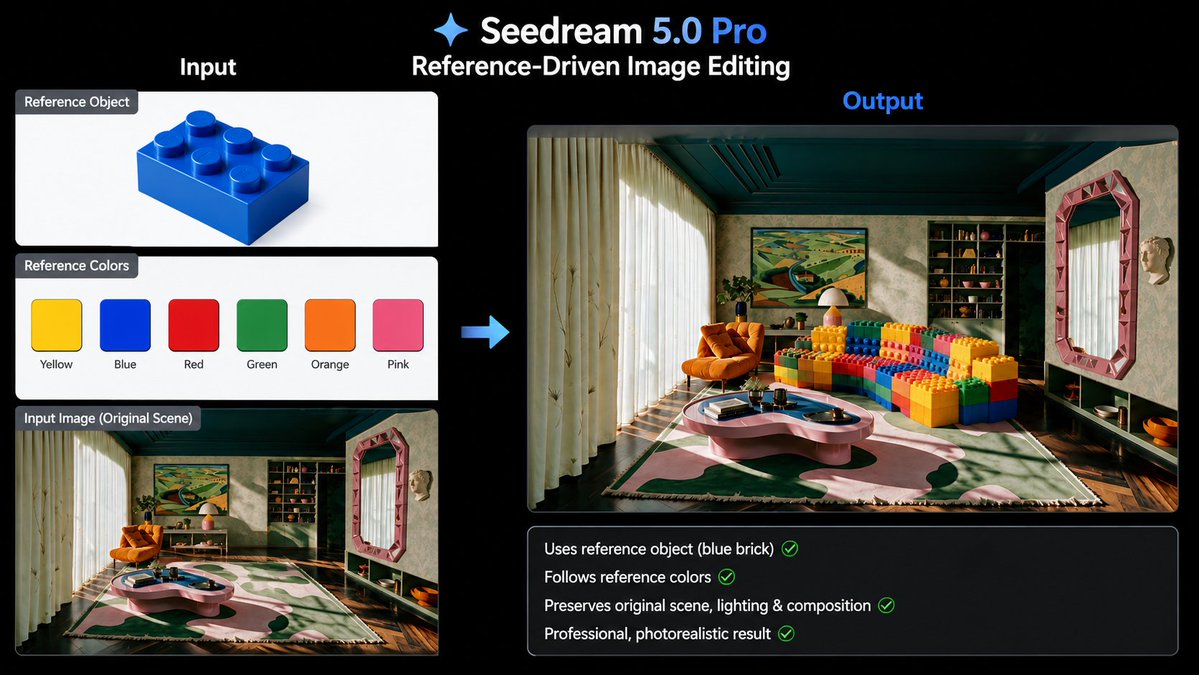
ByteDance has released Seedream 5.0 Pro, rivaling GPT-Image 2 in image quality and prompt understanding, and introducing precise image editing based on reference images.
Prompt
ByteDance just dropped Seedream 5.0 Pro. It now rivals GPT-Image 2 in image quality and prompt understanding. But the real breakthrough is image editing. Feed it reference images for objects, colors, or styles... It edits exactly what you want while keeping the rest of the scene untouched. AI image generation is becoming AI image editing. Available now via the AIReiter API.
Kynvio Prompt Workflow
How to use this prompt
Open it in Image Studio
Send the prompt to Kynvio AI without starting a generation.
Adapt the details
Replace the subject, setting, colors, text, or composition for your goal.
Review and generate
Choose your final settings, then click Generate when you are ready.
Related GPT Image 2 prompts
GPT Image 2 prompts

About this prompt
Will opening this prompt spend credits?
No. The button only prefills Image Studio. Credits are used only after you start a generation.
Can I edit the prompt first?
Yes. The transferred text is fully editable before you generate an image.