
Back Through the Mirror: Desert Gold Selfie
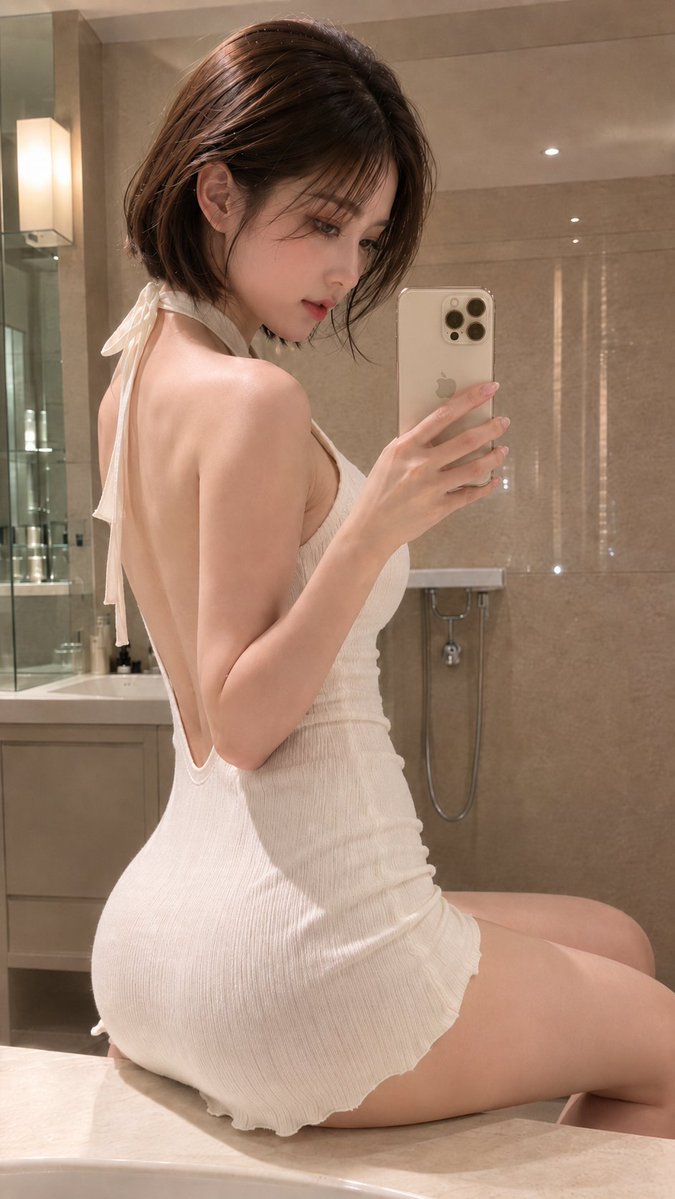
A woman taking a mirror selfie in a luxurious bathroom. Quiet beige harmonizes with desert gold.
Prompt
Even the light falling on the back enters the mirror. Quiet beige suits desert gold well. 🪞🤍📱✨ #AIart #AI写真 #ミラーセルフィー [GPT Image2 Prompt] Subject: Back view through the mirror Main subject: A fictional adult woman sitting sideways on the edge of a vanity counter in a bathroom reminiscent of a high-end urban hotel, taking a selfie through the mirror. The figure occupies the center to left side of the frame, captured from head to thigh in a vertical 9:16 aspect ratio. She holds a desert gold latest-generation smartphone with a triple camera in her right hand, pointing it toward the mirror on the right side of the frame. Character & Expression: A woman with natural transparency and a calm, mature aura. Her hair is a glossy dark chocolate brown chin-length bob with slightly inward-curled ends, soft bangs, and fine strands along the cheeks that gently frame her face. She has light pink-beige blush, delicate brown eye makeup, natural tear bags, and glossy rose-beige lips. Her face is slightly tilted toward the lower right, eyes downcast looking at the smartphone screen. Her expression is quiet and serene. Clothing & Pose: An ivory white summer mini dress made of fine ribbed fabric that naturally follows the body. The neckline is a modest V, and the back has a deep V opening from the shoulder blades to the waist. The center of the back is bare, clearly showing smooth lines. She pulls her left shoulder toward the mirror, slightly twisting her upper body. Her hips are stabilized on the counter, and both legs are aligned and extended toward the right side of the frame. Her right elbow is bent, keeping the smartphone at face height, with fingers naturally gripping the sides of the device. Background & Lighting: A clean bathroom with beige marble-look tiles, a glass shower enclosure, a greige vanity cabinet, and a white ceramic bowl sink. A small wall-mounted sink and chrome plumbing are placed in the center background. The main light sources are warm ceiling downlights and lighting around the mirror. They softly illuminate the face, shoulders, and upper back, casting gentle shadows on the left side of the waist and under the counter. Subtle reflections appear on the tiles and the metal surface of the smartphone. Composition & Camera: Vertical 9:16, close-up mirror portrait from above the waist to the thighs. The top of the head has a small margin from the upper edge, with the waist and hip line placed in the lower half of the frame. The camera is at eye level, roughly the same height as the mirror. A natural perspective equivalent to 50mm, focusing on the face and smartphone. The background is slightly softened but still distinguishable in terms of bathroom fixtures. Texture & Style: Realistic fashion photography. Carefully rendered natural skin texture, fine ribbed fabric stretch and wrinkles, glossy individual strands of hair, and reflections on polished marble and metal. Warm ivory and beige tones dominate, with low saturation and an elegant hotel-like color palette. Avoid excessive sharpening or skin smoothing, retaining a realistic feel as if shot with a smartphone. Negative: Unnatural face, unnatural gaze, extra fingers, missing fingers, fused fingers, broken joints, poor contact with device, distorted smartphone, inconsistent mirror image left-right, clothing artifacts, floating, unnatural gravity, incorrect perspective, shadows inconsistent with light source, garbled text, watermarks, excessive skin smoothing, plastic-like skin.
Kynvio Prompt Workflow
How to use this prompt
Open it in Image Studio
Send the prompt to Kynvio AI without starting a generation.
Adapt the details
Replace the subject, setting, colors, text, or composition for your goal.
Review and generate
Choose your final settings, then click Generate when you are ready.
Related GPT Image 2 prompts
GPT Image 2 prompts
About this prompt
Will opening this prompt spend credits?
No. The button only prefills Image Studio. Credits are used only after you start a generation.
Can I edit the prompt first?
Yes. The transferred text is fully editable before you generate an image.