
Back Portrait in the Mirror
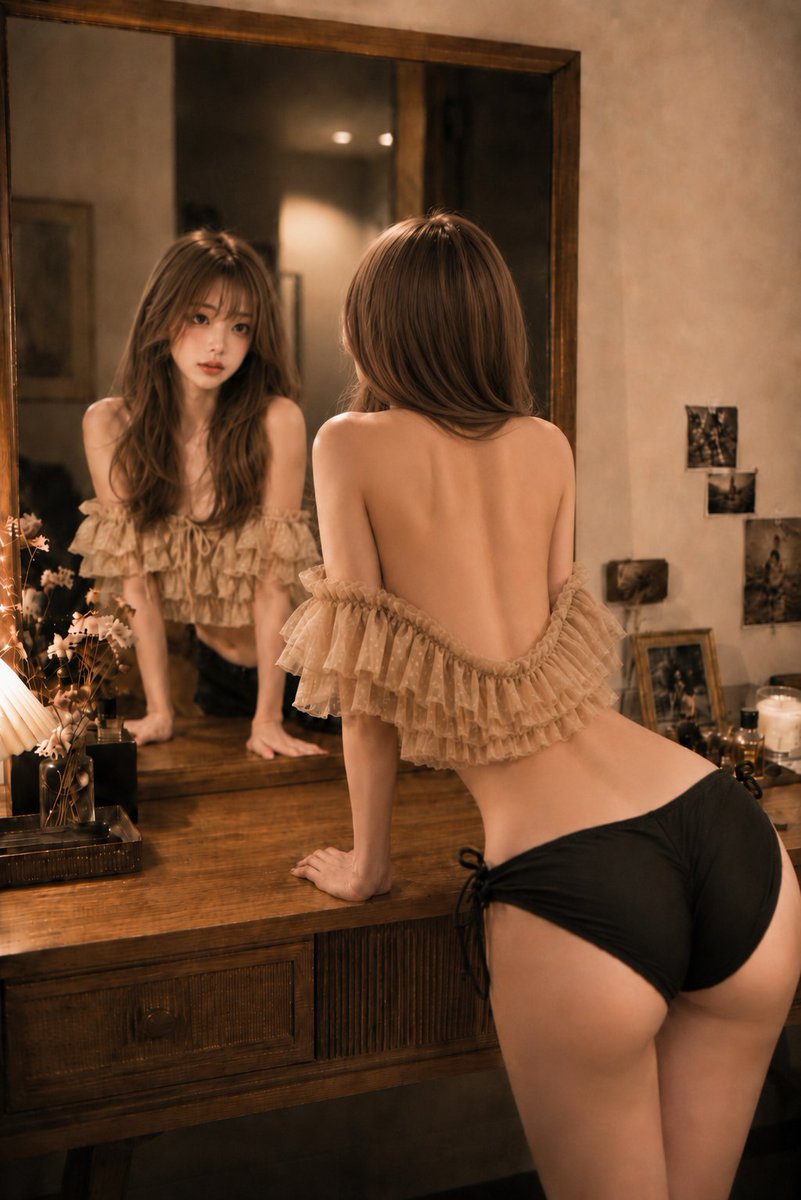
Only in the mirror, my face becomes a little more honest. Loose hair and light tracing my back. In a warm bedroom, the S-curve of the back captured through the mirror, along with the calm expression reflected. A woman leaning on a wooden dresser, with soft curves and delicate light rendering.
Prompt
Only in the mirror, my face becomes a little more honest. Loose hair and light tracing my back. 🪞🕯️ #AIart #AI写真 #鏡越しポートレート [GPT Image2 Prompt] Subject: Back view in the mirror Main subject: Vertical 3:4. Place a young adult woman leaning forward with both hands on a wooden dresser, slightly right of center. The figure is shown from above the waist to upper thighs, with the smooth S-curve from back to waist as the main focus. A large mirror on the left reflects the front face and upper body, creating a dual composition of real and mirror images. Character/Expression: Bright ivory-beige skin with a natural texture and a hint of rose undertone. In the mirror, she tilts her head slightly, gazing at herself with calm eyes. Light rose-pink blush, champagne-beige and pink-brown eye makeup, thin long lashes, natural under-eye bags, soft brown eyebrows, and a sheer pink-beige gloss lip. Small clear catchlights in the eyes. Hair is light milk tea ash brown, with thin see-through bangs, layers around the face, medium-long length below shoulders. Hair on the back flows forward from both sides, fully revealing the line from shoulder blades to waist. Clothing/Pose: Off-shoulder frilly top layered with fine beige dot tulle. Frills are two to three tiers, softly spreading from below the shoulders along the upper arms. Bottom is black shorts with side ribbons. Both arms extended, palms naturally placed on the dresser top. Shoulders slightly drawn inward, ribcage forward, pelvis back, creating a gentle curve from back to waist. Waist slightly twisted to the right, with natural connection between shoulder blades, spine line, and waist shadow. Fingers not too spread, conveying weight onto the tabletop. Background/Lighting: Warm small bedroom/dresser space. Foreground left: small lamp with pleated shade, dried flowers, clear bottle, black perfume bottle. Midground: wooden tabletop and large wooden-framed mirror. Right back wall: blurred small photo, thin frame, candle, and modest makeup items. Main light is soft amber from the lamp at bottom left, creating thin highlights on shoulders, spine, waist, and thighs. Opposite side has weak warm ambient light, with shadows falling to bottom right. Behind the mirror is darker, creating contrast to naturally bring out the face. Composition/Camera: Vertical orientation, eye level slightly lower than waist height. Natural wide-angle feel equivalent to 35mm. Left half of frame is mirror, right half is real image. Mirror face near top-left rule-of-thirds point, real waist near bottom-right. Slight wall margin at top, crop at mid-thigh at bottom. Focus on both real back and mirror face, with background items lightly blurred. Perspective is natural, accurately showing the spatial relationship between mirror and real images. Texture/Style: Quiet indoor portrait like warm film photography. Skin not overly smoothed, retaining fine texture and soft highlights on shoulders and back. Carefully depict wood, tulle, hair strands, and perfume bottle reflections. Low contrast, delicate grain, calm amber and dark brown tones. Sensual but elegant, like a beauty editorial in a magazine. Negative: Unnatural face, unnatural gaze, asymmetrical mirror image, extra fingers, missing fingers, wrist distortion, abnormal shoulder blades, joint distortion, unnatural gravity, incorrect perspective, shadows contradicting light source, excessive skin smoothing, plastic-like skin, garbled text, logos, watermarks.
Kynvio Prompt Workflow
How to use this prompt
Open it in Image Studio
Send the prompt to Kynvio AI without starting a generation.
Adapt the details
Replace the subject, setting, colors, text, or composition for your goal.
Review and generate
Choose your final settings, then click Generate when you are ready.
Related GPT Image 2 prompts
GPT Image 2 prompts
About this prompt
Will opening this prompt spend credits?
No. The button only prefills Image Studio. Credits are used only after you start a generation.
Can I edit the prompt first?
Yes. The transferred text is fully editable before you generate an image.