
Akihabara Maid Street Photo on Motorola RAZR V3
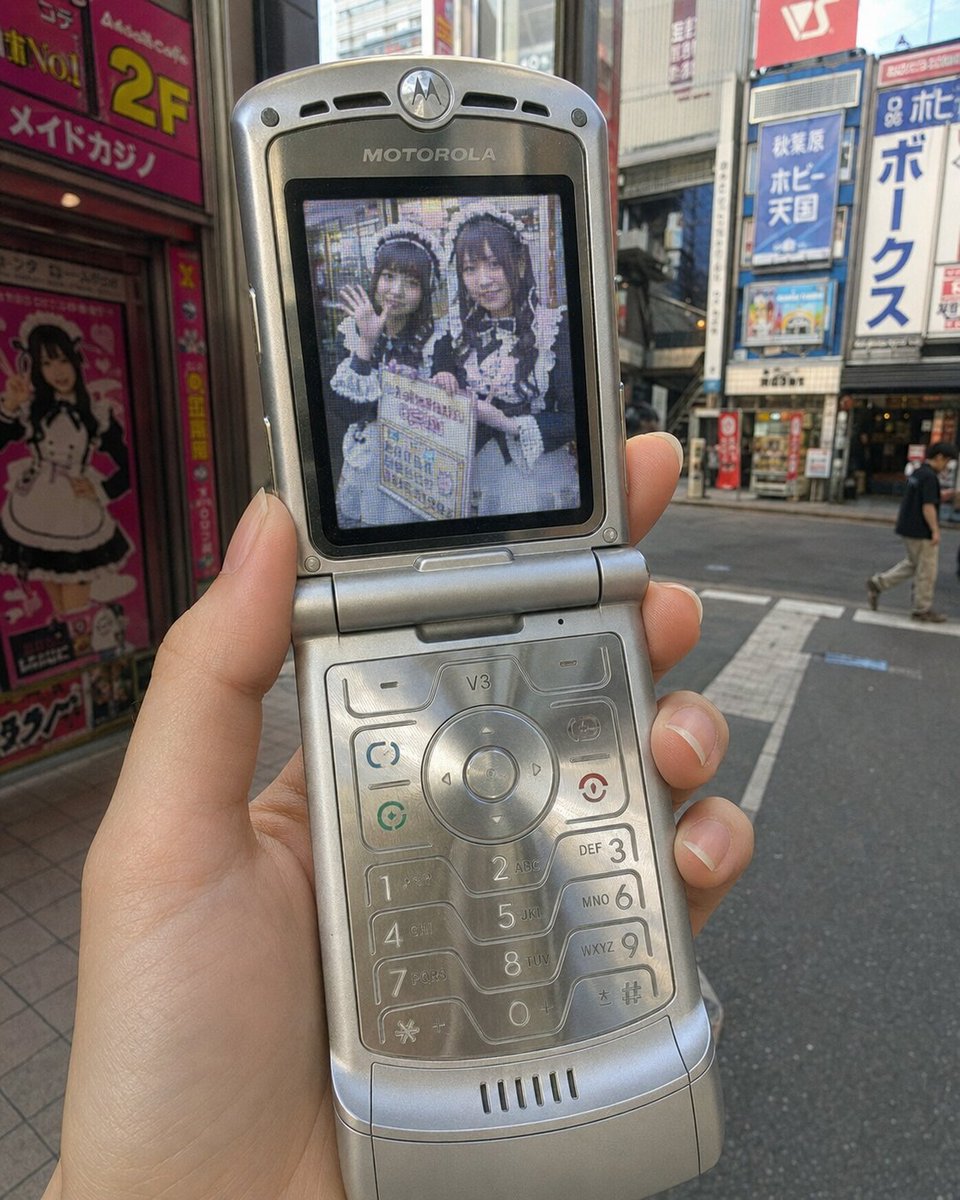
A modern smartphone photo showing a slender hand holding an open silver Motorola RAZR V3 flip phone. The phone's main screen displays a low-quality, pixelated early-2000s camera-phone image of two women in maid outfits promoting on the streets of Akihabara. The outer background is present-day Akihabara electric town, shown only limitedly. The screen image is physically integrated into the old LCD with perspective alignment, glare, reflections, pixel structure, etc.
Prompt
Create one photorealistic 4:5 vertical image. [SCREEN_SCENE] = two cute fictional adult women in their early twenties working as maid-cafe street promoters in Akihabara, wearing frilly maid outfits influenced by jirai-kei and ryousangata aesthetics; one holds a promotional signboard and the other waves toward the camera, in a casual medium shot street snapshot [OUTER_CONTEXT] = present-day Akihabara electric town in Tokyo Show a casual present-day smartphone photo of an opened Motorola RAZR V3 held in one hand by an adult woman with slender, elegant, feminine fingers and neat natural nails. The phone should clearly look like a silver Motorola RAZR V3 with its ultra-thin clamshell body, internal color LCD, small external display, etched metal keypad, and subtle readable Motorola branding near the screen or hinge. Keep the framing tight and simple. The phone and hand are the clear main subject. Important: the OUTER image must look like a normal modern smartphone photo taken today. Do not apply a retro filter to the whole image. Use [OUTER_CONTEXT] as the outer background. Show only a limited amount of it, with believable real-world depth and lighting, while keeping the background secondary and not too busy. On the phone’s main screen, display [SCREEN_SCENE] as if it was genuinely photographed by that same Motorola RAZR V3 just moments earlier. The screen image must look like a real early-2000s camera-phone image: 0.3-megapixel / VGA quality, low resolution, pixelation, sensor noise, muddy shadows, clipped highlights, weak dynamic range, JPEG compression artifacts, slight blur, color banding, and imperfect color reproduction. The screen image must look physically integrated into the old LCD, not pasted on top. It should appear behind the transparent screen cover and inside the true active display area, with exact perspective alignment, mild glare, faint reflections from the surroundings, visible pixel structure, slightly washed blacks, reduced contrast, subtle edge softness, uneven old-LCD backlighting, slight viewing-angle color shift, and a natural relationship to the bezel. It must feel like the photo is being emitted by the old display itself, not composited as a clean rectangular insert. Do not degrade the entire final image. Only the image shown on the phone’s screen should have old camera-phone quality.
Kynvio Prompt Workflow
How to use this prompt
Open it in Image Studio
Send the prompt to Kynvio AI without starting a generation.
Adapt the details
Replace the subject, setting, colors, text, or composition for your goal.
Review and generate
Choose your final settings, then click Generate when you are ready.
Related GPT Image 2 prompts
GPT Image 2 prompts
About this prompt
Will opening this prompt spend credits?
No. The button only prefills Image Studio. Credits are used only after you start a generation.
Can I edit the prompt first?
Yes. The transferred text is fully editable before you generate an image.