
Airport Tarmac Candid: A Turn in the Sun
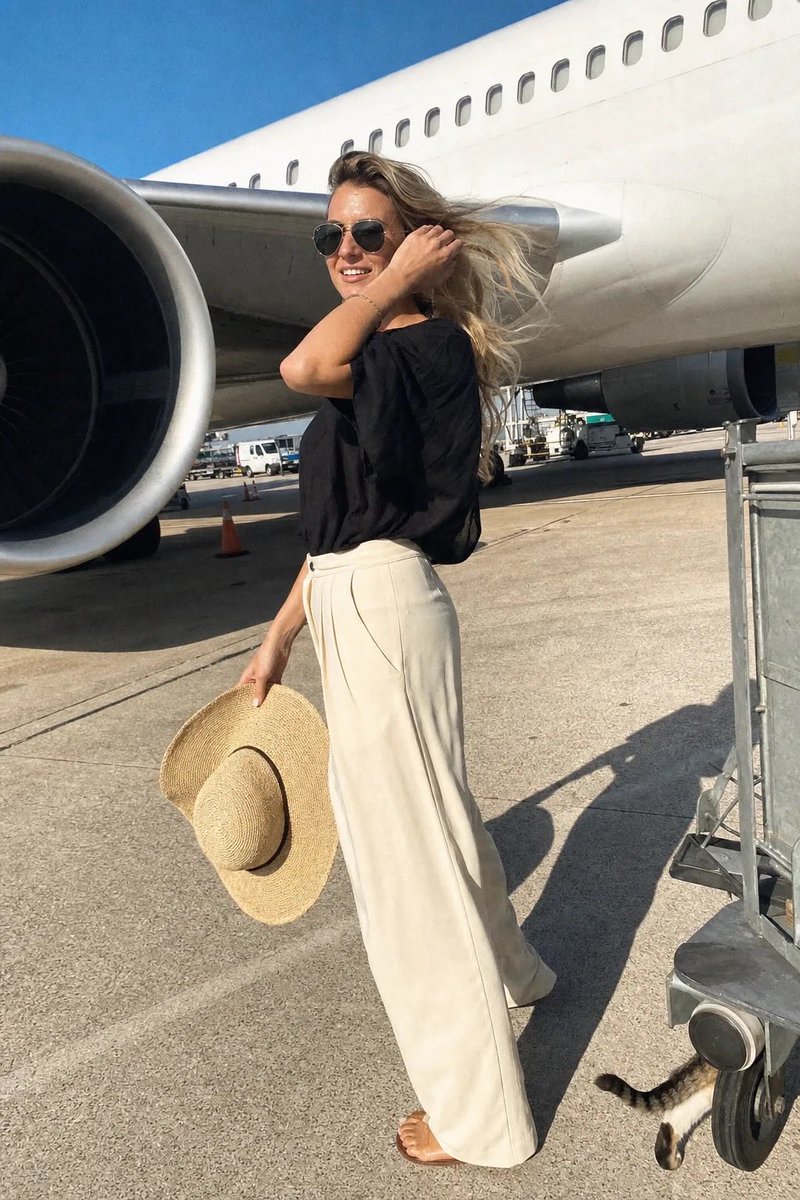
A candid photo taken on an airport tarmac on a sunny afternoon. A young woman stands under the wing of a large commercial airplane, turning with a genuine smile. Low-angle shot with strong light and shadow contrast, motion blur, phone camera grain, no beauty filter. A stray cat tail at bottom right. Dutch angle 3°, 9:16 aspect ratio.
Prompt
A spontaneous airport tarmac photo taken during a sunny afternoon, looks like someone called her name and she turned just as they pressed the shutter. A young woman stands beneath the wing of a large commercial airplane, her face 100% photorealistic—hat held casually in one hand, the other hand tucking a strand of her long wavy blonde hair behind her ear, a soft genuine smile on her lips, eyes crinkling with warmth. She wears a loose flowing black top with a boat neckline, high-waisted cream wide-leg trousers, simple sandals, large dark aviator-style sunglasses, her wide-brimmed woven sun hat held loosely in her hand. The frame is slightly tilted, caught mid-turn. Low-angle shot, making her and the airplane appear grand and monumental. Bright direct afternoon sun, harsh highlights on her skin and the white aircraft surface, deep shadows under the wing and her chin. The massive white fuselage with a row of small oval windows, the underside of the wing, and a large jet engine on the left side of the frame. Motion blur on her hair blowing in the wind and her hand tucking her hair. Slight overexposure on the white aircraft surface, heavy grain from phone camera, warm golden highlights, JPEG artifacts. Natural skin with visible pores, soft facial sheen, a tiny freckle on her nose, no beauty filter. A stray cat tail curls around a luggage cart wheel at the bottom right corner. Dutch angle 3°, 9:16
Kynvio Prompt Workflow
How to use this prompt
Open it in Image Studio
Send the prompt to Kynvio AI without starting a generation.
Adapt the details
Replace the subject, setting, colors, text, or composition for your goal.
Review and generate
Choose your final settings, then click Generate when you are ready.
Related GPT Image 2 prompts
GPT Image 2 prompts
About this prompt
Will opening this prompt spend credits?
No. The button only prefills Image Studio. Credits are used only after you start a generation.
Can I edit the prompt first?
Yes. The transferred text is fully editable before you generate an image.